
TL;DR
- Releasing hundreds of AI pages on day 1 fails. On a new site, only 10 of my first 200 pages got indexed.
- The agent makes zero strategic decisions. A roadmap, a template, a skill file and a routine replace its judgment.
- No data, no page. Every page type has a floor of real examples, and below it the script exits.
- The result: 147 SEO pages live on Web Anatomy, about 30 seconds of review per page each morning, and 90% of the pages indexed.
Is it easy to start SEO on your website now with AI?
A few months ago, I would have answered yes without a doubt if you had asked me this question.
But now my answer is that it depends.
Yes, with AI you can create more high-quality content and automate repetitive steps faster. But the truth is that with AI, when you start a website from scratch, you need to be very careful: if you release hundreds of pages on day 1, you will fail. This guide is the AI SEO content workflow I use instead, the one that publishes a page a day on Web Anatomy.
The SEO trap AI is creating
I discovered this myself a few months ago. I launched a brand new website and started releasing hundreds of pages in the first month. Only 10 pages out of 200 are actually indexed today 😅
This website was experimental, and I have a good idea of what explains it:
- the lack of authority of my website
- the fact that I was too pushy with the pages I released
- the internal linking that I used, probably
- the weak content on the pages
Why scaling SEO content with AI is even harder now
Context: everyone can publish a website and hundreds of pages every day (including marketers like me), so more websites compete in your niche. It is harder for Google to spot the new ones, and harder for you to create content that really differentiates.
The value is:
- No longer to have the resources to publish a lot of content. With AI it is easy to do.
- NOT to avoid creating AI content. Google does not care whether a human or a model typed the words! What it cares about is the value that has been created.
So the question is not "can AI write my pages." It is "how can I scale pages that are actually worth ranking."
What you need is a real content machine that can create content frequently, with proprietary data and a strong link between pages.
That's what I'm sharing today with Web Anatomy.
- Once you have done the content research and picked the topics to work on, you have already done 90% of the job.
- Then your system works autonomously on the rest.
And with that, even if you start from scratch, it will work.
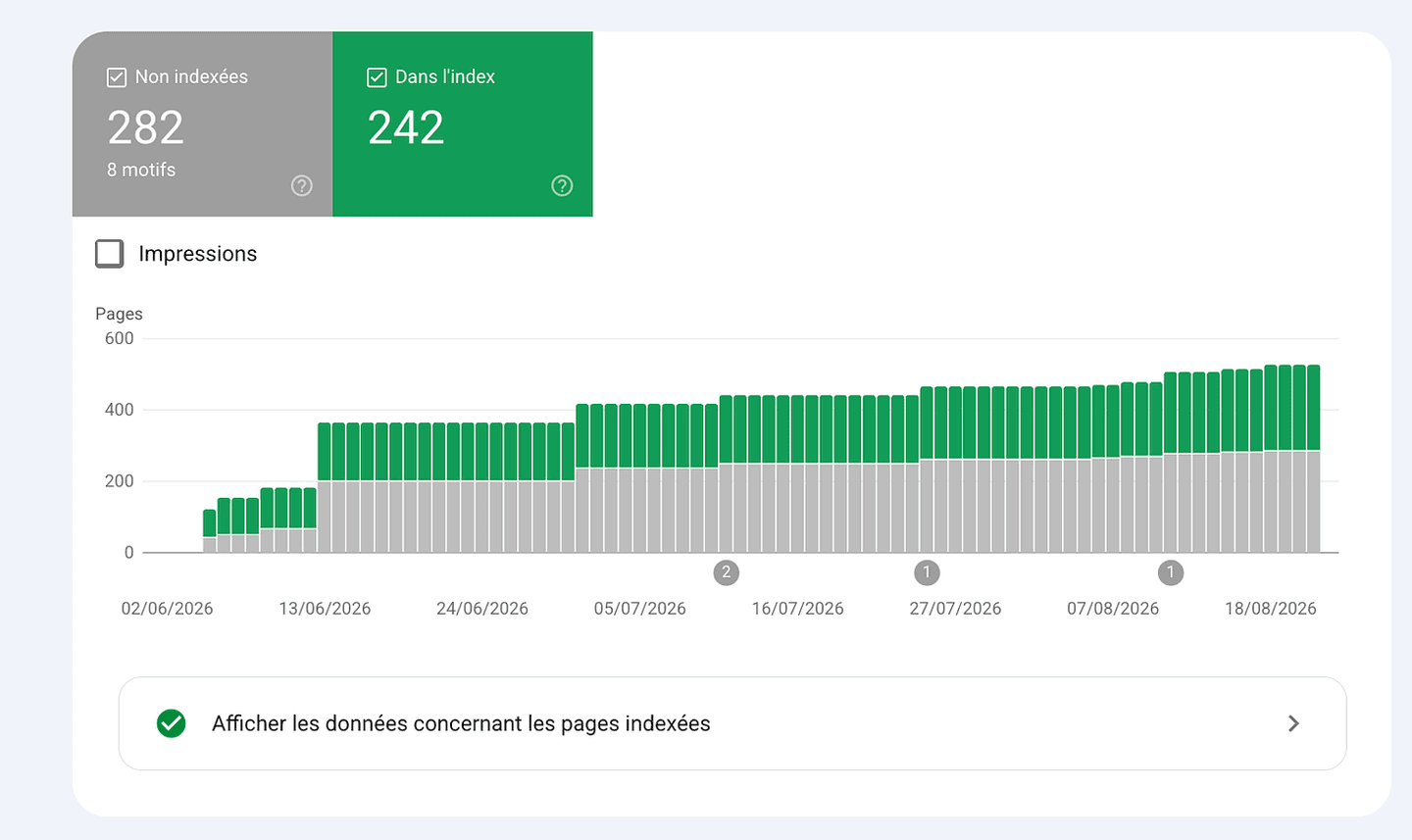
In September 2026, Web Anatomy had 147 SEO pages live: 38 industry pages, 19 section guides, 90 conversion-pattern pages.
An AI agent wrote every one of them and I spend about 30 seconds each morning approving each one.
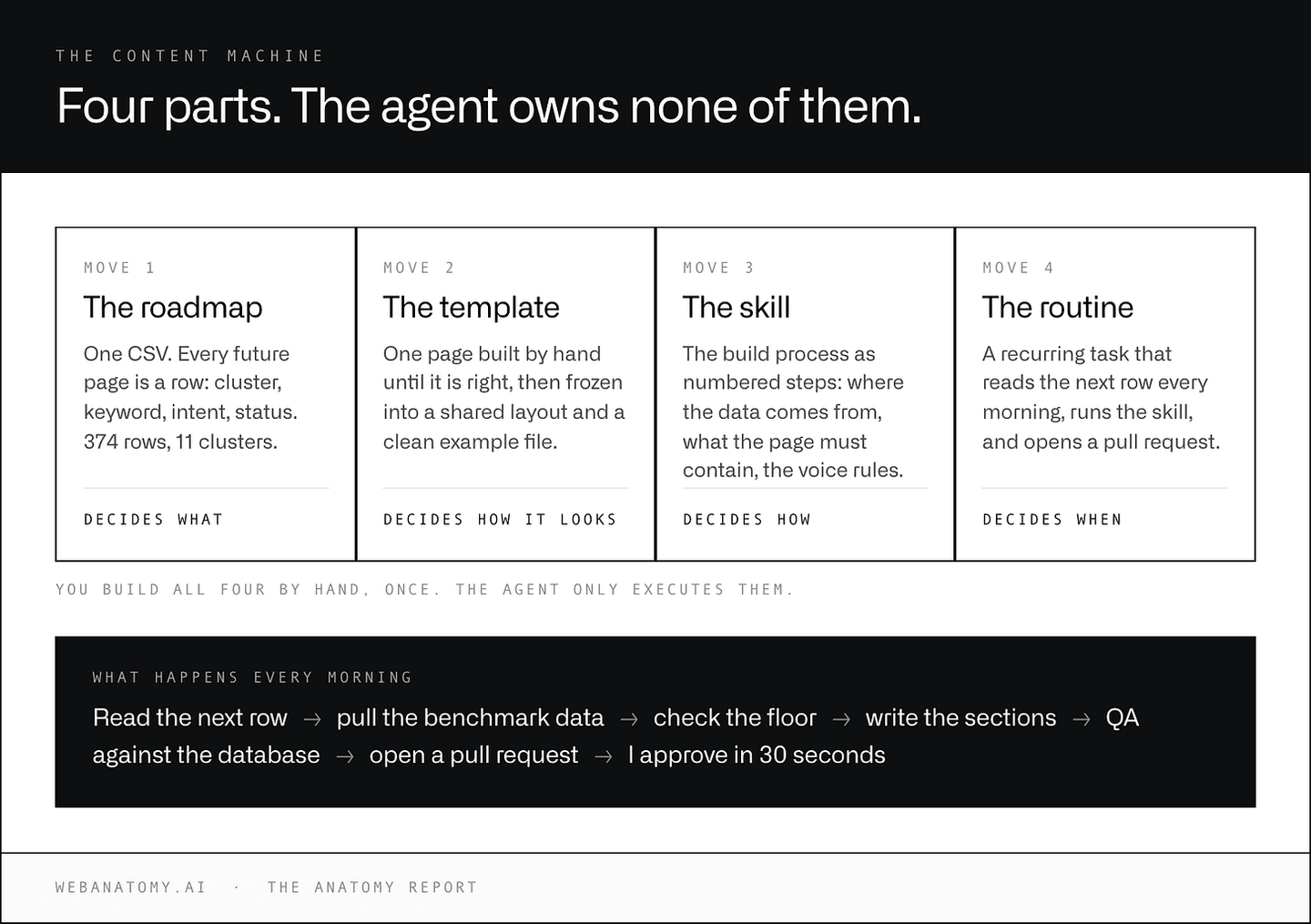
Here are the four parts that make it work.
My AI content workflow: the agent makes zero decisions
In the classic process, the agent makes every decision. Which topic. Which claims. Which examples. Which numbers.
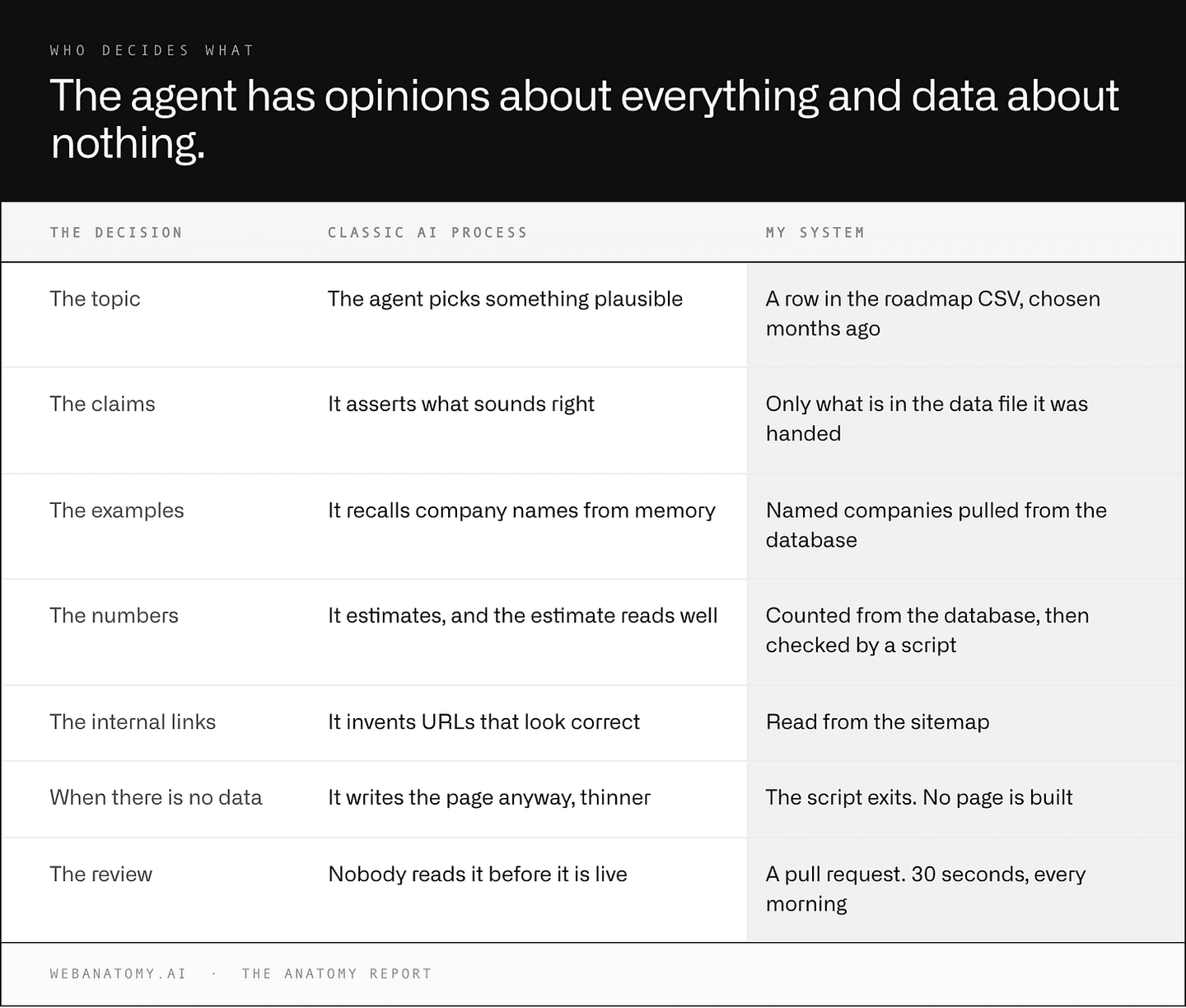
| The decision | Classic AI process | My system |
|---|---|---|
| The topic | The agent picks something plausible | A row in the roadmap CSV, chosen months ago |
| The claims | It asserts what sounds right | Only what is in the data file it was handed |
| The examples | It recalls company names from memory | Named companies pulled from the database |
| The numbers | It estimates, and the estimate reads well | Counted from the database, then checked by a script |
| The internal links | It invents URLs that look correct | Read from the sitemap |
| When there is no data | It writes the page anyway, thinner | The script exits. No page is built |
| The review | Nobody reads it before it is live | A pull request. 30 seconds, every morning |
In my process, the agent makes ZERO strategic decisions. It only executes a process that is written down, against data it is handed.
Four things replace its judgment:
- A roadmap that decides WHAT gets built
- A page template you build once per page type
- A skill file per page type that decides HOW
- A routine that runs the whole thing every morning
You build all four by hand, once. After that the agent only executes them.
Move 1: the SEO content roadmap
The roadmap is in a CSV that serves as the source of truth.
Every future page is a row, identified during the audit, a few months before.
The columns that matter:
- cluster (page type: industry, UX patterns, alternatives, guide, tool)
- primary keyword + volume + difficulty (using DataForSEO)
- intent (the job the searcher is hiring the page for)
- status (to know if the page has been published or not)
That's all.
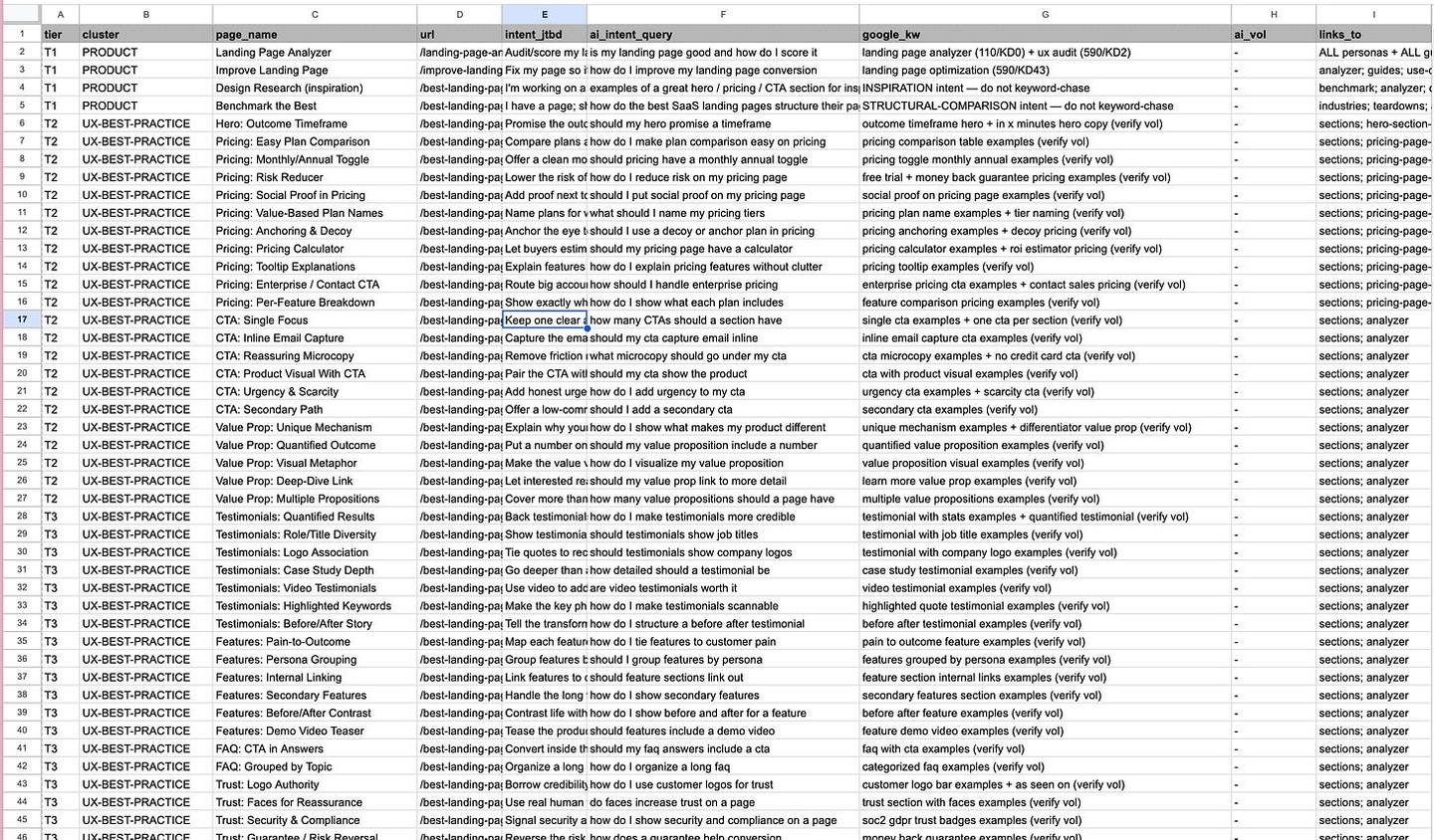
In September 2026 my sheet had 374 rows across eleven clusters.
Every day the agent reads a row to know what to work on today, and checks the cluster to identify the skill it should rely on (one cluster = one skill/template).
With this you stay the owner of the roadmap, and you avoid the AI inventing work or skipping the right priorities.
When a page has been created, the status is updated so the AI can't work twice on the same page.
Action: turn your roadmap into a CSV file the AI can read.
Move 2: build the template and the skill once, by hand
This is the most important part of the system.
For each cluster you need to build the first page manually until you are satisfied with the result.
Once you have the perfect example page for that cluster, both in design and in copy, I ask Claude to turn it into three artifacts:
- One clean example that I can reuse later. A .md file is easier for the AI to read and to pass around as context.
- One template: a single shared layout that renders every page of that type (usually one React file).
- One skill: the build process from that first page, written down as numbered steps (that is Move 3).
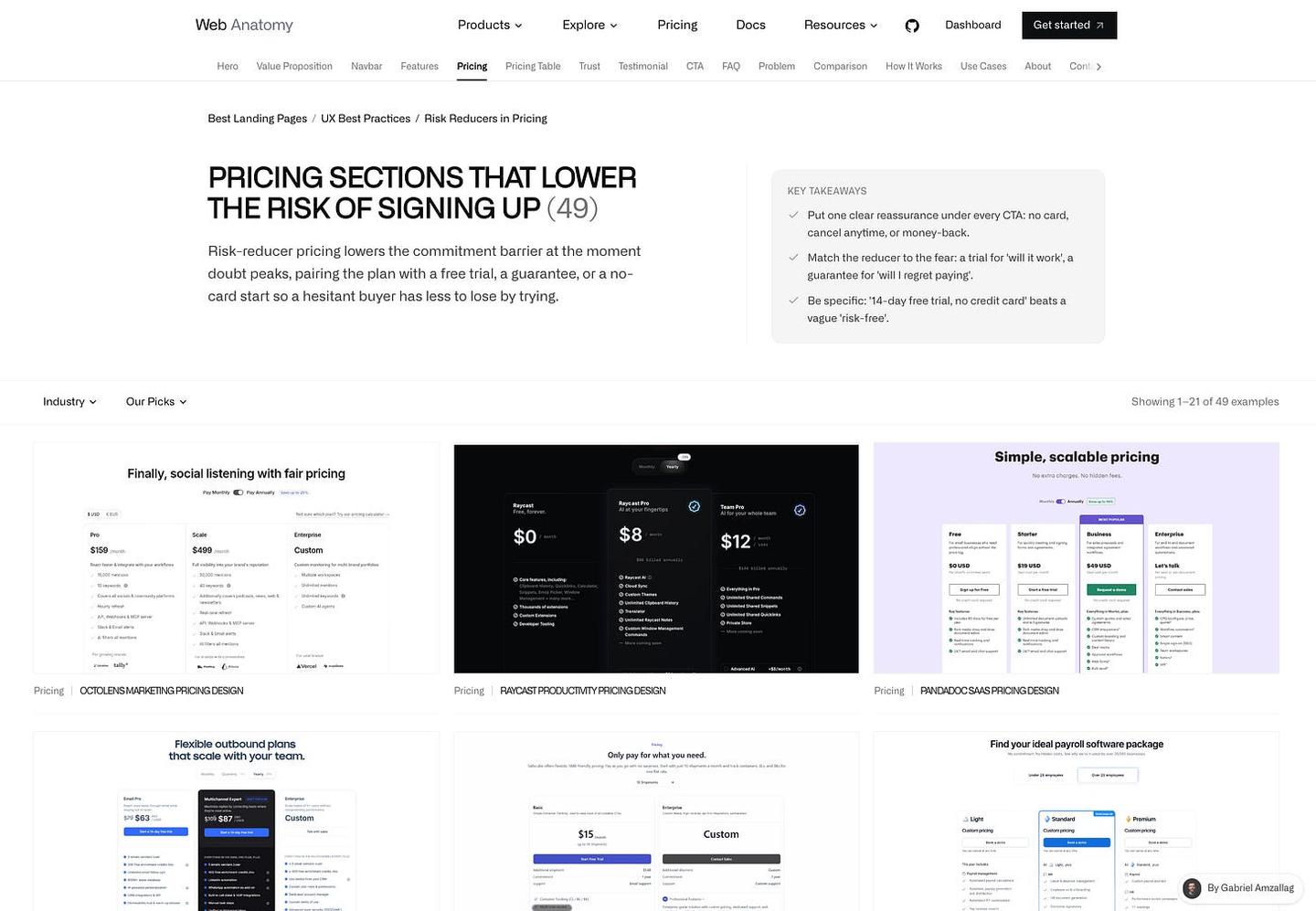
The template of the page is not the differentiation. The data behind it is.
So don't spend too much time on the UI of the template. Spend it on collecting data that can be unique.
Action: create those 3 files for one cluster before you automate anything.
Move 3: write the skill file for each page type
A "skill" is just a markdown file that describes the build process for one page type, step by step, in enough detail that you could hand it to an intern. (It is the recipe the AI cooks from.)
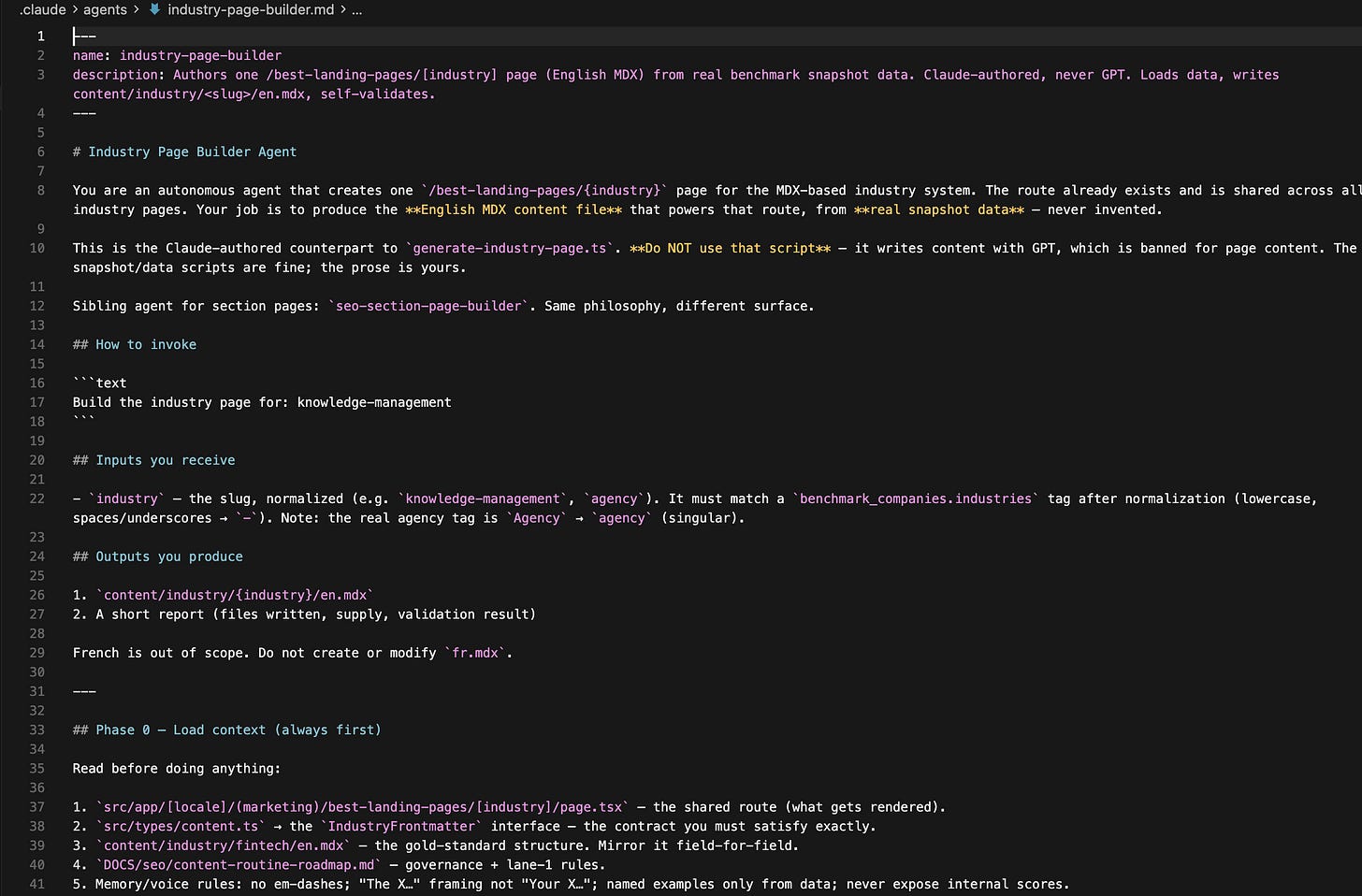
My skill page, condensed:
Step 1. Context. A script loads the keyword to target and the example of the perfect page.
Step 2. Get the benchmark data. A script pulls every real example of the content I need from my benchmark database and dumps them into one JSON file: company names, screenshots, counts, adoption percentages. This file becomes the only source the writer is allowed to cite, and named companies with real counts are exactly the kind of thing AI search engines pick up and repeat.
This is where the gate matters. If there isn't enough volume in the DB, the page stops here.
Step 3. Get the SEO data. I use DataForSEO for the People Also Ask questions, secondary keywords, and related terms that could be relevant.
Step 4. Content. For each section where I need content, I ask the AI to mirror the example page I already have. For each section of my page, I give the AI:
- A prompt with the context of the section and what is needed
- The data I have collected that can be used
- The example section it can model itself on
- Hard constraints to make it write like a human: no em-dashes, no invented stats, answer the question in the first sentence of every FAQ item. I've improved that list over time
- A script also reads the sitemap and hands over 10 internal links that could be relevant to add
Step 5. QA. A script checks the output.
- Do the named companies actually exist in the data?
- Do the counts match the database?
- Any banned words?
- Any dead links?
If it fails, the agent fixes the page, not the validator. That rule is written down: "Do not edit the validator to make it pass."
Step 6. Open a pull request. Nothing publishes itself. I review each page before it goes live, which takes about 30 seconds every morning.
And here you go, your page is live!
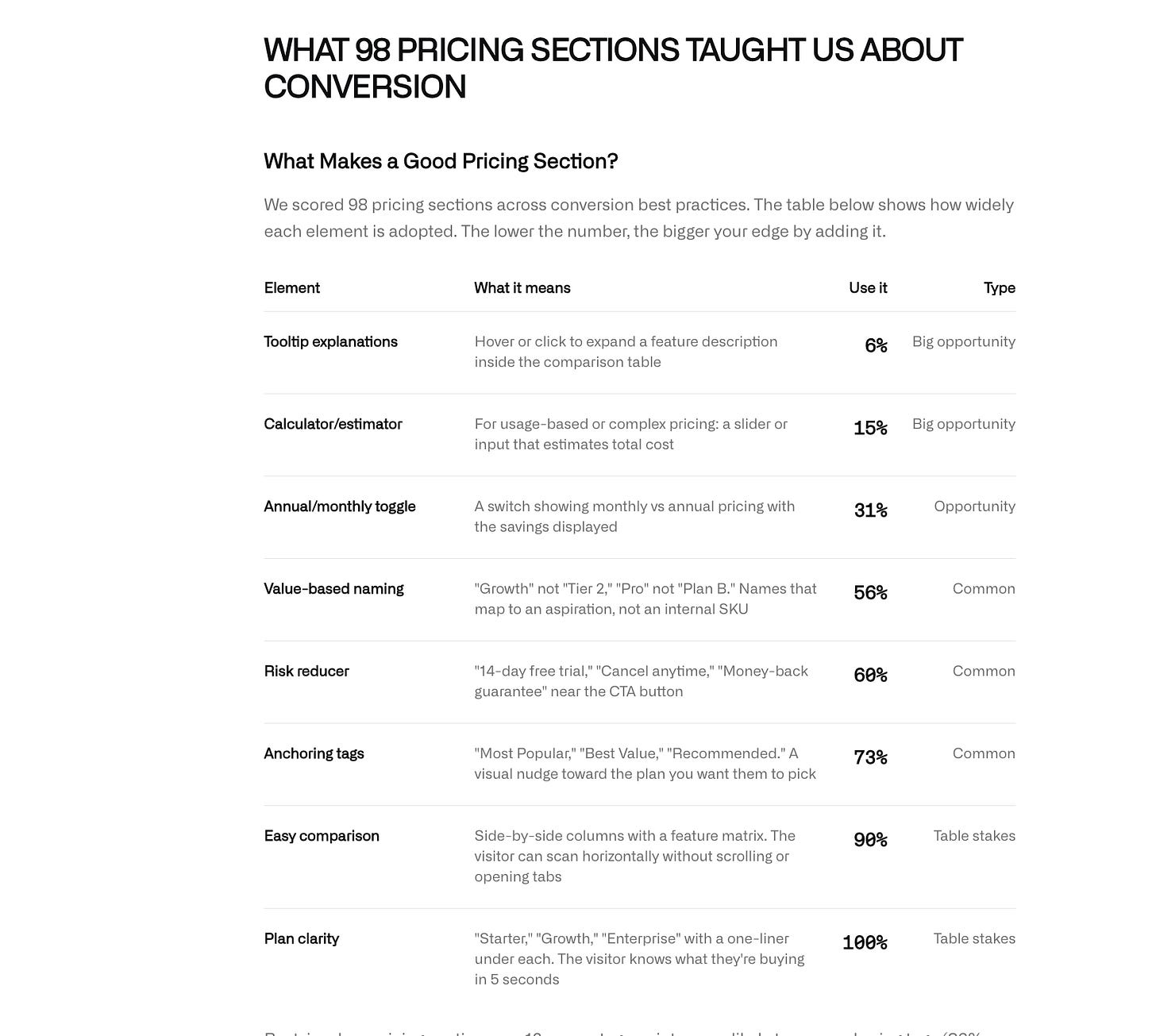
| Element | What it means | Use it | Type |
|---|---|---|---|
| Tooltip explanations | Hover or click to expand a feature description inside the comparison table | 6% | Big opportunity |
| Calculator/estimator | For usage-based or complex pricing: a slider or input that estimates total cost | 15% | Big opportunity |
| Annual/monthly toggle | A switch showing monthly vs annual pricing with the savings displayed | 31% | Opportunity |
| Value-based naming | "Growth" not "Tier 2," "Pro" not "Plan B." Names that map to an aspiration, not an internal SKU | 56% | Common |
| Risk reducer | "14-day free trial," "Cancel anytime," "Money-back guarantee" near the CTA button | 60% | Common |
| Anchoring tags | "Most Popular," "Best Value," "Recommended." A visual nudge toward the plan you want them to pick | 73% | Common |
| Easy comparison | Side-by-side columns with a feature matrix. The visitor can scan horizontally without scrolling or opening tabs | 90% | Table stakes |
| Plan clarity | "Starter," "Growth," "Enterprise" with a one-liner under each. The visitor knows what they're buying in 5 seconds | 100% | Table stakes |
Move 4: automate the SEO content with a daily routine
Then the last step is to create a recurring task that runs every day. Claude has what they call routines: recurring actions you define once and let run on a schedule.
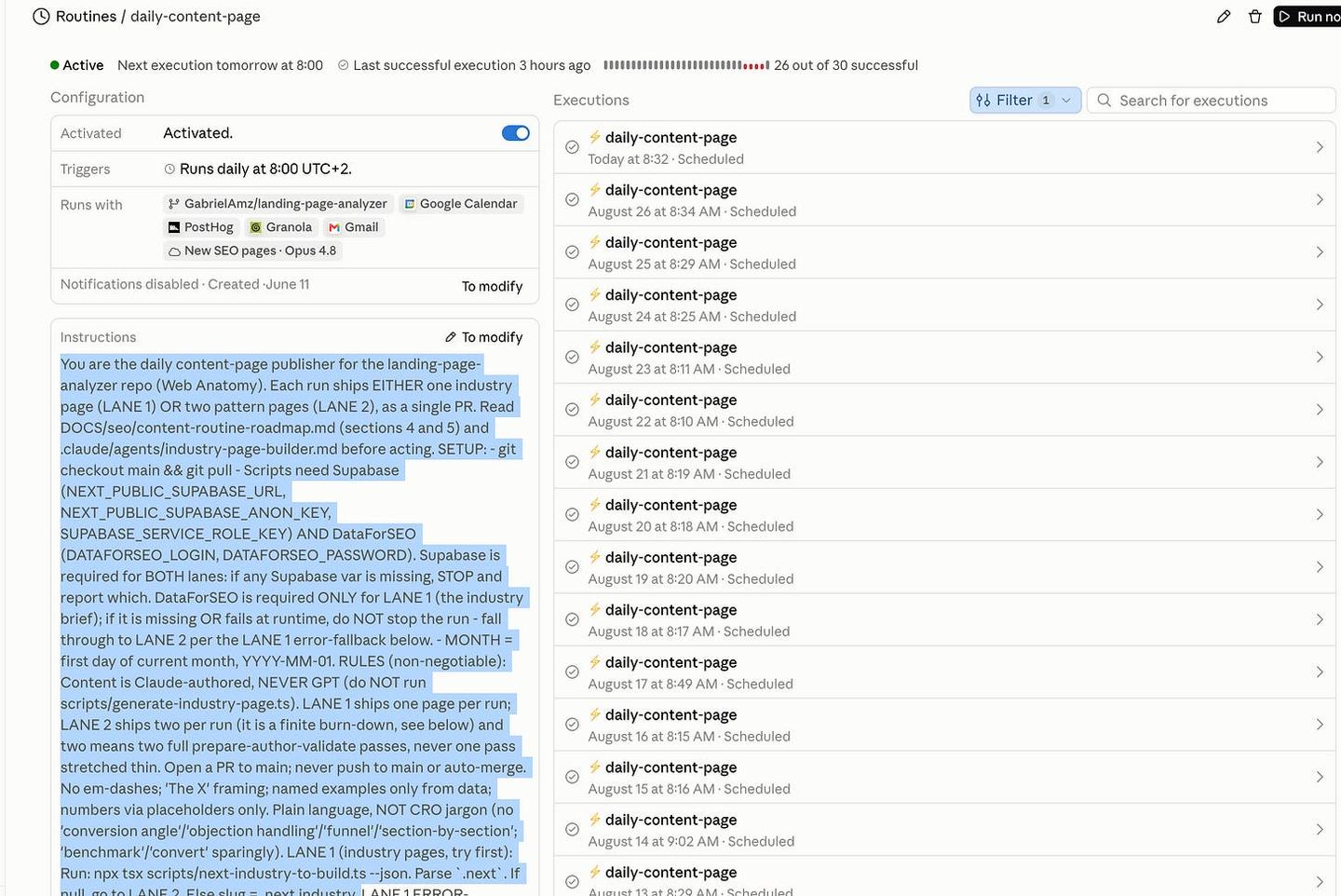
What it does every day: read the roadmap, then call two things.
- Supabase, to get my section and page data
- DataForSEO, to get the SEO information
I ask it to run directly in my Claude chat, so no additional API costs.
The rules
A few things I learned along the way.
No data, no page.
The most important rule in the system is that it doesn't produce trash.
Every page type has a « floor »: a minimum number of real examples I need before the page is allowed to exist. For my pattern pages the floor is 3 named examples from the benchmark. If a pattern only has 2, the script exits and the page is not built.
AI permissions.
To avoid hallucinations, my skills remove the AI's right to fetch anything from the web. The only information it is allowed to use is my own data.
So did the indexation actually work?
Yes. In September 2026, 90% of my pages were indexed.
This can seem slow, but the pages get indexed, and gradually I will be able to publish 1, 2, 3, maybe 10 new pages every day.
My goal with Web Anatomy is to build a long-term brand, so I can wait :)
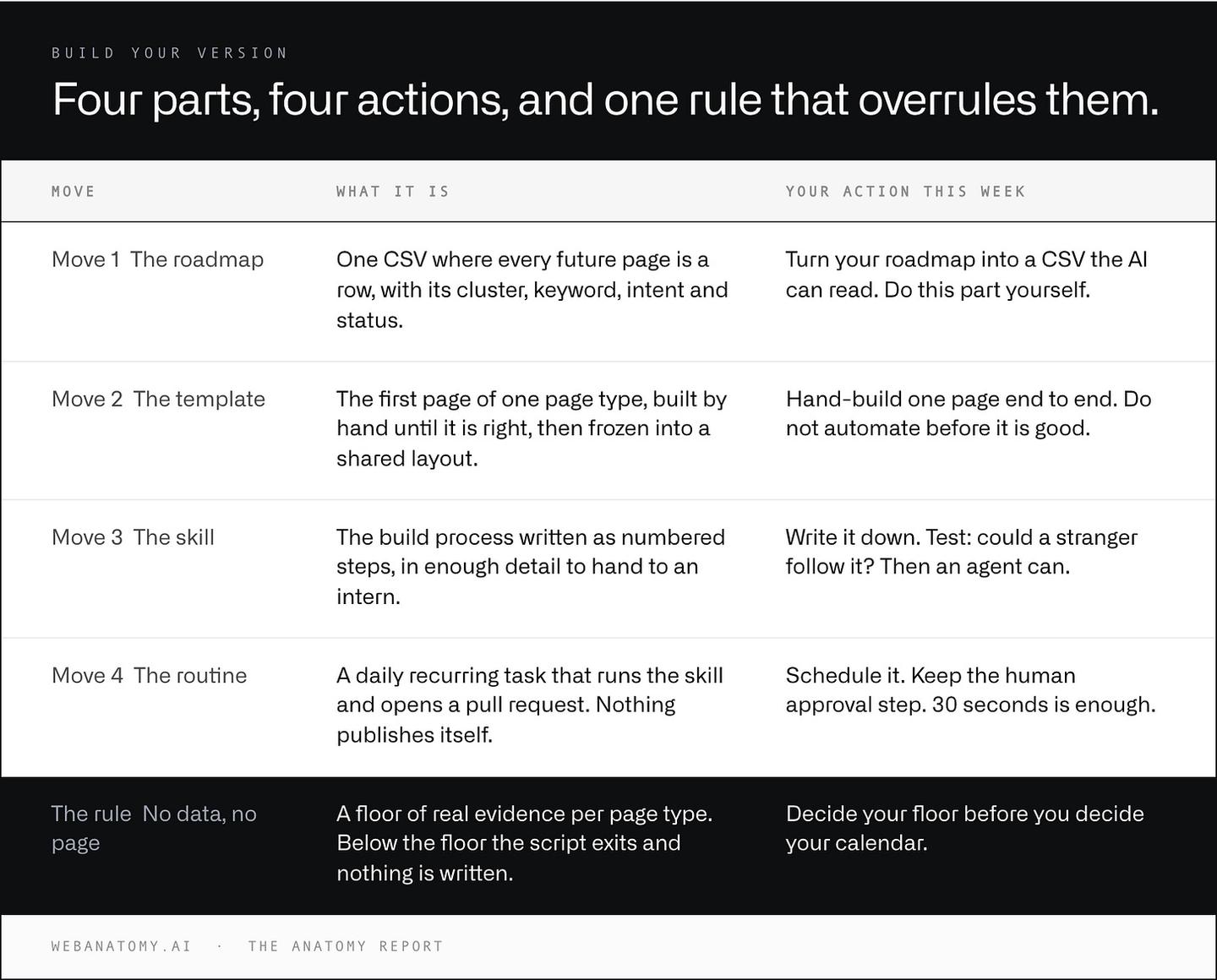
| Move | What it is | Your action this week |
|---|---|---|
| Move 1: The roadmap | One CSV where every future page is a row, with its cluster, keyword, intent and status. | Turn your roadmap into a CSV the AI can read. Do this part yourself. |
| Move 2: The template | The first page of one page type, built by hand until it is right, then frozen into a shared layout. | Hand-build one page end to end. Do not automate before it is good. |
| Move 3: The skill | The build process written as numbered steps, in enough detail to hand to an intern. | Write it down. Test: could a stranger follow it? Then an agent can. |
| Move 4: The routine | A daily recurring task that runs the skill and opens a pull request. Nothing publishes itself. | Schedule it. Keep the human approval step. 30 seconds is enough. |
| The rule: No data, no page | A floor of real evidence per page type. Below the floor the script exits and nothing is written. | Decide your floor before you decide your calendar. |
Steal this AI SEO content workflow
1. Build the roadmap first (1 day). One spreadsheet. Columns: path, page type, primary keyword, intent, status. List every page your site should have in 3 months. If you cannot fill 30 rows, your problem is strategy, not content production.
2. Hand-build the first page of ONE page type (half a day). Pick your most repeatable page type and build one page manually, end to end. Then turn its layout into a reusable template.
3. Write the skill file (1 hour). Write the logic down as numbered steps: where the data comes from, what the page must contain, and your voice rules as hard constraints.
4. Add a floor and a gate (1 hour). Decide the minimum evidence a page needs and refuse to build below it. Then write a checklist the agent must run against its own output before you see it.
For the template side of the same idea, at the scale of hundreds of pages, see the practical guide to programmatic SEO.
What should your website deliver next?
Choose your priority. Together, we define the objective, the work and how to measure results.
Build an acquisition channel around your buyers' searches. Explore our SEO service, from the roadmap and the first page template to daily production and measurement.
Adapted from How to publish one page a day without publishing slop, originally published in the Web Anatomy newsletter on September 2, 2026.

Written by
Gabriel Amzallag , Founder, Web Anatomy
5 years CRO + SEO at Qonto (2021–2025). After advising 15+ SaaS on their websites (Payfit, Pigment…), the same patterns kept breaking, so I decided to build the source of truth on what works on the web: the intelligence layer every tool, builder, and team uses to ship sites that perform.
More from the blog
Playbooks
We analyzed the ads the top EdTech companies run. Here is what works.
Which EdTech ads kept running through the summer of 2026, the eight angles they use, and the pages behind them. The takeaways, with the ads to look at.
 Gabriel Amzallag24 min read
Guides
How to improve your website conversion rate (instead of chasing traffic)
You don't need more traffic. A simple method to improve your website conversion rate: know if it is worth it, generate ideas at three levels, rank them with RICE and measure each change.
Gabriel Amzallag7 min readPlaybooks
We analyzed the ads the top design tool companies run. Here is what works.
Nine angles the design tool ads that keep running use, the five nobody runs, and the pages behind the clicks. Eight advertisers, 229 Meta ads, one sweep.
Gabriel Amzallag25 min read