Best Knowledge Management Website Examples (And Why They Work)
We reviewed 21 knowledge management homepages to see what makes them clear and convincing. See which parts separate the top performers, and what your page is probably missing.
What high-performing knowledge management website design gets right
The best knowledge management websites sell a clear outcome while proving the product can be trusted with a team's knowledge. The strongest pages we reviewed do four jobs early:
50.7/100
Avg. page score
Name the category in the first viewport so the buyer knows exactly what knowledge job the product owns.
Layer reassurance into the page before the ask, using named testimonials, quantified results, transparent pricing, or open-source proof.
Frame the cost of the status quo so the buyer feels the pain the product removes, not just the feature list.
Give a busy buyer a low-friction next step with specific CTA language and supportive microcopy.
5 best knowledge management homepages analyzed in detail
Each company below is paired with its strongest part of the page. See what they get right, and what you can borrow.
01
readywhen
Editor's pick66/100
Section we love
·Value Proposition
1Three distinct value props (no setup, captures everything you commit to, you stay in control) cover the main buyer worries in one view
2Each card carries a real product visual (onboarding checklist, Slack and Notion capture, approval card) that shows the claim rather than just stating it
3Concrete reassurance (zero building, no learning curve, set up in minutes) makes the ease-of-use promise believable
4See all connections link under the capture card gives interested visitors a path to dig deeper without cluttering the section
02
Spellar, Honest pricing and stacked reassurance, right up front.
5 years CRO + SEO at Qonto (2021–2025). After advising 15+ SaaS on their websites (Payfit, Pigment…), the same patterns kept breaking, so I decided to build the source of truth on what works on the web: the intelligence layer every tool, builder, and team uses to ship sites that perform.
“Spellar removes the budget question before features even start. A price-in-headline hook sits above three stacked risk reducers, and an anti-trick eyebrow frames the whole block as honest pricing. A primary gradient pill routes evaluators to detail while a second action catches ready buyers.”
What makes this page stand out
The hero CTA pair uses “Get Spellar Pro” and “See it in action” to capture paid and exploratory intent.
The microcopy line lists “All AI models included”, “14-day money-back guarantee”, and “Cancel anytime” directly under the CTAs.
The interactive workspace demo shows concrete UI like “Search all notes...⌘K” and “Import / Start Recording” controls.
The how-it-works section anchors benefits with “3 steps”, “20+ native integrations”, and “30+ templates” called out in copy.
Section we love
·Cta
1Price-in-headline hook (From $11.99/mo. Every device. Every AI model.) removes the will-this-fit-my-budget anxiety upfront
2Three risk reducers stacked (All AI models included, cancel anytime, 14-day money-back) directly under the price
3Primary gradient pill (See full pricing) routes evaluators to detail while Get Spellar Pro catches ready buyers
4Eyebrow tag (Simple, honest pricing) frames the whole block with an anti-trick promise
03
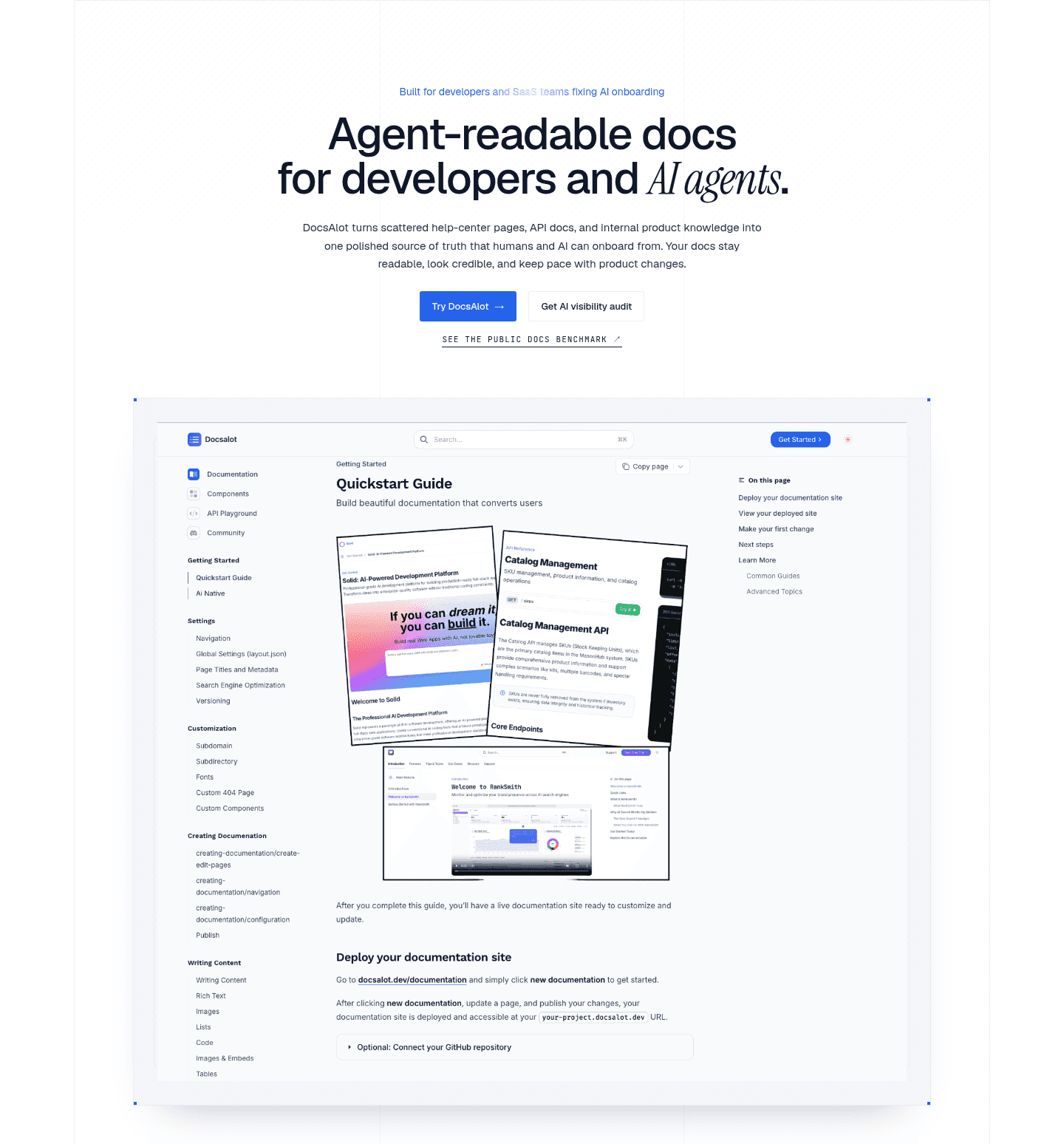
DocsAlot
62/100
Section we love
·Hero
1Audience call-out (Built for developers and SaaS teams fixing AI onboarding) names exactly who it serves
2Category is instantly clear (Agent-readable docs for developers and AI agents)
3Three paths (Try DocsAlot, Get AI visibility audit, See the public docs benchmark) fit different intent levels
4Real product screenshot of the Docsalot Quickstart Guide shows the actual documentation interface
04
Scribehow, Human testimonials and hard numbers under one proof headline.
5 years CRO + SEO at Qonto (2021–2025). After advising 15+ SaaS on their websites (Payfit, Pigment…), the same patterns kept breaking, so I decided to build the source of truth on what works on the web: the intelligence layer every tool, builder, and team uses to ship sites that perform.
“Scribehow proves results from three angles at once. Customer cards pair company logos with named, photographed people and titles, each led by a quantified result, and a row of stat counters reinforces the proof at scale under one results headline.”
What makes this page stand out
The subhead promises “Instantly capture and optimize workflows” for “teams & AI agents” in one line.
The trust bar shows a 5‑stars graphic plus “over 5 million users” and “78,000+ enterprise customers”.
The navigation uses a dense mega-menu grouping Products, Platform, “By function,” and “By use case” with icon tiles.
The top-right CTAs pair “Get Started” with “Talk to Sales,” alongside “Sign in” for returning users.
Section we love
·Trust
1Three customer cards pair company logos (Artex, Cornells, Paycor) with named people, photos and titles for human credibility
2Quantified results lead each card (50% less training time, 98% procedure compliance, hours-to-minutes documentation)
3Bottom stat counters (75% faster docs, 35 hours saved per month, 98%) reinforce the proof at scale
4Proof diversity stacks logos, named-photo testimonials and metric counters under one Real results headline
05
PromptQL
61/100
Section we love
·Features
1One headline and one visual hold the section to a single idea: correct it once, the whole team inherits the skill
2Mock thread names the real sources it pulled (Slack, docs, tickets, CRM) and the assumptions it made
3Output panel with three learned rules plus an Add to wiki button shows exactly what the feature produces
4Scenario walks a false churn flag from panic to a reusable rule, tying a weekly support pain to the fix
06
Tigerhall
61/100
What makes this page stand out
The hero headline 'The System Built for Smarter Transformation' pairs with links to 'Product Overview' and 'Why Tigerhall'.
Customer logos under 'Fortune 500s’ Change Activation Platform of Choice' show Accenture and AWS credibility above the fold.
The results strip quantifies outcomes with '3 Days' launch, '75-90%' less manual work, and '87%' adoption.
The bottom CTA 'Schedule a 30-Minute Demo Today' embeds a calendar, shows SOC 2 Type II and GDPR badges.
Section we love
·FooterBest in class
1Eight labeled columns (Get Started, Product, Use Cases, By Role, About, ECLC, Resources) make a deep site scannable
2Footer CTA card (What's Slowing Down Your Transformation? Reveal in 2-Min Quiz) captures last-chance leads
3Compliance seals (SOC 2 Type II, GDPR Approved) reassure enterprise buyers right at the page bottom
4G2 badges (Users Love Us, High Performer Winter 2022) and app store buttons echo proof and reach
Your top 3 opportunities for more revenue.
We find every way to grow your website’s visibility and conversions: SEO, AI search (AEO), backlinks and mentions, and UX/UI. 3 free opportunities, delivered by email.
Design patterns we see across the best knowledge management pages
Across 21 knowledge management pages we reviewed, the pages that work tend to make the first screen do one job: name the knowledge problem and prove the product can be trusted with the answer.
The strongest patterns pair a single, clear action with proof a first-time visitor can check at a glance, whether that is a stat-led trust bar, a featured-in row, or a free trial with a reason to start now. This matters in knowledge management website design, where the buyer is handing over the thing they care about most: what their team knows. Use best landing page examples to compare how these building blocks show up across page types.
1Three stacked promises, each a headline in the reader voice: your thoughts are yours, your mind is unique, your knowledge should last
2Every promise names the mechanism behind it (stored on your device, open file formats) rather than asserting it
3Privacy line goes further than most: no one else can read them, not even us
4Thousands of plugins is an inline link, so the curious can go deeper without a second CTA competing with Download now
Reviewed design-pattern pick from Obsidian’s value proposition section.
What I love about this section
Three stacked promises, each a headline in the reader voice: your thoughts are yours, your mind is unique, your knowledge should last
Every promise names the mechanism behind it (stored on your device, open file formats) rather than asserting it
Privacy line goes further than most: no one else can read them, not even us
Thousands of plugins is an inline link, so the curious can go deeper without a second CTA competing with Download now
Overlooked sections that quietly drive clarity and trust
In this set, integration, how-it-works, and pricing sections often do more work than teams expect: they show the product fits the tools the buyer already uses, make the process feel easy, and clear up plan confusion before the buyer hesitates.
The biggest gaps usually show up where the page should tie the product to real outcomes in plain language. When those sections are thin, the hero is left to do all the trust work, and visitors are left guessing about fit.
1Head-to-head matrix against Mem0, Letta, and Cognee on 7 rows lets prospects benchmark without leaving the page
2Source citation (Numbers straight from the LongMemEval-S benchmark and each project docs) makes the 95.2 percent retrieval claim verifiable
3Quantified wins (51 MCP tools vs 12, 0 external deps vs 2 Qdrant Neo4j) show the magnitude of the gap, not just direction
4Open-source line (Yes Apache-2.0) closes the audit-trail story on the same row competitors all answer yes
Reviewed overlooked-section pick from Agentmemory’s comparison section.
What I love about this section
Head-to-head matrix against Mem0, Letta, and Cognee on 7 rows lets prospects benchmark without leaving the page
Source citation (Numbers straight from the LongMemEval-S benchmark and each project docs) makes the 95.2 percent retrieval claim verifiable
Quantified wins (51 MCP tools vs 12, 0 external deps vs 2 Qdrant Neo4j) show the magnitude of the gap, not just direction
Open-source line (Yes Apache-2.0) closes the audit-trail story on the same row competitors all answer yes
Use the examples below as prompts for what to standardize, not just what to redesign.
Checklist: a practical audit for knowledge management website design
If you are reworking a knowledge management homepage design, this checklist helps you spot missing parts and unclear messaging quickly, especially around Cta, Value Proposition, and Trust.
Built from 29 sections across 7 knowledge management homepages in this benchmark. Each check below is a move the highest-scoring pages share, each paired with a real example from the benchmark.
Hero
Can a visitor tell what you do and who it is for in five seconds?
The hero names the product category outright.
Example: Marqly names the category in the headline (The Bookmark Manager supercharged with AI) for instant comprehension.
A primary action and proof sit above the fold.
Example: Agentmemory stacks a featured-in row above the fold (AlphaSignal 180K subscribers, Linux Foundation backing, GitHub Trending #1) in a single strip.
Trust
Does the page earn belief before it asks for anything?
Proof is quantified with a real number.
Example: Spellar runs a four-stat row (1M+ notes generated privately, 150+ countries, 4 premium AI models, 0 bots in your call ever).
The page mixes proof types instead of leaning on one.
Example: Scribehow pairs company logos (Artex, Cornells, Paycor) with named people, photos, and titles for human credibility.
Value proposition
Is the value concrete, or just adjectives?
The headline names the outcome in user language, not jargon.
Example: Spellar leads with You control where every byte goes, naming the privacy outcome instead of security jargon.
Features
Do features connect to outcomes the buyer cares about?
Feature copy leads with the outcome, not the feature name.
Example: Tigerhall uses benefit-led card headers (Reach the right audiences with the right messages at the right time) ahead of feature names.
The page lets prospects see their own use case.
Example: Spellar shows a tabbed template strip (Sales discovery, 1:1, Retro, Standup) so prospects spot their exact meeting type.
Call to action
Does the next click feel safe to a cautious buyer?
One dominant button uses action-led copy with no competing links.
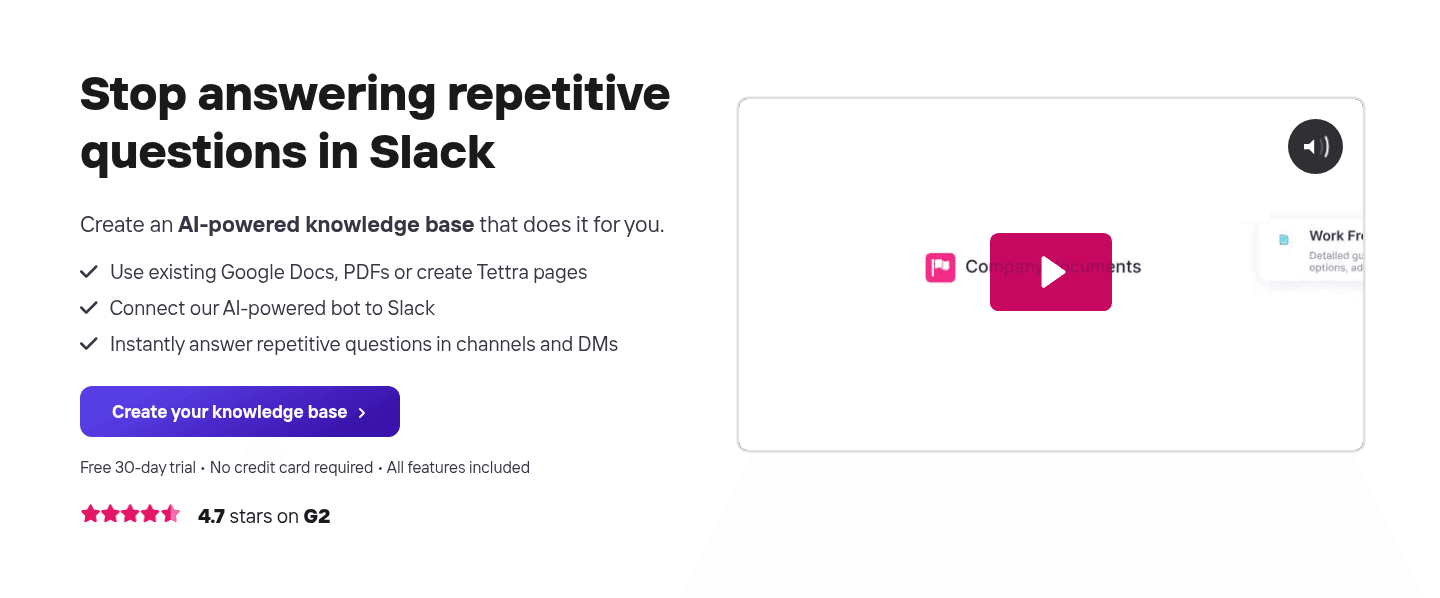
Example: Tettra keeps a single dominant CTA (Create your knowledge base) with no competing buttons.
A reassuring or risk-reducing line sits with the button.
Example: Bulkmark leads with a single black CTA (Start your 7-day free trial) that names the trial and removes friction.
The gap most knowledge management pages leave open is pricing.
Pricing is the rarest section in this knowledge management set. Of the 7 products benchmarked, only 1 exposes a pricing block clear enough to score. Bulkmark locks a single clear price (Founders $59/yr, about $4.92/mo) and shows the next prices on a timeline, so there is no tier confusion. Pages that hide cost behind a sign-up leave the cautious buyer guessing.
Run it on your current page, then decide what to rewrite, what to reorder, and what proof to add before you touch visual polish. For a faster starting point, send us your site: we come back with the 3 changes that would bring it the most revenue.
Interactive quiz
What would your knowledge management homepage score?
Question 1 of 5
0%
Can a buyer identify what your knowledge tool does in under 5 seconds?
"The bookmark manager supercharged with AI" beats "unlock your team's collective intelligence."
Reviewed by
Gabriel Amzallag , Founder, Web Anatomy
5 years CRO + SEO at Qonto (2021–2025). After advising 15+ SaaS on their websites (Payfit, Pigment…), the same patterns kept breaking, so I decided to build the source of truth on what works on the web: the intelligence layer every tool, builder, and team uses to ship sites that perform.
We find every way to grow your website’s visibility and conversions: SEO, AI search (AEO), backlinks and mentions, and UX/UI. 3 free opportunities, delivered by email.
Knowledge management homepage inspiration, grounded in real pages
Knowledge Management FAQ
Quick answers based on the knowledge management websites we reviewed.
What are the best knowledge management websites?
[01]
The strongest performers we reviewed are Spellar, Scribehow, and Bulkmark, with Marqly and Agentmemory rounding out the detailed analysis. Across 21 knowledge management homepages, these pages win by pairing a clear promise with fast proof: Spellar's honest pricing and stacked reassurance, Scribehow's testimonials that show real named people next to results, and Bulkmark's problem section that makes the status quo feel costly.
What makes knowledge management websites harder to sell?
[02]
The buyer is handing over the thing their team cares about most, what they know, so trust has to land before the feature pitch. Across 21 homepages we looked at, the pages that win make reassurance easy to see early: Spellar stacks honest pricing with three reasons not to worry before features start, Scribehow opens each customer card with a real result, and Agentmemory lets people compare it on a sourced matrix without leaving the page.
What is the biggest design mistake on knowledge management homepages?
[03]
Leaning on polished visuals while leaving proof thin, especially real testimonials. The average page we reviewed scored 50.7, and weak proof is the most common gap. The pages that fix it answer "why trust you?" early: Scribehow pairs company logos with real named people and their results, while Spellar packs scale, reach, and its privacy promise into a single four-stat trust bar.
What sections should a knowledge management homepage include?
[04]
A hero that names the category, an early trust layer such as real testimonials or honest pricing, a problem section that makes the status quo feel costly, a real product or how-it-works visual, and a clear next step. The parts that work hardest are Cta, Value Proposition, and Trust. Across 21 pages, the ones that skip the trust layer lose buyers before they reach the product.
How does a knowledge management homepage build trust before the ask?
[05]
The strongest pages make proof easy to see in the first screens instead of saving it for later. Scribehow gathers several kinds of proof under one results headline, pairing company logos with real named customers and live counters. Spellar runs a four-stat trust bar that pulls together scale, reach, and its privacy promise, then borrows credibility with featured-in chips. Trust is the part that does the most work across these 21 pages.
How many knowledge management examples should I review before redesigning?
[06]
Three to five is enough if you compare them part by part rather than saving full-page screenshots. The gap is concentrated in a few blocks, so study the pages that win each one: Spellar for honest pricing and a trust bar, Scribehow for layered proof, Bulkmark for a problem section that puts a number on the status quo, Marqly for category clarity above the fold, and Agentmemory for a sourced comparison matrix.
Where can I find great inspiration for my knowledge management website?
Use a simple checklist for clarity, trust, and friction instead of relying on gut feel. Or send us your site and we come back with the 3 changes that would bring it the most revenue.