Best Community Website Examples (And Why They Convert)
We scored 18 community homepages on the same conversion criteria. See which sections separate the top performers, and what your page is probably missing.
Updated September 202618 pages analyzed
#CompanyScore
Scored by AI across 60+ conversion criteria
#1
76/100
Scroll to explore
WavMaker
What the best community websites get right
A community website has to do two things at once: make a visitor want to belong, and calm the worry that this is the wrong place to join. The strongest community sites we looked at do four things early:
47.3/100
Avg. page score
Make the offer clear on the first screen, so a visitor knows exactly what kind of community they are about to join.
Build the page around what the member actually gets, tying each frustration to a real fix instead of listing features.
Give one clear next step in plain words, so the way in is never confusing.
Answer the common questions and doubts right where they come up, with each worry getting its own clear answer before the ask.
6 best community homepages, looked at up close
Each company below is paired with its strongest section. See what they get right, and what you can borrow for your own page.
01
Beamly, The all-in-one platform for creators who want to own their audience.
5 years CRO + SEO at Qonto (2021–2025). After advising 15+ SaaS on their websites (Payfit, Pigment…), the same patterns kept breaking, so I decided to build the source of truth on what works on the web: the intelligence layer every tool, builder, and team uses to ship sites that perform.
“Beamly takes a big, do-everything creator platform and makes the choice easy. The pricing table lines up every feature against the Creator and Business plans, sorts the long list into clear groups, and adds a quick explanation when you hover, so nothing feels hidden. Because each row shows what changes between plans, the reason to upgrade is obvious before anyone has to ask.”
What makes this page stand out
Key features and capabilities are highlighted upfront: creator discovery, campaign management, content approval workflows, and performance analytics — the full brand-creator collaboration lifecycle
The product explanation makes the workflow tangible: brands find creators, brief them, review content, approve deliverables, and measure results — all within one platform
Creator economy positioning taps into a massive growth market where brands are shifting budget from traditional advertising to influencer and creator partnerships at an accelerating rate
The brand-side focus (helping brands manage creator relationships) rather than creator-side (helping creators monetize) creates a clearer monetization model: brands have bigger budgets than individual creators
Section we love
·Pricing TableBest in class
1Full feature matrix lays 60+ rows against Creator and Business columns with checks and values for effortless comparison
2Four labeled categories (Content & Publishing, Monetization & Audience, Website Builder & SEO, More features) keep the long list organized
3Info (i) icons on every feature row offer hover explanations without cluttering the table
4Differing values like 1 show versus 10+ shows and 2 seats versus Unlimited seats spotlight the upgrade reasons per row
5Plan headers repeat at each category and two Try for free buttons sit at the bottom of each column for easy conversion
02
Membership, Bring your scattered content into one profitable home.
5 years CRO + SEO at Qonto (2021–2025). After advising 15+ SaaS on their websites (Payfit, Pigment…), the same patterns kept breaking, so I decided to build the source of truth on what works on the web: the intelligence layer every tool, builder, and team uses to ship sites that perform.
“Membership leads with what you get, not feature names, and links each creator frustration straight to the fix. That pain-then-fix idea runs all the way down the page, real product shots show the result instead of just describing it, and a few deeper links let curious visitors dig into the parts that matter to them.”
What makes this page stand out
The specific problem articulation — creators struggling to retain members and reduce churn — positions the platform around the business model's core challenge, not just content delivery
Competitive differentiation against specific alternatives (Patreon's limited tools, WordPress's complexity, all-in-one platforms' bloat) helps buyers self-select quickly
The all-in-one membership toolkit (content library, community, courses, mobile app) covers every element a membership business needs without requiring multiple subscriptions
Engagement and retention features (drip content, gamification, progress tracking) directly address the churn problem that kills most membership businesses within the first year
Section we love
·Features
1Headlines lead with the outcome (Everything you need in one place, All your scattered content in one profitable home) not feature names
2Pain-to-outcome framing is explicit (no more juggling tools, escape the algorithm) tying each frustration to the fix
3See more, See Community and See Automations links route curious visitors to deeper feature pages
4Real product mockups (community chat, content hub) show the result, and stacked rows cover several supporting features
5 years CRO + SEO at Qonto (2021–2025). After advising 15+ SaaS on their websites (Payfit, Pigment…), the same patterns kept breaking, so I decided to build the source of truth on what works on the web: the intelligence layer every tool, builder, and team uses to ship sites that perform.
“Linktree makes the next step impossible to miss. One main button, with nothing else competing for the click, makes the action clear; a plain label tells the visitor exactly what happens when they tap; and a short line underneath takes away any guesswork before they do.”
What makes this page stand out
Real creator testimonials with photos (Koy Sun, lettering artist; Nico and Fran, Pistakio founders) provide authentic social proof while showcasing diverse use cases from creative professionals to D2C brands.
"Get started for free" single CTA maintains simplicity and eliminates any barrier to adoption — matching the product's core promise of simplicity.
The vibrant yellow-green design palette is instantly recognizable and highly differentiated in a space of muted SaaS designs — strong brand identity.
Available on Chrome Web Store, Google Play, and App Store shows platform ubiquity, reinforcing the "everywhere" positioning.
Section we love
·Cta
1One dominant button (Contact Linktree) with no competing links makes the next step obvious
2Direct action label (Contact Linktree) tells the user exactly what tapping the button does
3Plain supporting line (tap the button below for your options) removes any guesswork before the click
04
GourmetPro, Connect with vetted food and beverage experts on demand.
5 years CRO + SEO at Qonto (2021–2025). After advising 15+ SaaS on their websites (Payfit, Pigment…), the same patterns kept breaking, so I decided to build the source of truth on what works on the web: the intelligence layer every tool, builder, and team uses to ship sites that perform.
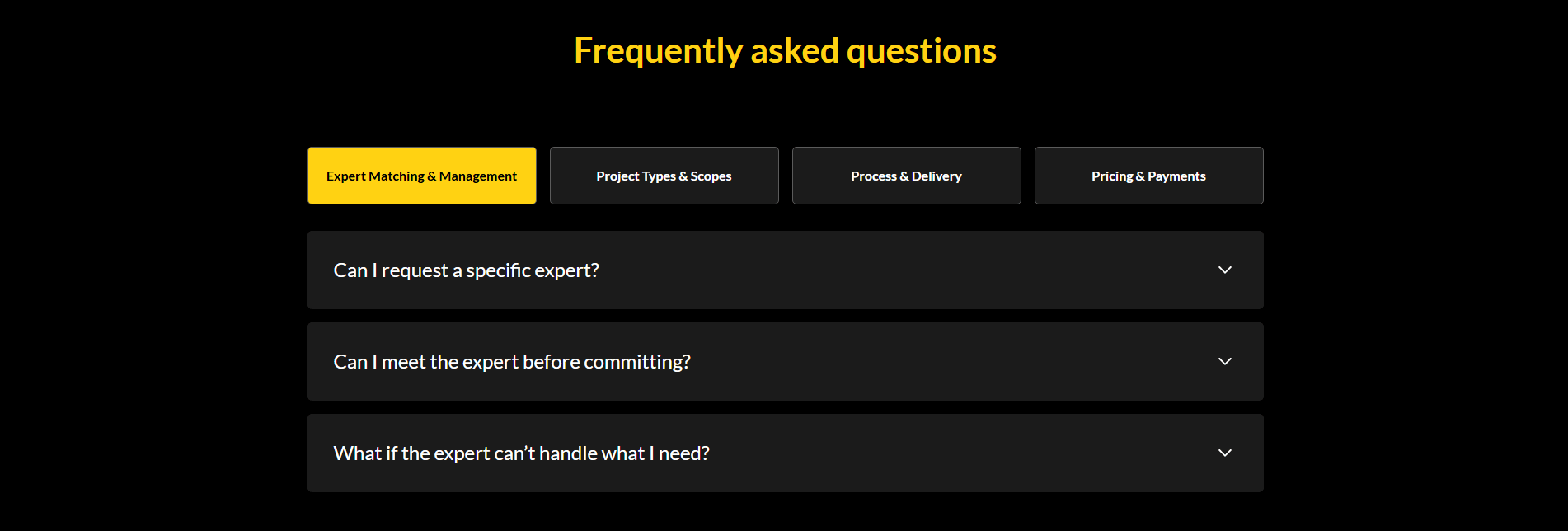
“GourmetPro sends each visitor straight to the thing holding them back. Topic tabs split the common questions into clear lanes, the questions themselves take on trust head-on, and each answer stays tucked away until you open it, so the page never feels heavy.”
What makes this page stand out
Expert cards featuring professionals from Unilever, Subway, PepsiCo, Coca-Cola, DHL, General Mills build instant credibility
Industry-specific positioning (food & beverage only) signals deep domain expertise over generic consulting
"Local F&B experts guide your global expansion from game plan to execution" — end-to-end service promise
Logo bar with recognizable global F&B companies (Domino's, CJ, Associated British Foods) validates market reach
Section we love
·Faq
1Four topic tabs (Expert Matching, Project Types, Process and Delivery, Pricing and Payments) route each buyer to their own blocker
2Questions tackle trust head-on (Can I request a specific expert, Can I meet the expert before committing)
3What if the expert cant handle what I need? removes the fear of a bad match before payment
4Chevron accordion keeps each tab clean and scannable with answers collapsed by default
05
Joinblink
54/100
What makes this page stand out
The subheadline “Awesome employee experience lives in Blink” adds a punchy benefit before “trusted, AI-powered platform” positioning.
The hero offers two CTAs side-by-side—“Book a demo” and “Start for free”—to match sales-led and self-serve intent.
The product screenshot shows desktop and mobile views, featuring a live event video, trending topics, and story sharing.
Customer tiles pair recognizable logos with metrics like “87% adoption in just 10 days” and “700,000 employees across 32 countries.”
Section we love
·Use Cases
1Four role tabs (Internal Communications, Human Resources, IT, Operations) let visitors self-select their use case instantly
2Active tab pairs a clear outcome (Make sure messages don't get missed) with a real app mockup of multichannel campaigns
3Concrete in-product scenarios (Wellbeing Week, weather Security alert, Town Hall is live) make the value tangible not generic
4Clean tab navigation makes switching between personas effortless
06
Inmemori, Compassionate, end-to-end support for arranging a ceremony.
5 years CRO + SEO at Qonto (2021–2025). After advising 15+ SaaS on their websites (Payfit, Pigment…), the same patterns kept breaking, so I decided to build the source of truth on what works on the web: the intelligence layer every tool, builder, and team uses to ship sites that perform.
“Inmemori makes a hard, sensitive process feel manageable. A simple column of numbered steps walks the visitor from the first call to the final arrangements, a clear "get a quote in a minute" line makes it easy to start, and two ways to reach out sit right where the visitor needs them.”
What makes this page stand out
"Obsèques de qualité à partir de 3 000€" (Quality funerals from €3,000) creates transparent pricing in an industry known for opaque costs
Three key reassurances — prélèvement possible, démarches gérées à 100%, équipe 24h/7j — address the top anxieties of grieving families in one glance
Four-step accompaniment journey (call → advisor meeting → ceremony → burial/cremation) demystifies a process that families dread navigating alone
Multiple agency locations (Paris, Nantes, Lyon, Bordeaux) with 24/7 availability demonstrate national coverage and always-on support
Section we love
·How It Works
1The Complete support column lays out four numbered steps (call, schedule appointment, ceremony, burial or cremation).
2A concrete timeframe anchors the start (Get a quote in 1 minute).
3Numbered circles plus FAQ icons give each step a clear visual marker.
4The final steps preview the end outcome (secular or religious ceremony, then burial or cremation).
5Two CTAs are embedded (Get a quote in 1 minute and a tappable Call us phone number).
See how your page compares to the 47.3 average page score
Run a quick check on your community page and get a part-by-part read of what to fix first to improve clarity, belonging, and proof.
Design patterns we see across the best community websites
Across 18 community pages we looked at, the ones that work tend to make the first screen do a single job: say what the community is, and make the next step obvious.
The strongest pages pair specific, what-you-get claims with a layout that keeps one clear path, then back each claim with proof a first-time visitor can check fast. Browse the best landing page examples to see how these building blocks show up across different kinds of pages.
2Marquee brands span Toyota, Klarna, Sothebys, KPMG, Chanel and Camper
3Hard metrics show 140,000+ successful transactions processed
4A 98% client satisfaction figure adds a quantified outcome
5Combines recognizable logos with two concrete stats for proof diversity
Reviewed design-pattern pick from Ruul’s trust section.
What I love about this section
The Top-tier companies trust Ruul framing pairs with premium customer logos
Marquee brands span Toyota, Klarna, Sothebys, KPMG, Chanel and Camper
Hard metrics show 140,000+ successful transactions processed
A 98% client satisfaction figure adds a quantified outcome
Overlooked sections that quietly drive belonging and trust
In this set, the quieter parts of the page, like the section that names the problem or the navigation up top, often pull more weight than teams expect. They shape what a visitor thinks the community is for, take a little doubt off the table, and keep the offer steady as people read down the page.
The biggest gaps usually show up where the page should name the member's pain in plain words and prove the community is alive and active. When those parts are thin, the hero is left to do all the persuading, and visitors are stuck guessing whether this is for them.
1Links grouped into 4 labeled columns (Explore, Custom routes and maps, Company, Community)
2App Store and Google Play badges drive app installs as a secondary conversion
3Legal row with Privacy Policy, Terms, Cookie Policy and Manage Cookies kept clear and accessible
41% For the Planet and Leave No Trace badges signal brand values alongside social channels
Reviewed overlooked-section pick from AllTrails’s footer section.
What I love about this section
Links grouped into 4 labeled columns (Explore, Custom routes and maps, Company, Community)
App Store and Google Play badges drive app installs as a secondary conversion
Legal row with Privacy Policy, Terms, Cookie Policy and Manage Cookies kept clear and accessible
1% For the Planet and Leave No Trace badges signal brand values alongside social channels
Use the examples below as prompts for what to make standard, not just what to redesign.
Checklist: a practical read on community website design
If you are working on a community homepage, this checklist helps you spot missing parts and unclear messaging fast, especially around Hero, Cta, and Value Proposition.
Run it on your current page, then decide what to rewrite, what to reorder, and what proof to add before you touch the visual polish. For a quick starting point, you can also study the best hero section examples.
Built from 83 sections across 15 community homepages in this benchmark. Each check below is a move the highest-scoring pages share, each paired with a real example from the benchmark.
Hero
Can a first-time visitor tell what this is in five seconds?
The hero makes it instantly clear what the product is and who it's for.
Example: Trainline's hero headline reads "Save 46% when you book top 3 European routes at least 30 days in advance," so the offer is clear at a glance.
Proof is visible before the first scroll.
Example: WavMaker surfaces its "Built for ministry" audience proof in the first screen instead of waiting.
A risk reducer sits next to the first ask.
Example: Inmemori pairs its hero CTA with "Get a quote in 1 minute" to make the first step feel low commitment.
Value proposition
Is the value concrete, or just adjectives?
The benefits are specific.
Example: Malt runs four named propositions side by side, "Lightning fast," "Safe and secure," "Time saving," and "Community first."
The promise is quantified with a number or an outcome.
Example: Ruul frames its props under a "What makes Ruul so different" headline instead of stacking generic adjectives.
A unique mechanism explains why the result is possible.
Example: Trainline splits three distinct savings cards, early booking, SplitSave, and a digital Railcard, each with its own icon.
Features
Do the features connect to outcomes the visitor cares about?
Feature headlines lead with the outcome.
Example: Membership opens with "Everything you need in one place" rather than listing capabilities.
The copy stays benefit-led instead of describing the mechanism.
Example: Back Market makes the savings the headline of each deal with "Save 99.95" and a last-lowest-price reference.
Features link out to deeper pages for visitors who want detail.
Example: Beamly adds a "View all AI features" button under its six AI feature cards, giving visitors a path to the deeper feature pages.
Call to action
Does the next click feel safe and obvious?
The button copy is action-led.
Example: Ruul lets one bold "Open an account" button own the block with no competing action.
Reassuring microcopy sits next to the button.
Example: WavMaker catches hesitant visitors with a "Not ready to subscribe?" framing instead of losing them.
A lighter secondary path catches visitors who are not ready.
Example: Trainline keeps "Sign up now for free" as the primary action and adds a softer "Not ready to sign up? Contact our Sales Team" route beside it.
The gap most community pages leave open is pricing.
Pricing is the rarest section in the community set. Of 15 companies benchmarked, only six expose a pricing block clear enough to score. The ones that do make the visitor's job easy. Membership lines up three named plans, Start, Grow, and Scale, each with a short who-it-is-for line, so a visitor can compare without booking a call. Pages that hide pricing behind a contact form leave the cheapest trust on the table.
Interactive quiz
What would your community homepage score?
Question 1 of 5
0%
Can a visitor tell what kind of community this is in under 5 seconds?
"A membership for full-time creators" beats "join a movement of like-minded people."
Reviewed by
Gabriel Amzallag , Founder, Web Anatomy
5 years CRO + SEO at Qonto (2021–2025). After advising 15+ SaaS on their websites (Payfit, Pigment…), the same patterns kept breaking, so I decided to build the source of truth on what works on the web: the intelligence layer every tool, builder, and team uses to ship sites that perform.
Community homepage inspiration, grounded in real pages
Community FAQ
Quick answers drawn from the community websites we reviewed.
What are the best community websites?
[01]
The pages that came out strongest are Wavmaker, Beamly, Membership, Linktree, GourmetPro, and Ruul. Across 18 community homepages we looked at, these win by making the offer clear and the next step easy: Beamly lines up every feature against its named plans, Membership ties each creator frustration to a fix, and Linktree keeps one main button with nothing else competing for the click.
What makes a community website convert?
[02]
The community sites that do well get a few things right: it is clear what the community is, it is clear what a member walks away with, there is one next step instead of five, and the common questions and doubts are answered right where people look for them. Beamly makes plans easy to compare, Membership leads with what the member gets and ties each pain to a fix, and GourmetPro groups questions by what each visitor is actually worried about.
What does the best community website homepage do differently?
[03]
The pages that win make joining feel obvious and low-risk instead of just leaning on how big they are. Linktree keeps one main button with a plain, do-this label, Inmemori walks a sensitive process through numbered steps with a clear way to start, and Ruul backs every selling point with a real figure on a clean grid. The average community page we looked at scored 47.3, so the gap is in how the page is built, not in audience size.
What sections should a community website homepage include?
[04]
A hero that says what the community is, a value section built around what the member gets, one clear next step, an FAQ that answers the common doubts where people look for them, and a section that names the member's pain in plain words. Beamly and Membership stack these well, GourmetPro sends each worry to its own tab, and Membership's problem section makes the cost of doing nothing real. Across 18 pages, the ones that skip the problem and the FAQ tend to lose visitors before they decide to join.
How many community website examples should I study before redesigning?
[05]
A handful is plenty if you pick by community type and compare them part by part. Only 1% of the sections we looked at reach the top tier, so the gap sits in just a few blocks. Study Beamly for comparing plans, Membership for leading with what the member gets, Linktree for one clear next step, GourmetPro for grouping the common doubts, and Ruul for making the difference plain.
Where can I find inspiration for my community website design?
Walk through it with a simple checklist for clarity, belonging, and friction instead of going on gut feel. Run your page through the landing page audit for a part-by-part read against the same criteria used across the pages we reviewed.