
TL;DR
- Start with a template. Decide which sections stay fixed and which can change.
- Collect only data that changes the page. Industry, traffic source, customer stage, and company details are useful signals.
- Write the rules before generating content. Every signal needs a defined page change, a priority, and a fallback.
- Begin with one use case. An account page, an ad-specific page, a proposal, or a lifecycle CTA is enough to prove the workflow.
Landing page personalization means adapting a page's content to the person, company, or audience visiting it. In 2020, I built three personalized pages in Webflow to get my first job. Each page used the target company's colors, a photo of its team, and an FAQ addressing its objections.
It worked, but the process was slow and prone to errors. I had to adapt every page by hand.
With AI, you can keep the same process and remove much of the manual work. Start with a page template, collect useful data, decide what that data changes, and send each person to the right page.
Here is the workflow, followed by four landing page personalization examples you can apply to your own website.
How to personalize landing pages with AI
1. Create a landing page template
First, benchmark what your competitors are doing.
You can use Web Anatomy to explore competitors' pages and sections, then choose examples worth learning from. This gives your AI builder real context instead of a blank prompt.
Once you have the right references, ask the builder to turn them into a template. Keep the parts that should remain consistent and identify the sections you want to personalize: the headline, proof, FAQ, offer, or call to action.
The template is a control mechanism. It keeps the structure, design system, and core product claims stable while allowing a small set of fields to change.
2. Collect data that changes what the page says
My original use case was manual account-based marketing: one page for each target company. The same process works for several types of personalization.
Start by defining your goal. What can you know about a visitor, and what should that knowledge change on the page?
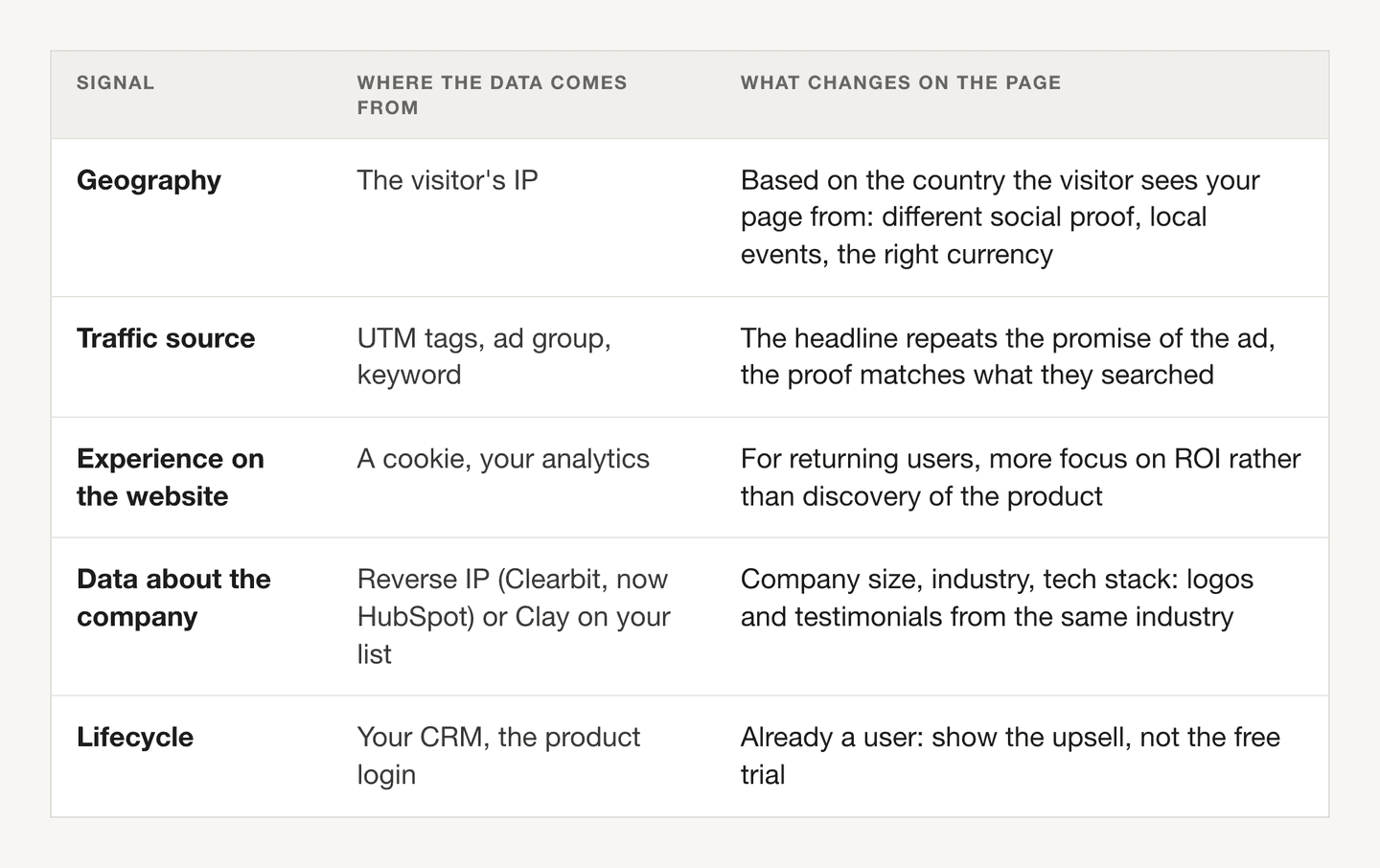
Create a research table with the company name and the information that is useful to your page: industry, role, technology stack, traffic source, customer stage, or a specific problem.
One column equals one signal. Store it in a spreadsheet, Airtable, Notion, or another structured format. It will be easier to use than a collection of unstructured research notes.
Avoid collecting a field just because it is available. If the visitor's city does not change the offer, proof, or next step, it does not need to be part of the first version.
3. Map each signal to a page change
Next, write your personalization rules.
One signal can trigger one or several changes on the page. List them explicitly. An industry field might select a headline, two customer logos, and a case study. A lifecycle field might only change the CTA.
If several rules can apply at the same time, decide which takes priority. For example, a headline that names the company's industry might matter more than a headline about ROI for returning visitors.
The implementation depends on your website. You might create one CMS item per company, as in the Verkada example below, or use a content table that maps signals to the sections they change.
Always keep a default version for visitors whose data is missing, uncertain, or contradictory. Personalization should fail gracefully.
4. Send each prospect to the right page
You now have prospect details, company research, and a personalized landing page. Connect the three.
Each person should receive the link that matches their company, ad group, or use case. Before sending the campaign, test several complete journeys: the message, the link, the data the page receives, and the version it displays.
Check the page on mobile as well. A personalized headline that is twice as long can break a layout even when the logic is correct.
Four landing page personalization use cases
1. ABM landing pages for target accounts
Build a personalized landing page for each target account. Verkada's workflow with Clay is a useful example.
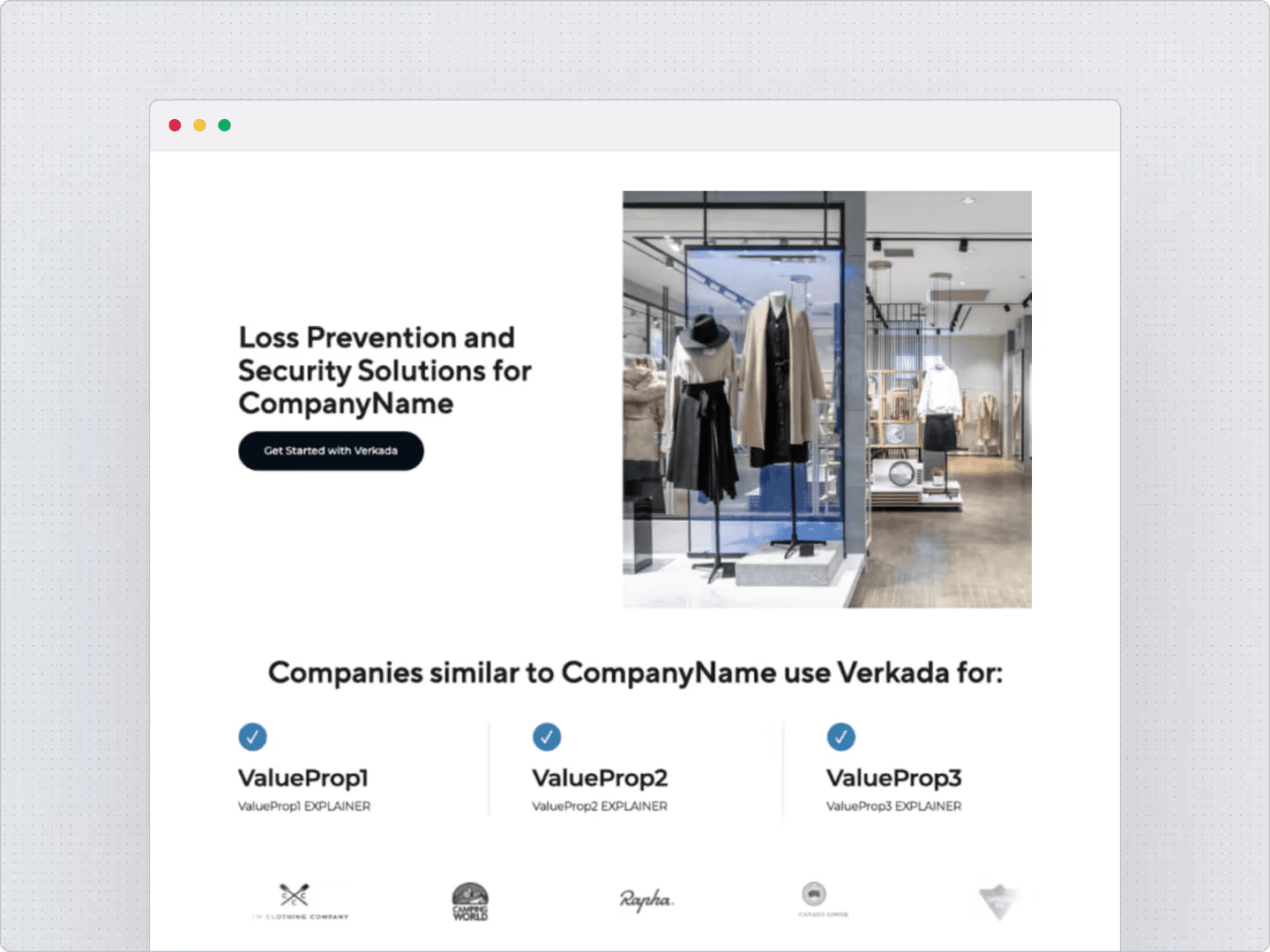
The team enriches prospect data in Clay and syncs it to Webflow. Each prospect's page draws on that data to personalize its content.
Clay reports that Verkada generates more than 600 personalized landing pages per campaign. The part worth copying is the connection between the research table and the page template. You do the research once, then use those fields consistently.
For a related approach, look at Navattic's experiment with persona-specific demos. Personalization can extend beyond the headline into the product experience a visitor sees.
2. One landing page per ad group
An ad targets a specific audience and makes a specific promise. Too often, the page after it is generic. The visitor should not have to search for what the ad offered.
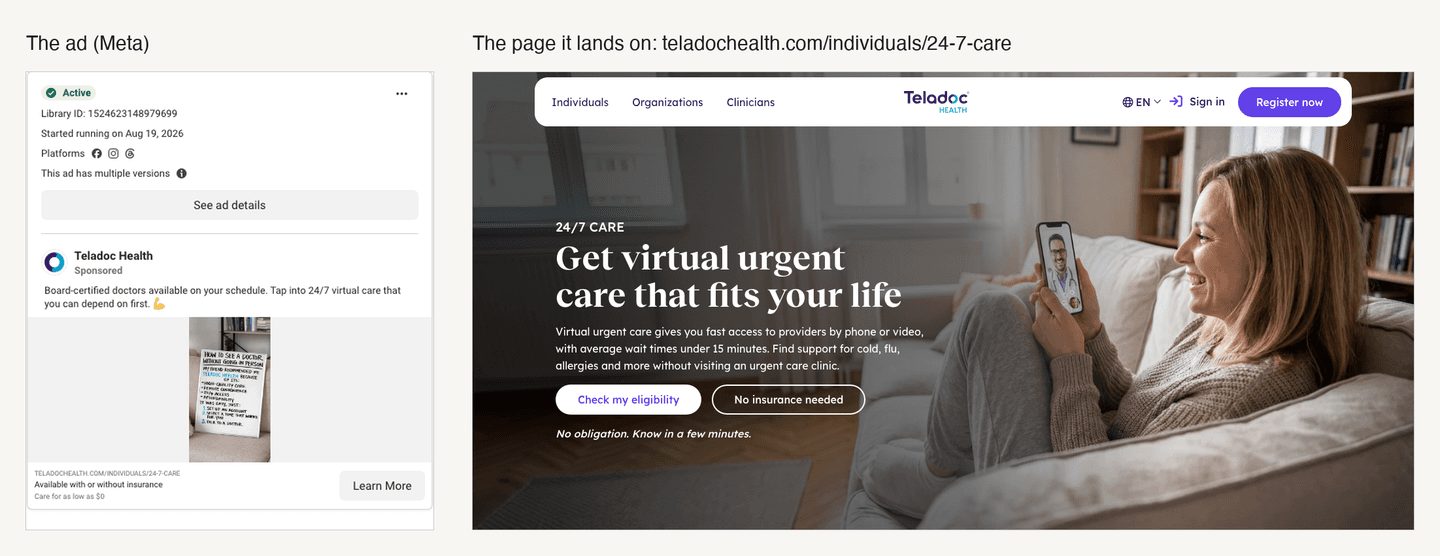
In the healthcare ads analysis, I looked at how Teladoc carries an ad's promise into its landing page: access to care, insurance information, and wait times.
The simple version is to tag each ad group with a UTM or URL parameter, then create one row per group with its headline, proof, and CTA. Use that row to adapt the top of the page, with a default version for everything else.
Keep some traffic on the generic page so you can compare results. Remove variations that do not improve the outcome you care about.
3. Website proposals for local businesses
Another use case came from a post on X: send a local business a link to several versions of a proposed website.
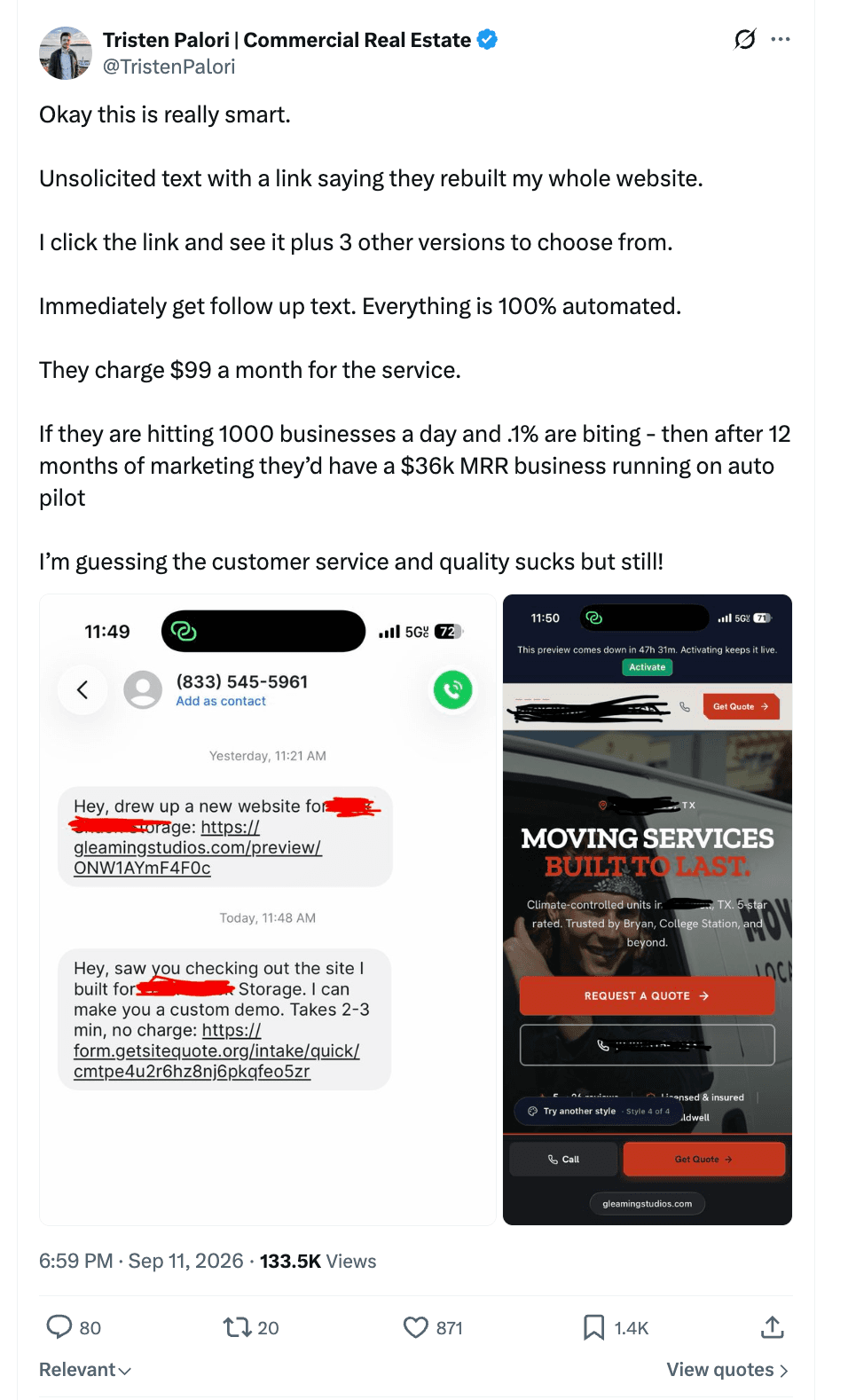
The process starts with identifying businesses that have no website, or one that needs work. Collect useful public information from their business profile and existing site, then adapt a template for their niche.
You can personalize the business name, services, location, and visuals while keeping the structure consistent. Check every detail before sharing the proposal, especially anything AI filled in.
This extends the same idea from a landing page to a website proposal: a relevant example makes the offer easier to understand.
4. Personalized CTAs for each customer stage
A new visitor and someone already using your product do not need the same next step.
A new visitor might see “Free trial.” A user already on a trial might see “Request a demo.”
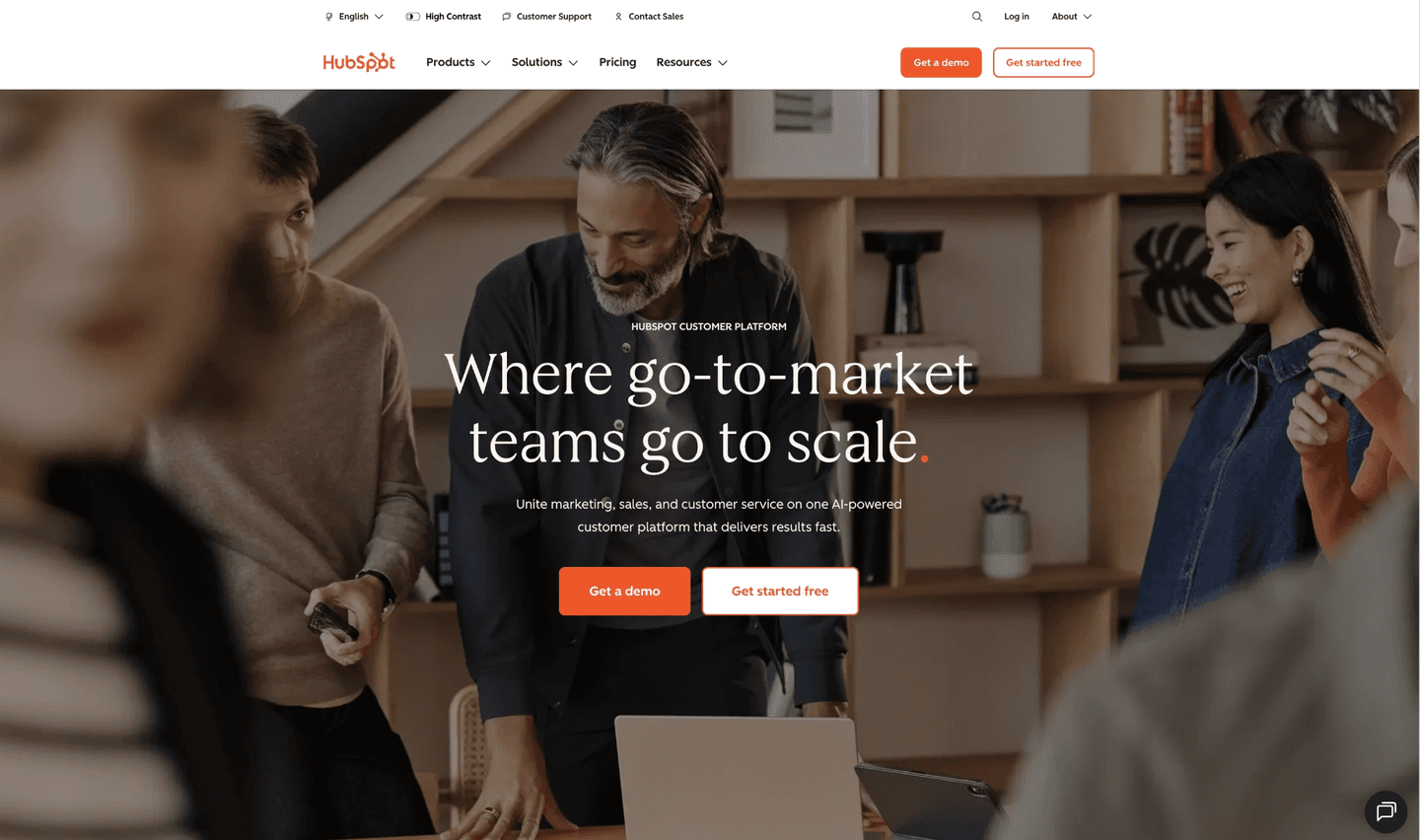
HubSpot's research on personalized CTAs is one reference for this approach.
To apply it, identify the visitor when you have a reliable signal, read their customer stage, and show the corresponding CTA. Keep a default for anonymous visitors.
The useful question is simple: what is the next action for this person, given what they have already done?
Start with one signal and one page change
You do not need a different website for every visitor.
Choose one use case, collect the information it needs, and define what changes on the page. Build from there once you can verify that each visitor gets the right content.
If you need examples before building your template, browse Web Anatomy's landing page benchmark.
Adapted from How to personalize your landing page with AI, originally published in the Web Anatomy newsletter on September 16, 2026.

Written by
Gabriel Amzallag , Founder, Web Anatomy
5 years CRO + SEO at Qonto (2021–2025). After advising 15+ SaaS on their websites (Payfit, Pigment…), the same patterns kept breaking, so I decided to build the source of truth on what works on the web: the intelligence layer every tool, builder, and team uses to ship sites that perform.
More from the blog
Playbooks
We analyzed the ads the top consumer app companies run. Here is what works.
Which app ads keep running in 2026, the eight angles they use, and the pages behind them. The quiz beats the pitch, and almost nobody lands on a store.
 Gabriel Amzallag23 min read
Playbooks
We analyzed the ads the top B2B companies run. Here is what works.
Which B2B ads keep running, the eight angles behind them, and the pages the clicks land on. Two teardowns, HubSpot and Atlassian, with the ads to open.
Gabriel Amzallag24 min readPlaybooks
We analyzed the ads the top SaaS companies run. Here is what works.
Which SaaS ads keep running in 2026, which angles they use, and the pages behind them. Seven angles that work, five nobody is running.
Gabriel Amzallag25 min read