Skip to content

Best Design Tools Website Examples (And Why They Convert)

We scored 7 design tool homepages against dozens of conversion checks. See which sections separate the top performers, and what your page is probably missing.

Updated June 20267 pages analyzed
#CompanyScore

Scored by AI across 60+ conversion criteria

ReactVision Studio landing page
#1
61/100
Scroll to explore
See full analysis
Analyze your design tool pageFree. Takes 2 minutes.

What the best design tool websites get right

Design tool buyers want to see the product work before they trust it. The strongest pages in this set do a few things early:

46.4/100

Avg. page score

  • Show the real product in the first screen, a live editor, a builder mockup, or the actual canvas, so the promise feels concrete instead of abstract.
  • Lead with the outcome the buyer wants, not the toolset, so the value lands before the feature list ever starts.
  • Put one action-led button above the fold, paired with a low-commitment path for visitors who want to look before they commit.
  • Back the claim with proof people can verify, a live user counter, a logo wall, or a wall of real creator pages.

6 best design tool homepages analyzed in detail

Each company below is paired with its strongest section and scored across 60+ conversion criteria. See what they get right, and what you can borrow.

01

ReactVision Studio, XR you can actually ship, with an honest free tier and clear plans.

Editor's pick61/100
Gabriel AmzallagGabriel AmzallagFounder, Web Anatomy

ReactVision Studio makes pricing the easy part of the decision. Its plans name a free forever tier that needs no card, then mark the Pro card as the popular pick so the eye lands on the recommended upgrade. A short footnote explains what counts toward storage and API requests, so the meter feels predictable rather than arbitrary. It is the clearest pricing story in this set.

What makes this page stand out

  • The primary CTA button reads “Start Building With Studio,” paired with a secondary “Watch Studio Quick Start” link.
  • The platform bar lists ARKit, ARCore, and HorizonOS alongside “Expo compatible” and “Powered by ViroReact” badges.
  • The open-source callout states “Open source MIT renderer, 140k+ npm installs,” reinforcing adoption and licensing clarity.
  • The “Ship it inside your React Native app” section shows a StudioSceneNavigator JSX snippet and links to docs and tutorial.

Section we love

·Pricing
ReactVision Studio Pricing section
  1. 1Free tier honest tag (Forever, no card required) plus Sign up for free, no card required headline anchor every objection at the top
  2. 2Most Popular ribbon on the Pro card (with a green border) directs the eye to the recommended upsell
  3. 3Tier scale labeled by what scales (500 MB asset storage to 5 GB, 1,000 to 100,000 Platform API requests) translates dollars into resource math
  4. 4Footnote breaks down what counts as Asset storage and Platform API requests so the meter feels predictable, not arbitrary
02

Submagic, Start creating shorts that get more views, faster.

59/100
Gabriel AmzallagGabriel AmzallagFounder, Web Anatomy

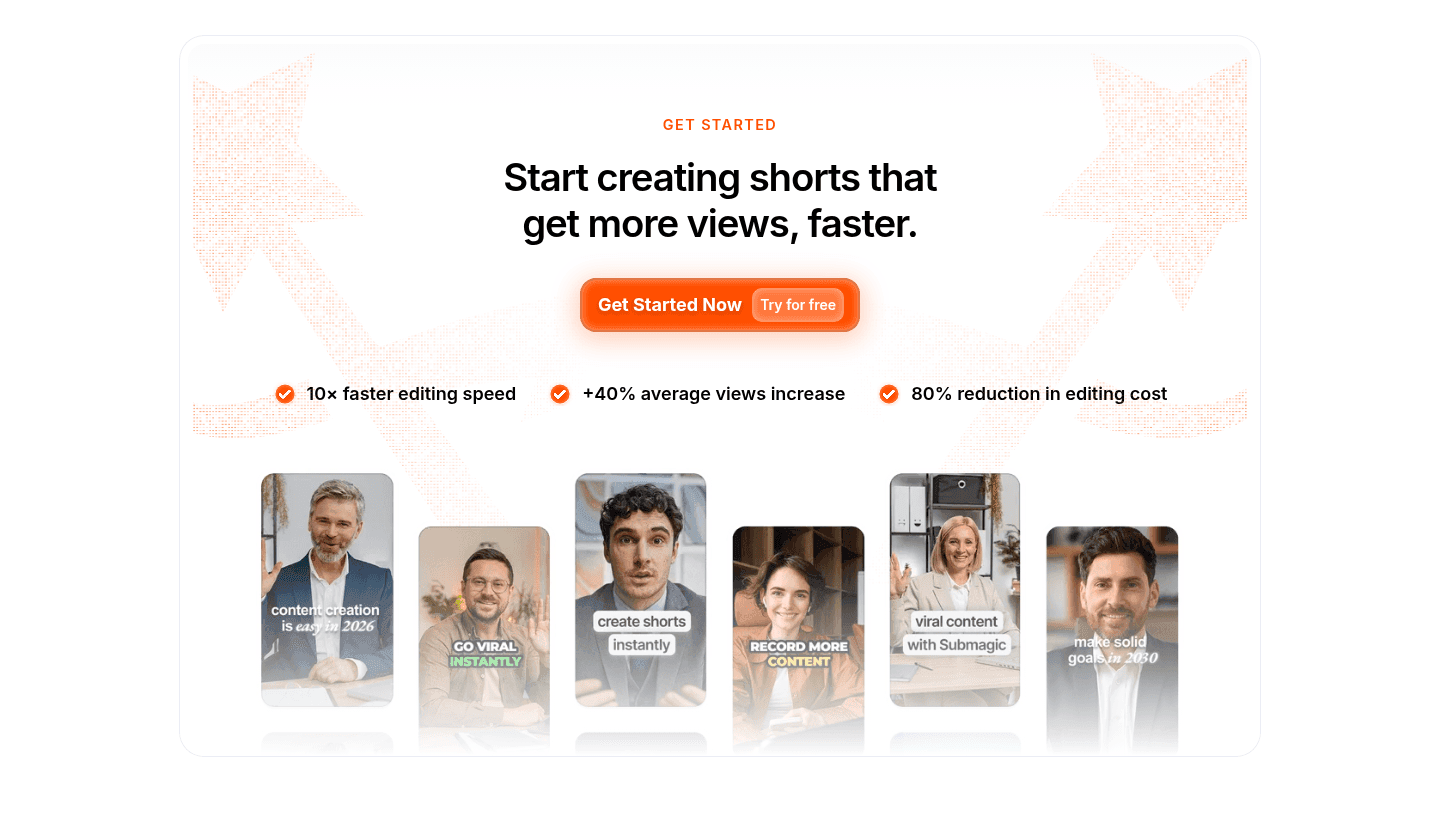
Submagic turns its closing call to action into the strongest block on the page. A primary Get Started Now button sits next to a low-friction Try for free link, covering both ready and still-looking visitors. A strip of real short-form video thumbnails shows the output instead of describing it, so the promise is visible right at the decision point.

What makes this page stand out

  • The hero headline says “Edit shorts 10x faster with AI,” followed by “From raw footage to viral shorts in 1 click.”
  • The primary CTA button reads “Get Started Now” with “Try for free,” linking directly to app.submagic.co/signup.
  • Trust badges show G2 “4.9/5” and Trustpilot “TrustScore 4.3” with “807 reviews” displayed beside the hero.
  • Customer logos including Shopify, Booking, Uber, iHeartMEDIA, Y Combinator, Airbus, Supabase, and Zapier appear in repeated logo rows.

Section we love

·Cta
Submagic Cta section
  1. 1Primary Get Started Now button paired with low-friction Try for free link covers ready and exploring visitors
  2. 2Outcome row 10x faster editing speed, +80% average views, 80% reduction in editing cost quantifies the promise at the decision point
  3. 3Strip of real short-form video thumbnails with face previews shows the product output instead of describing it
  4. 4Headline Start creating shorts that get more views, faster pairs verb plus measurable outcome cleanly
03

Rayon, A design canvas for architecture and space planning teams.

54/100
Gabriel AmzallagGabriel AmzallagFounder, Web Anatomy

Rayon turns its resources block into an onboarding hub. The heading frames it as everything you need to get started, and the cards route visitors into documentation, academy videos, and planning guides, each with its own clear next step. Varied card sizes give the most important paths visual priority, so new users know where to begin.

What makes this page stand out

  • The top CTA row offers two paths: “book a demo” and “try it for free” side-by-side.
  • Customer logos appear immediately under “Meet our customers,” including Virgin Atlantic, Goldbeck, and Numa.
  • Each feature block repeats a “try it for free” CTA beneath benefit-led headings like “Draw faster than ever.”
  • The Export and Import section lists concrete outputs—“PDF drawing sets,” “schedules,” and “DWG exports”—to reduce compatibility doubts.

Section we love

·Resources
Rayon Resources section
  1. 1Heading (All you need to get started with Rayon) frames the block as an onboarding hub tied straight to product adoption
  2. 2Four resource types (Documentation, Academy videos, Space planning guide, Rayon assets) all map to the architecture and CAD use case
  3. 3Every card carries a clear CTA (go to documentation, see academy, all guides, open now) that routes visitors into deeper content
  4. 4Varied card sizes and colors give visual hierarchy, letting Documentation and Academy stand out from secondary guides
04

own.page, More than a link in bio, your portfolio page.

53/100
Gabriel AmzallagGabriel AmzallagFounder, Web Anatomy

own.page earns belief before it asks for anything. A live creator counter signals momentum, and a grid of real user photos with names and live page links makes the community feel authentic. A Create your own page button sits right below the wall, so visitors can act while the proof is still fresh.

What makes this page stand out

  • The hero subhead promises “Create your page in minutes” and “control your online presence,” emphasizing speed and ownership.
  • The primary CTA uses a URL-style button reading “own.page/Claim it” instead of “Sign up” or “Get started.”
  • The trust strip states “Loved by 6000+ creators,” backed by seven creator headshots and a Product Hunt top-post badge.
  • The opening visuals preview widget tiles for YouTube, Buy Me a Coffee, Instagram, Substack, and Product Hunt.

Section we love

·Trust
own.page Trust section
  1. 1Live counter (6,000+ creators and counting) quantifies adoption and signals momentum
  2. 2Grid of real user photos with names and live page URLs makes the community feel authentic
  3. 3Combines a stat counter with dozens of real faces for two reinforcing types of proof
  4. 4Create your own page CTA below the wall converts visitors while social proof is fresh
05

Getshogun, Turn more of your visitors into customers.

49/100
Gabriel AmzallagGabriel AmzallagFounder, Web Anatomy

Getshogun shows the product doing the work. A live page-builder mockup renders a finished product page with edit chips and a device switcher, and the copy leads with the outcome rather than the toolset. Secondary features stay tucked away until a visitor wants them, so the section stays readable on the first pass.

What makes this page stand out

  • The subheadline uses “Stop guessing, start growing” and explicitly lists “visual editing” and “A/B testing tools.”
  • The hero CTA row pairs “Try for free” with “Book a demo,” offering self-serve and sales-led paths.
  • The product grid splits four tools—Page Builder, A/B Testing, Smart Pages, AI Section Builder—each with “Learn more.”
  • The case-study carousel shows named quotes with headshots and outcome labels like “More revenue” and “Higher AOV.”

Section we love

·Features
Getshogun Features section
  1. 1Live page-builder mockup shows the actual output: a finished skincare product page with edit chips and device switcher
  2. 2Benefit-led copy (high-performing pages in minutes without the headaches) leads with the outcome not the toolset
  3. 3Expandable feature list keeps Optimize every interaction and Personalize the journey collapsed as secondary items
  4. 4Real device-preview rail (desktop, tablet, mobile) signals the builder is responsive across screens
06

Jitter, Motion design made simple.

39/100
Gabriel AmzallagGabriel AmzallagFounder, Web Anatomy

Jitter builds credibility fast. A logo wall of teams like Google and Perplexity sits high on the page, the real onboarding screen lets prospects picture the tool, and one action-led Try Jitter for free button sits under the headline with the free framing lowering commitment. The layout moves the eye from headline to button to proof without clutter.

What makes this page stand out

  • The social proof line “Over 20,000 creative teams use Jitter” sits beside logos like Google, TikTok, Spotify.
  • The horizontally scrolling gallery shows multiple “Open in Jitter↗” examples, turning the homepage into a clickable demo reel.
  • The Figma integration callout says “used by over 300,000 designers” and promises “Import your designs in one click”.
  • The export section highlights “4K” and formats “GIF, Lottie,” while testimonials name Deliveroo and Perplexity with headshots.

Section we love

·Hero
Jitter Hero section
  1. 1Quantified social proof (Over 20,000 creative teams) plus a strong logo wall (Google, Gamma, Perplexity, DEPT, Deliveroo) builds instant credibility
  2. 2Real Jitter product UI (the What should we call you onboarding screen) lets prospects picture the actual tool
  3. 3Action-led primary CTA (Try Jitter for free) sits directly under the headline with the free framing lowering commitment
  4. 4Clean visual hierarchy moves the eye from a big headline to one purple CTA, then proof, then product

See how your page compares to the 46.4 average page score

Run a check on your design tool page and get a clear breakdown of what to fix first, from the hero and product proof to pricing and the final call to action.

Design patterns across these design tool homepages

Across 7 design tool homepages, the pages that win share one habit: the first screen shows the real product and states a single, clear promise. A live editor, a builder mockup, or the actual canvas does more to earn a click than any amount of polish.

The strongest patterns pair an outcome-led headline with the product on screen, then back it with proof a first-time visitor can verify. Use website section examples to compare how these building blocks show up across page types.

Hero own.page

78/100

How own.page captures attention above the fold

own.page hero section
  1. 1Inline username field with Claim It button lets visitors start building their page without leaving the hero
  2. 2More than a Link in Bio. Your Portfolio. positions the product above basic link-in-bio tools
  3. 3Loved by 4000+ creators with avatar faces plus a Product of the Day badge stacks social proof above the fold
  4. 4Floating page previews on both sides show real portfolio output so prospects see what they will build
  5. 5Create your page in minutes sets a fast time-to-value expectation right under the headline

Reviewed design-pattern pick from own.page’s hero section.

What I love about this section

  • Inline username field with Claim It button lets visitors start building their page without leaving the hero
  • More than a Link in Bio. Your Portfolio. positions the product above basic link-in-bio tools
  • Loved by 4000+ creators with avatar faces plus a Product of the Day badge stacks social proof above the fold
  • Floating page previews on both sides show real portfolio output so prospects see what they will build

Cta Getshogun

60/100

How Getshogun drives action without pressure

Getshogun cta section
  1. 1Action-oriented primary CTA (Try for free) tells visitors exactly what they get with no commitment
  2. 2Secondary path (Book a demo) captures hesitant buyers who want a guided look before signing up
  3. 3Outcome-led headline (Turn more of your visitors into customers) frames the click around a concrete result

Reviewed design-pattern pick from Getshogun’s cta section.

What I love about this section

  • Action-oriented primary CTA (Try for free) tells visitors exactly what they get with no commitment
  • Secondary path (Book a demo) captures hesitant buyers who want a guided look before signing up
  • Outcome-led headline (Turn more of your visitors into customers) frames the click around a concrete result

Features Jitter

50/100

How Jitter showcases their product

Jitter features section
  1. 1Benefit-led headers (Motion design made simple, Animate effortlessly) lead with the outcome not the feature name
  2. 2Pain-to-outcome mapping turns complex keyframes into intuitive actions, as simple as telling your layers what to do
  3. 3Each card shows a concrete result (4K export visual, Bounce animation preset) so prospects see what they actually get
  4. 4Figma plugin proof point (used by over 300,000 designers) reinforces the import step with social validation

Reviewed design-pattern pick from Jitter’s features section.

What I love about this section

  • Benefit-led headers (Motion design made simple, Animate effortlessly) lead with the outcome not the feature name
  • Pain-to-outcome mapping turns complex keyframes into intuitive actions, as simple as telling your layers what to do
  • Each card shows a concrete result (4K export visual, Bounce animation preset) so prospects see what they actually get
  • Figma plugin proof point (used by over 300,000 designers) reinforces the import step with social validation

Overlooked sections that quietly do the selling

In this set, the blocks teams treat as secondary often carry real weight: a short how-it-works flow, an about section that doubles as product proof, and a pricing block that answers the cost question before the visitor has to ask.

The biggest gaps show up where pricing should be. When plans are hidden, the hero is forced to do all the trust work, and cautious buyers leave to compare elsewhere. See how the strongest pages handle it in our pricing section examples.

How It Works Submagic

67/100

How Submagic simplifies the process

Submagic how it works section
  1. 1Three labeled stages (Upload a video, Let AI edit for you, Schedule and publish) make the flow easy to follow
  2. 2Effort framing (Simple to use, built for speed, edits automatically, all formats work) cuts perceived complexity
  3. 3Outcome preview shows the result: an AI-edited clip and posts live on TikTok, Reels and Shorts with 172K likes
  4. 4Get Started Now and Try for free button sits right with the steps so prospects can act while it feels easy

Reviewed overlooked-section pick from Submagic’s how it works section.

What I love about this section

  • Three labeled stages (Upload a video, Let AI edit for you, Schedule and publish) make the flow easy to follow
  • Effort framing (Simple to use, built for speed, edits automatically, all formats work) cuts perceived complexity
  • Outcome preview shows the result: an AI-edited clip and posts live on TikTok, Reels and Shorts with 172K likes
  • Get Started Now and Try for free button sits right with the steps so prospects can act while it feels easy

About own.page

67/100

How own.page tells their story to build connection

own.page about section
  1. 1Real product UI doubles as about content showing a live persona page (Elitza Vasileva) instead of stock visuals
  2. 2Contact CTA pinned inside the product mockup gives a direct path to learn more without leaving the section
  3. 3Authentic founder/user photo and personalized links signal the human behind the product

Reviewed overlooked-section pick from own.page’s about section.

What I love about this section

  • Real product UI doubles as about content showing a live persona page (Elitza Vasileva) instead of stock visuals
  • Contact CTA pinned inside the product mockup gives a direct path to learn more without leaving the section
  • Authentic founder/user photo and personalized links signal the human behind the product

Pricing own.page

63/100

How own.page creates pricing transparency

own.page pricing section
  1. 1Free and Pro plans sit side by side with names, prices and feature lists for instant comparison
  2. 2Yearly and monthly toggle with a savings note nudges visitors toward the cheaper annual commitment
  3. 3Badge on the Pro card anchors attention to the paid tier and frames it as the recommended choice
  4. 4Pro at $6.65/mo billed yearly with a Try Pro for free path keeps the upgrade low risk
  5. 5Generous Free tier (launch your first page) lets visitors start with zero commitment

Reviewed overlooked-section pick from own.page’s pricing section.

What I love about this section

  • Free and Pro plans sit side by side with names, prices and feature lists for instant comparison
  • Yearly and monthly toggle with a savings note nudges visitors toward the cheaper annual commitment
  • Badge on the Pro card anchors attention to the paid tier and frames it as the recommended choice
  • Pro at $6.65/mo billed yearly with a Try Pro for free path keeps the upgrade low risk

Use the examples below as prompts for what to standardize, not just what to redesign.

Checklist: a practical audit for design tools website design

If you are iterating on a design tool homepage, this checklist helps you spot missing sections and messaging gaps quickly, especially around Hero, Cta, and Trust.

Built from 29 sections across 7 design tools homepages in this June 2026 benchmark. Each check below is a move the highest-scoring pages share, each paired with a real example from the set.

Hero

Can a visitor see what the tool does in five seconds?

  • The real product shows in the first screen, not a decorative graphic.

    Example: Rayon shows the actual design canvas on the right, with floor plans, comment threads, and panels, so buyers see exactly what they get.

  • One action-led button sits above the fold.

    Example: own.page puts an inline username field with a Claim It button in the hero, so visitors start building without leaving the screen.

Trust

Does the page earn belief before it asks for anything?

  • Proof is quantified with a real number.

    Example: own.page runs a live counter ("6,000+ creators and counting") that quantifies adoption and signals momentum.

  • A logo wall shows real adoption in the niche.

    Example: Rayon lines up many design and architecture firms under a "Meet our customers" wall to show real-world adoption.

Value proposition

Is the value concrete, or just generic AI hype?

  • The value claim is specific, not a vague AI promise.

    Example: Runway frames its product as "General World Models that understand, perceive, generate and act," setting it apart from generic AI claims.

  • A named mechanism sets the product apart.

    Example: ReactVision Studio's headline ("Finally, XR you can actually ship") names the alternative pain in a single word.

Features

Do features connect to outcomes the buyer cares about?

  • Feature copy shows the actual output.

    Example: Getshogun shows the live page-builder output: a finished skincare product page with edit chips and a device switcher.

  • Headlines lead with the benefit, not the feature name.

    Example: Submagic runs benefit-led headlines ("Captions that keep people watching," "Edit faster than ever") ahead of feature names.

Call to action

Does the next click feel safe and obvious?

  • The button copy is action-led.

    Example: Submagic pairs a primary Get Started Now button with a low-friction Try for free link, covering ready and exploring visitors.

  • A second, lower-commitment path catches undecided visitors.

    Example: Getshogun pairs an action-led Try for free button with a Book a demo path for hesitant buyers who want a guided look first.

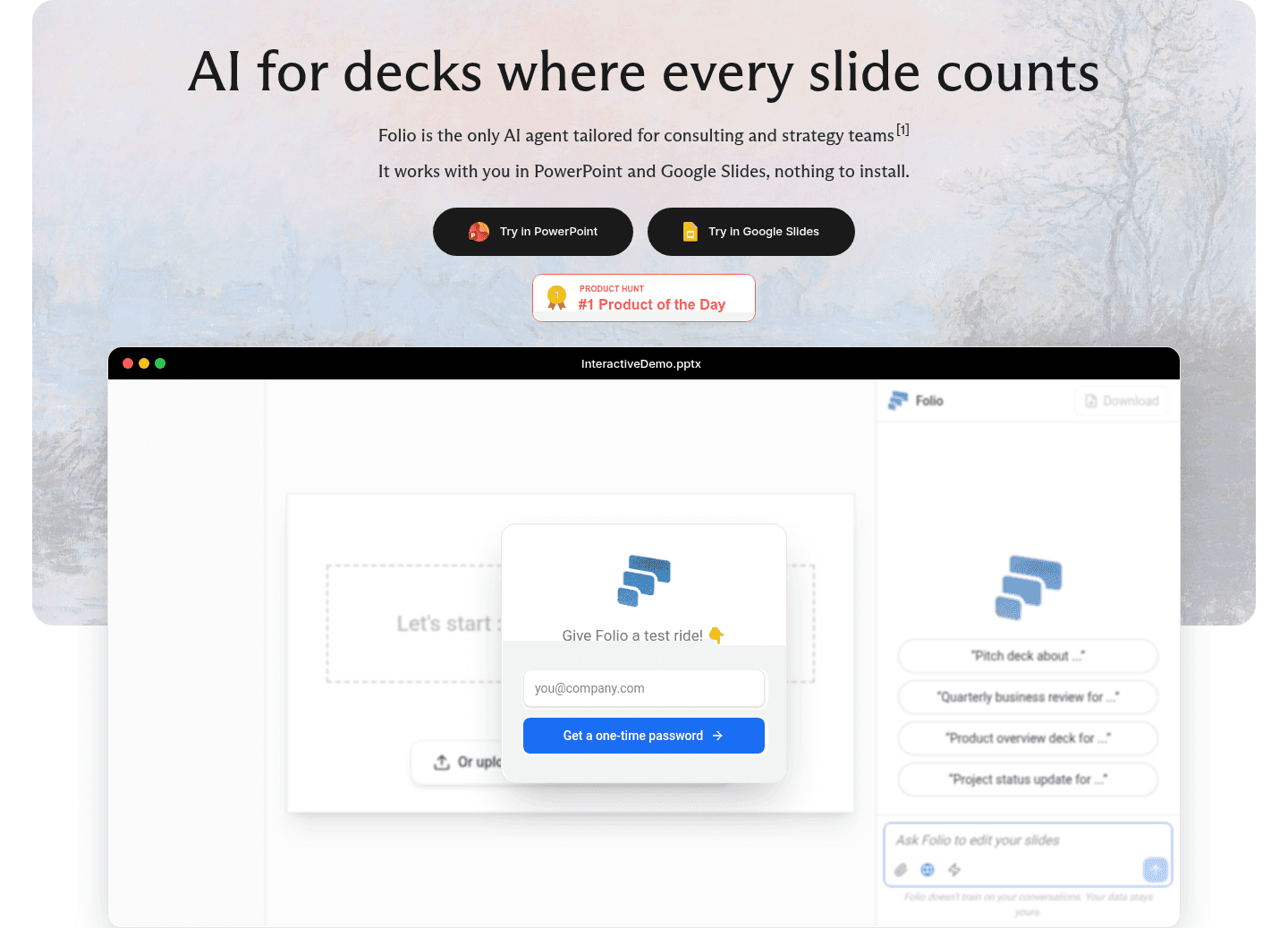
The gap most design tool pages leave open is pricing.

Pricing is the rarest scored section in the design tools set. Of the seven homepages benchmarked, only two expose a pricing block clear enough to score. The ones that do make the cautious buyer's job easy. ReactVision Studio tags a free Forever plan with no card required and marks the Pro card as the popular pick, and own.page lines up Free and Pro side by side with a yearly and monthly toggle. Pages that bury pricing behind a contact form leave the cheapest trust on the table.

Run it on your current page, then decide what to rewrite, what to reorder, and what proof to add before you touch visual polish. Score your own page against the same checks below, or try our landing page analyzer for a faster baseline.

Interactive quiz

What would your design tool homepage score?

Question 1 of 5
0%

Can a visitor tell what your design tool does in under 5 seconds?

"Edit short-form video with AI captions" beats "the all-in-one creative platform."

Gabriel Amzallag

Reviewed by

Gabriel Amzallag , Founder, Web Anatomy

5 years CRO + SEO at Qonto (2021–2025). After advising 15+ SaaS on their websites (Payfit, Pigment…), the same patterns kept breaking, so I decided to build the source of truth on what works on the web: the intelligence layer every tool, builder, and team uses to ship sites that perform.

See how your page compares to the 46.4 average page score

Run a check on your design tool page and get a clear breakdown of what to fix first, from the hero and product proof to pricing and the final call to action.

Analyze your design tool pageFree. Takes 2 minutes.

Explore other industries

See how conversion patterns differ across verticals. Each page scores real homepages on the same framework.

See all industries
Benchmark-backed design tool homepage inspiration

Design Tools FAQ

Quick answers based on our design tools website review.

What are the best design tools websites?

[01]

The strongest pages in this review are ReactVision Studio, Submagic, Rayon, and own.page, with Jitter standing out for its hero. What they share is simple: they show the real product early and make the next step easy. ReactVision Studio leads with clear, honest pricing, Submagic puts its output right next to the button, and own.page proves itself with a live counter and a wall of real creator pages.

What makes a design tool homepage convert?

[02]

Design tool buyers want to see the thing work before they trust it. The pages that convert open on the real product, a live editor, a builder mockup, or the actual canvas, then lead with the outcome rather than the feature list. Getshogun renders a finished page inside a live builder, Rayon shows its design canvas in full, and Jitter drops you straight onto the onboarding screen.

What is the biggest design mistake on design tool landing pages?

[03]

Hiding the product behind generic claims. The average page in this review scored 46.4, and the weakest pages lean on abstract language while the product stays off screen. Runway is strongest when it names a real mechanism, and the pages that win pair a specific promise with a visual of the tool actually running.

What sections should a design tool homepage include?

[04]

A hero that shows the product and one clear action, early proof like a counter, logos, or real user pages, a features block that visualizes the output, a pricing section that names plans, and a closing call to action with a low-commitment path. own.page and Submagic stack these well. own.page proves momentum before the ask, and Submagic pairs a primary button with a Try for free link so both ready and curious visitors find a path.

How do the best design tool pages show the product?

[05]

With live mockups and real interface shots, not stock art. Getshogun shows a finished product page inside its builder with edit chips and a device switcher, Rayon puts its real canvas with floor plans and comment threads on screen, and Jitter uses its actual onboarding screen so prospects can picture using the tool themselves.

Where can I find great design tool website inspiration?

[06]

Study pages part by part instead of saving full-page screenshots. Browse best landing page examples for the full gallery, then drill into hero section examples and trust section examples to see how ReactVision Studio, Submagic, and own.page handle each part.

How do I audit my design tool homepage?

[07]

Use a structured rubric that checks clarity, product proof, and friction instead of relying on gut feel. Run your page through the landing page analyzer for a part-by-part score against the same checks used in this benchmark.