No-code buyers arrive comparison-ready and quick to leave if a page does not answer "what does this build and why should I care?" in the first screen. The best no-code websites in this benchmark treat no-code website design as a clarity problem first, and they do a few things consistently:
52.9/100
Avg. page score
Name the product in the first line. The top pages state the category and the outcome together, so a visitor knows what they are looking at before anything else competes for attention.
Show the real product early. The strongest no-code pages pair a specific claim with a real editor, dashboard, or before-and-after view so the promise feels operational, not abstract.
Lead proof with something concrete. A hard user count, recognizable logos, or a quantified result does more work than a wall of adjectives.
Make the next step feel safe. A single, action-led call to action with a line of reassurance beats a crowded row of competing buttons.
6 best no-code homepages analyzed in detail
Each company below is paired with its strongest section. See what they get right, and what you can borrow for your own no-code website design.
01
Drizz, An AI mobile-testing tool that self-heals tests and ships fixes faster across qa, dev, and leadership.
5 years CRO + SEO at Qonto (2021–2025). After advising 15+ SaaS on their websites (Payfit, Pigment…), the same patterns kept breaking, so I decided to build the source of truth on what works on the web: the intelligence layer every tool, builder, and team uses to ship sites that perform.
“Drizz turns its use-cases section into a self-selection tool. Three persona cards, for qa teams, developers, and tech leadership, each lead with a different outcome trio, and a tab toggle lets visitors switch between a persona lens and a team-type lens. Every card carries concrete bullets, like self-healing tests across UI changes, instead of generic value-prop lines, and distinct icons help scanners find their card without reading. It is the strongest section pattern in the no-code set.”
What makes this page stand out
The hero stacks “Write. Run. Ship.” above “Reliable Mobile Test Automation. Built For Real Apps.” to clarify outcome and category.
The primary CTA is “Download for mac,” while a secondary “Schedule a demo” appears later for enterprise buyers.
Product Hunt badges highlight “Top Post” and “Featured On Product Hunt #2,” adding third-party validation in the fold.
The problem section cites “1 in 7 tests fail randomly” and links “See what Appium is costing you →”.
Section we love
·Use Cases
1Three persona cards (QA Teams, Developers, Tech Leadership) each lead with a different outcome trio (cycles, fixes, ROI)
2Tab toggle (By Persona / By Team Type) lets visitors self-select the lens that matches their role
3Four concrete bullets per persona avoid generic value-prop fluff, naming specifics like (Self-healing tests across UI changes)
4Distinct icons per persona (frame, code tags, crown) help scanners locate their card without reading
02
BetterClaw
69/100
Section we love
·HeroBest in class
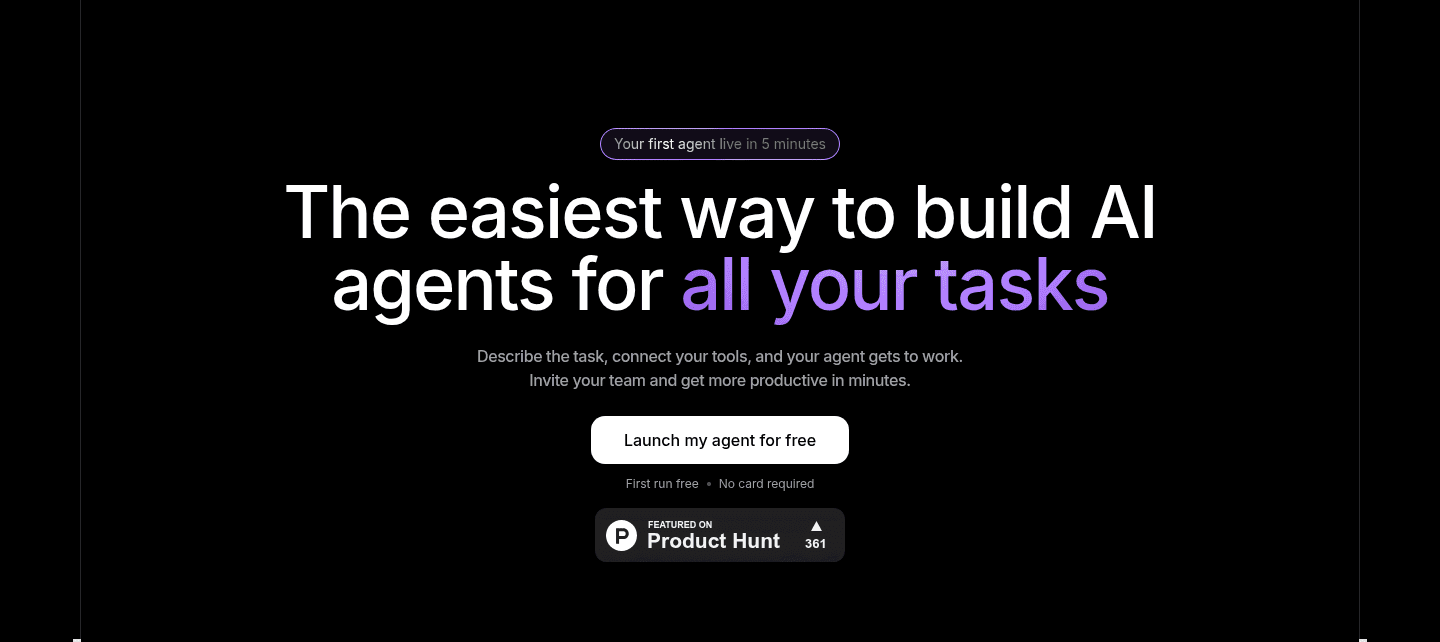
1Headline pairs a hard time promise (60 seconds) with the objection killer (No Code) in one line
2Pill above the fold positions the product against a named rival: The Better OpenClaw Alternative
3Subhead picks its side, for teams that need agents working, not infrastructure
4Risk reducer lives inside the button label itself: Start free (No Credit Card)
5Security strip under the fold line answers the AI-agent trust question with ISO 27001, AES-256 and GDPR-ready
03
Softr, A no-code app builder that turns your data and favorite tools into working internal apps.
5 years CRO + SEO at Qonto (2021–2025). After advising 15+ SaaS on their websites (Payfit, Pigment…), the same patterns kept breaking, so I decided to build the source of truth on what works on the web: the intelligence layer every tool, builder, and team uses to ship sites that perform.
“Softr makes integrations feel like an easy fit rather than extra work. Its integrations section pairs recognizable logos with a concrete use case on every card, like sync contacts and deals or embed scheduling links to book meetings, and a see-all-integrations link opens the full marketplace so prospects can confirm their own tools. The plain headline, bring your data and tools, frames the section as making a visitor's current workflow work together.”
What makes this page stand out
The primary CTA is a “Build” button next to “Build me a client portal…” suggesting instant AI-generated apps.
The social proof line reads “Loved by 1 million+ teams around the globe,” followed by logos like Google and Netflix.
The integrations grid spotlights Airtable, Notion, and Google Sheets with short descriptions for each data source.
The testimonial block quotes “We’re not coders…” and attributes it to Ashley Kalinauskas, CEO at Torigen Pharmaceuticals.
Section we love
·Integrations
1Recognizable logos (HubSpot, Slack, Stripe, Google Calendar, monday.com) confirm it fits the existing stack
2Each card pairs the logo with a concrete use case (Sync contacts and deals, Embed scheduling links to book meetings)
3See all integrations CTA links to the full marketplace so prospects can confirm their own tools
4Plain headline (Bring your data and tools) frames integrations as making your current workflow work together
04
Super, A tool that turns a plain document into a fast, custom website with no code.
5 years CRO + SEO at Qonto (2021–2025). After advising 15+ SaaS on their websites (Payfit, Pigment…), the same patterns kept breaking, so I decided to build the source of truth on what works on the web: the intelligence layer every tool, builder, and team uses to ship sites that perform.
“Super leads with a headline that states the category and the exact outcome in one line, then backs it with a real before-and-after preview so buyers see the transformation they will get. A free call to action with no-credit-card reassurance sits directly underneath to remove signup friction, and a logo wall under trusted-by proves adoption above the fold. It is the highest-scoring hero in this no-code group.”
What makes this page stand out
The subheadline promises “fully customized… in less than a minute” plus “high performance” and “SEO optimization.”
The primary CTA button reads “Get started for free,” reinforced by the line “No credit card required.”
The before/after preview shows “From Notion Site” → “To Custom Super Site,” visualizing the transformation without scrolling.
The social proof stacks “Trusted by teams at” logos and “Join over 100,000 creators,” plus testimonials citing “$10,000.”
Section we love
·Faq
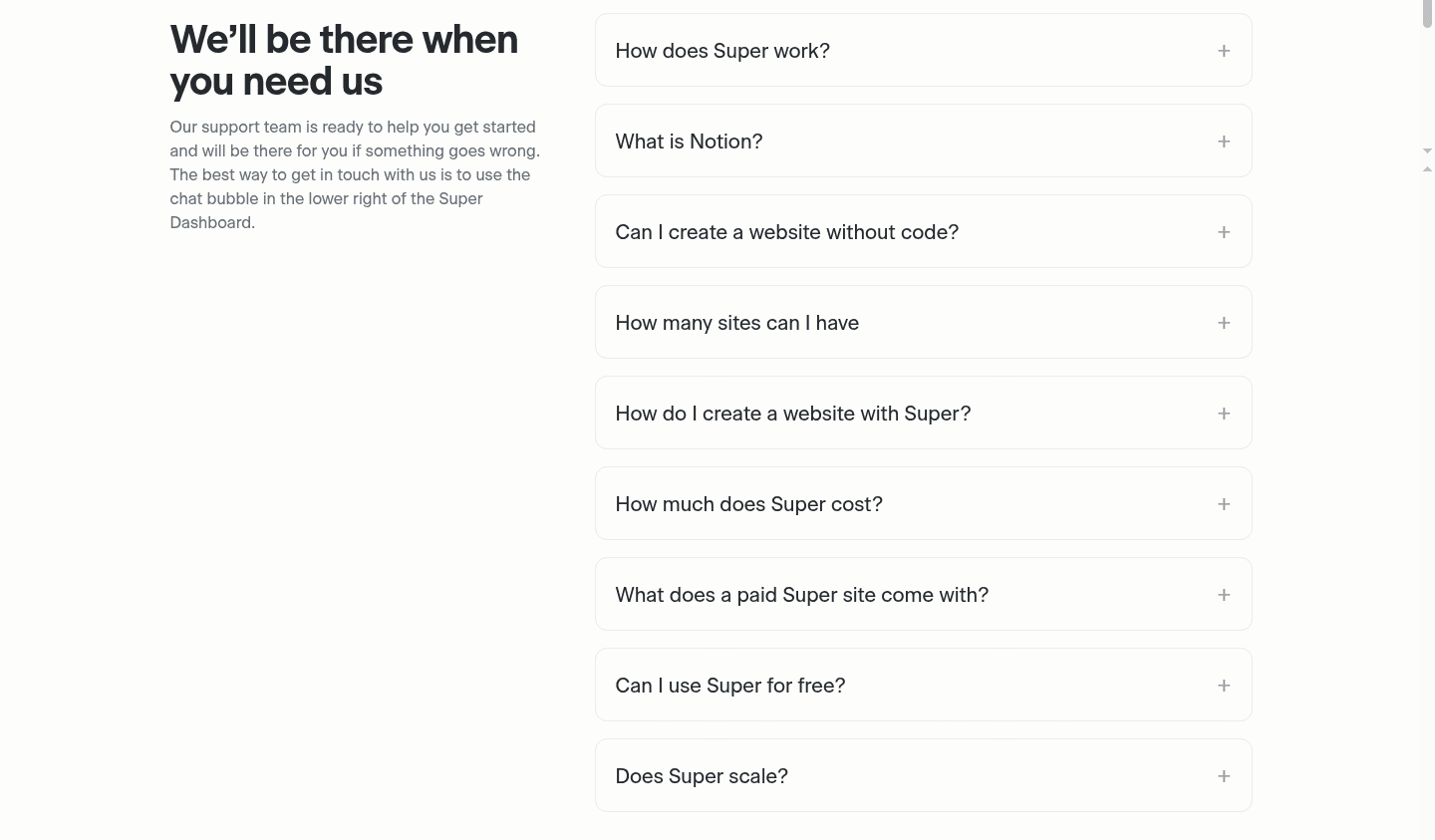
1Accordion format with plus toggles keeps a long question list scannable and uncluttered
2Questions hit real buying objections: pricing (How much does Super cost), free option, what a paid site includes
3Concerns about scaling and building without code answer hesitations a prospect has before signing up
4Standard structured Q and A pairs make FAQ schema markup likely for search rich results
05
Jimdo, A no-code website builder for small businesses, with legal and language support built in.
5 years CRO + SEO at Qonto (2021–2025). After advising 15+ SaaS on their websites (Payfit, Pigment…), the same patterns kept breaking, so I decided to build the source of truth on what works on the web: the intelligence layer every tool, builder, and team uses to ship sites that perform.
“Jimdo shows how much quiet work a footer can do. Its links sit in three clearly labeled columns, products, about us, and resources, so visitors find pages fast, and a full legal row, legal notice, terms of service, privacy policy, and cookie settings, signals compliance at a glance. A language selector supports international visitors, and the clean layout keeps the whole block scannable without link overload.”
What makes this page stand out
The CTA “Start for free” pairs with “See how it works” and the line “No credit card. Free forever.”
The “What solopreneurs achieve” strip quantifies results: +45% transactions, +17% inquiries, 3x visitors, 2.5x faster first sale.
The page organizes benefits into verbs—“Get found,” “Get booked,” “Get paid”—with product modules for bookings, Smart Forms, and shop.
The trust block stacks compliance proof: “Made in Germany since 2007,” Trusted Shops “4.6/5 by 12,000+ businesses,” and PCI DSS.
Section we love
·Footer
1Links grouped into three clear labeled columns (Products, About us, Resources) so visitors find pages fast
Across 18 no-code homepage examples, the pages that convert share a simple trait: the first screen does one job well, name the product, show the real thing, and make the next step obvious.
The strongest no-code website design patterns pair a clear category line with a real product view, then a low-friction call to action. Restraint beats density for visitors weighing several builders at once. Explore our best landing page examples to see how other industries solve the same clarity problem.
Real customer site thumbnails (TIME, CNN, Disney, Rolling Stone, Billboard) back the enterprise-standard headline
Sections no-code teams underuse (but visitors still look for)
Even with a strong hero, secondary sections often decide whether someone keeps scrolling, especially when buyers are weighing several no-code tools at the same time.
In this set, Hero and Cta sections tend to carry the load while Trust sections are the most fragile, a sign that many no-code pages nail the pitch but leave gaps where visitors look for detail. See how the best hero section examples handle the same first-screen job.
1Cards carry a category tag (Getting Started, Use Case) so a reader picks by intent, not by title
2Each summary says what is inside (gateway architecture, agent loop, skills, memory, security, in plain English)
3Two of the three posts are role use cases (Customer Support, Operations Teams), close to a buying question
4A single View all articles link keeps the block short while still opening the whole blog
Reviewed overlooked-section pick from BetterClaw’s resources section.
What I love about this section
Cards carry a category tag (Getting Started, Use Case) so a reader picks by intent, not by title
Each summary says what is inside (gateway architecture, agent loop, skills, memory, security, in plain English)
Two of the three posts are role use cases (Customer Support, Operations Teams), close to a buying question
A single View all articles link keeps the block short while still opening the whole blog
If you are refreshing a no-code landing page, treat these overlooked blocks as part of the sale, not decoration.
Checklist: a practical audit for no-code website design
A quick way to pressure-test a no-code homepage is to check it one part at a time against what the top pages here do.
Built from 46 sections across 10 no-code homepages in this benchmark. Each check below is a move the highest-scoring pages share, paired with a real example from the benchmark.
Hero
Can a visitor tell what the product is in five seconds?
The hero names the product category and the outcome in one line.
Example: Super's headline states the category and the exact outcome in one line, turning a Notion document into a live website.
A primary action sits above the fold with action-led copy.
Example: Xano pairs dual CTAs, Get started for free and Explore the platform, serving both ready and undecided visitors.
Trust
Does the page earn belief before it asks for anything?
Proof is quantified with a hard number.
Example: Xano's headline, 100,000+ builders can't be wrong, turns a hard user count into instant social proof.
A security or compliance cue answers the "is it safe" question.
Example: Drizz runs four compliance badges (SOC 2, GDPR, HIPAA, PCI DSS) covering finance, healthcare, and payments.
Value proposition
Is the value concrete, or just adjectives?
The page makes several distinct value claims, not one vague promise.
Example: Stacker runs four distinct pillars (Works in your tools, Learns on the job, Lives where you work, Adapts to any problem).
Benefits are specific rather than generic.
Example: Yansu's headline, You play, Yansu ships, sells the core benefit of autonomous work in four words.
Features
Do features connect to outcomes the buyer cares about?
Feature copy leads with the outcome, not the spec name.
Example: Softr's pillar copy, Move beyond spreadsheets, frames the database benefit as escaping a known pain, not a feature name.
Each feature shows the real product output.
Example: Xano shows a real editor screenshot with a code view and a Push to Staging button so buyers see the actual output.
Call to action
Does the next click feel safe to a cautious buyer?
One primary action dominates, with action-led copy.
Example: Stacker's dominant black Get Started for Free button clearly outweighs the muted gray See plans link.
Reassuring microcopy sits next to the button.
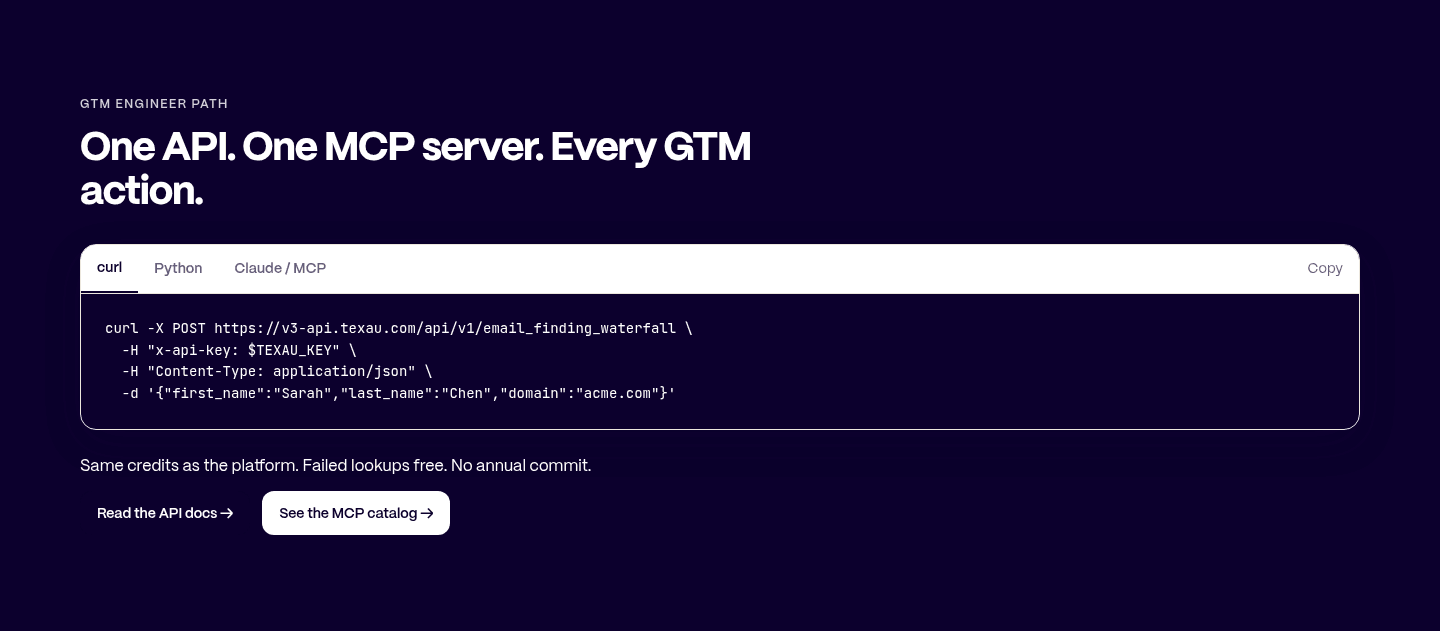
Example: Texau places reassuring microcopy, Failed lookups free and No annual commit, right above the buttons to remove lock-in fear.
The gap most no-code pages leave open is pricing.
Pricing is the rarest section in the no-code set. Of the companies benchmarked, only one exposes a pricing block clear enough to score. Yansu is the exception: it lines up five named tiers side by side, from Free at $0 to Enterprise, each with a clear name, price, and feature list. Pages that hide pricing behind a contact form leave the cheapest trust on the table.
Five quick questions to see where your page stands against this no-code benchmark. For a full audit, try our landing page analysis.
Interactive quiz
What would your no-code homepage score?
Question 1 of 5
0%
Can a visitor understand what your no-code product does in under 5 seconds?
"Turn a document into a website" beats "the all-in-one platform for modern builders."
Reviewed by
Gabriel Amzallag , Founder, Web Anatomy
5 years CRO + SEO at Qonto (2021–2025). After advising 15+ SaaS on their websites (Payfit, Pigment…), the same patterns kept breaking, so I decided to build the source of truth on what works on the web: the intelligence layer every tool, builder, and team uses to ship sites that perform.
Quick answers to common questions about what makes the best no-code websites clear and easy to act on, based on section-level data from this review.
What makes the best no-code websites different from average ones?
[01]
The best no-code websites answer "what does this do and who is it for?" faster, with less clutter. The gap between strong and weak pages is usually clarity and proof placement, not visual polish. Super, for example, states the category and the outcome in one headline, then shows the real before-and-after so the promise feels concrete instead of abstract.
What sections should a no-code homepage include?
[02]
A strong no-code homepage usually has a clear hero with one primary action, early proof like a user count or recognizable logos, a real product view, a focused features or use-cases block tied to outcomes, and a call to action that matches how ready the visitor is. In this data, Hero, Cta, and Value Proposition are the three most common section types among the top performers.
What is the biggest design mistake on no-code landing pages?
[03]
Trying to show everything at once instead of leading with one clear promise. With an average page score of 52.9 across this review, many no-code pages crowd the first screen with competing messages and no real product view, so visitors work harder than they should to understand the offer. Xano avoids this by putting a hard user count and a real editor screenshot up front.
How do the top no-code websites use their hero section?
[04]
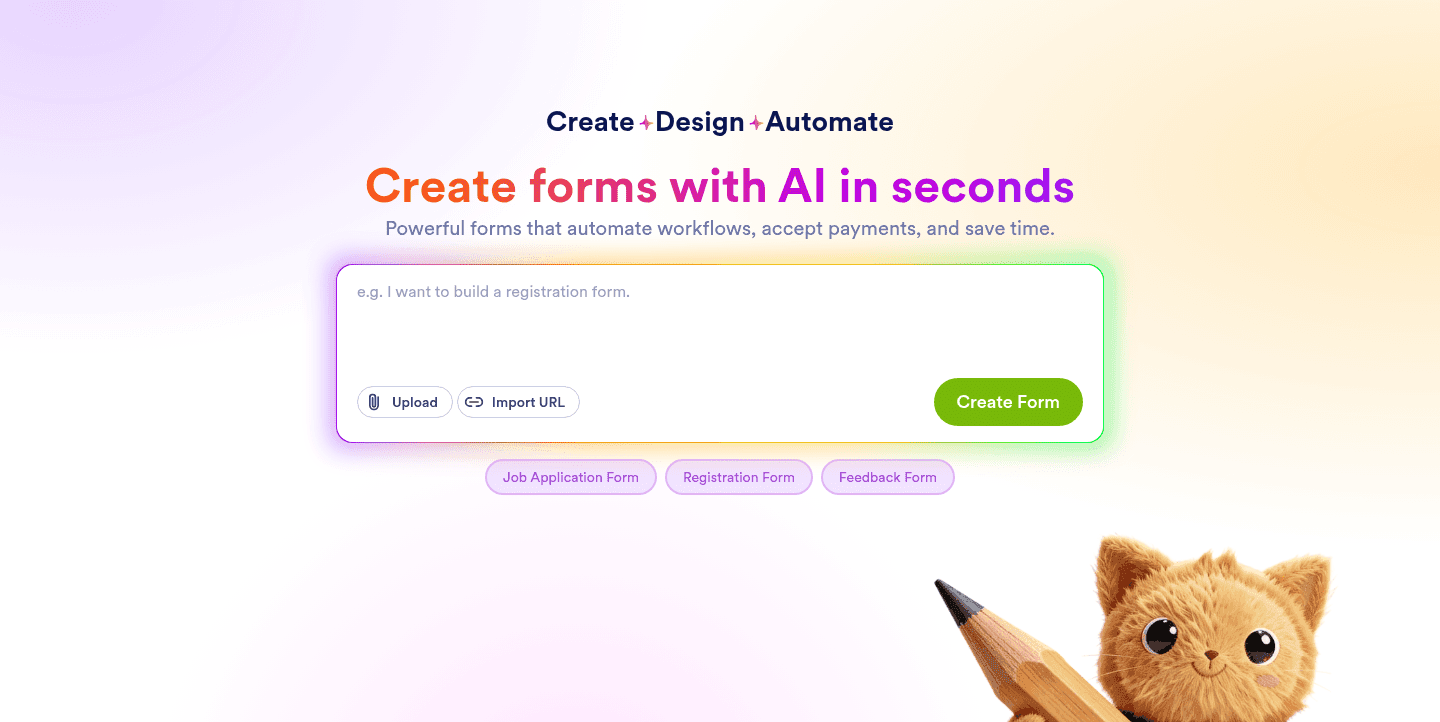
They put the product category and the outcome in the headline, then back it with a real product view and a low-friction next step. Super names the exact transformation in one line and adds a free start with no-credit-card reassurance, while Texau chains the outcomes a buyer wants and pairs a start button with a lighter see-the-flow link for undecided visitors.
What proof do the best no-code websites show above the fold?
[05]
The strongest pages lead with proof a visitor can weigh: a hard user count, recognizable logos, or a quantified result. Xano turns a large builder count into instant credibility, Softr borrows top-tier brand logos in a single marquee, and Texau lines up oversized stat counters so the proof reads in one glance.
Where can I find no-code website design inspiration?
How do I audit my no-code homepage before a redesign?
[07]
Use a consistent checklist that grades clarity, proof, and friction instead of relying on gut feel. Run your page through our landing page analyzer for a section-level score, then compare it against the no-code examples on this page.