Best Operations Website Examples (And Why They Convert)
We scored 34 operations homepages on the same conversion criteria. See which sections separate the top performers, and what your page is probably missing.
Updated September 202634 pages analyzed
#CompanyScore
Scored by AI across 60+ conversion criteria
#1
73/100
Scroll to explore
Toggl
What the best operations websites get right
Operations buyers are busy, skeptical of one more tool, and quick to leave if a page does not show what it runs and prove it works. The strongest operations websites in this review do four things early:
51.1/100
Avg. page score
Name the category and the audience in the first screen so an operator knows what the tool runs and who it is for.
Put proof early, whether that is named customer faces, third-party badges, or hard operating numbers.
Show the real product, a dashboard or a workflow, so the promise feels operational instead of abstract.
Give a low-risk next step, a free trial or a download, with microcopy that removes the fear of clicking.
The four operations homepages analyzed in detail
Each company below is paired with its strongest section. See what they get right, and what you can borrow for your own operations page.
01
Elvin
Editor's pick72/100
Section we love
·Cta
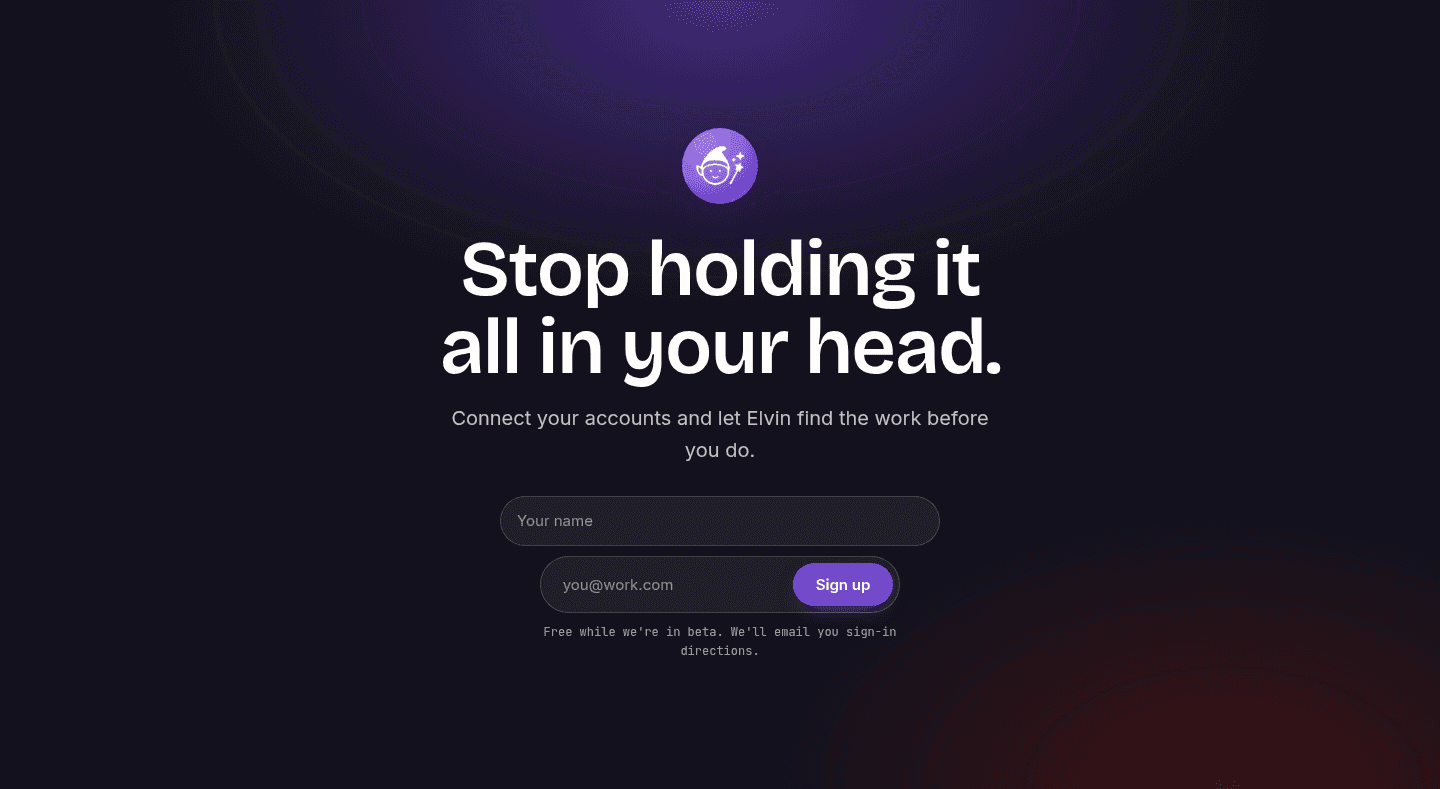
1Inline email field (you@work.com) with a Sign up button captures the lead without a redirect
2One clear primary action keeps focus on signup with no competing buttons
3Reassuring microcopy (Free while we are in beta, We will email you sign-in directions) sets expectations under the form
4Pain-led headline (Stop holding it all in your head) makes the signup feel like instant relief
02
Webgility
69/100
What makes this page stand out
The hero line 'Software + Service, orders to close' reinforces trust with 'Experts close' and 'Specialists certify' messaging.
The platform cards emphasize precision with 'Every transaction posted individually — no batching, no black boxes.'
A primary CTA 'Schedule a Demo →' promises to show 'your channels, your accounting setup, and your close' before commitment.
The solutions segmentation calls out 'operators crossing $500K–$2M' and '10,000+ orders a month' to qualify visitors.
Section we love
·Value Proposition
1Guarantee headline (Every order detailed. Every close guaranteed.) makes an unusually strong, specific promise
2Three-stage pipeline (Order-level Automation, Real-time Reconciliation, Expert-verified Close) shows how the guarantee is delivered
3Realistic card visuals (Order #2313 categorized, 1,350 reconciled, June Close certified) make the abstract process tangible
4Software-plus-human mechanism (software reconciles, human experts verify and handle exceptions) is the named differentiator
5See how Webgility works link gives interested prospects a deeper path
03
Agently
68/100
Section we love
·Integrations
1Bold count (100+ Connectors) signals a mature ecosystem prospects can plug into
2Wall of recognizable logos (Notion, Google Drive, Stripe, HubSpot, GitHub, Gmail, Figma, Slack, Jira, Asana, Linear) confirms it fits existing stacks
3A +100 more link opens the full connector list so buyers can verify their own tools
4Capability tags (Two-way, OAuth, Live updates) reassure on sync depth and security
04
Payaca
67/100
What makes this page stand out
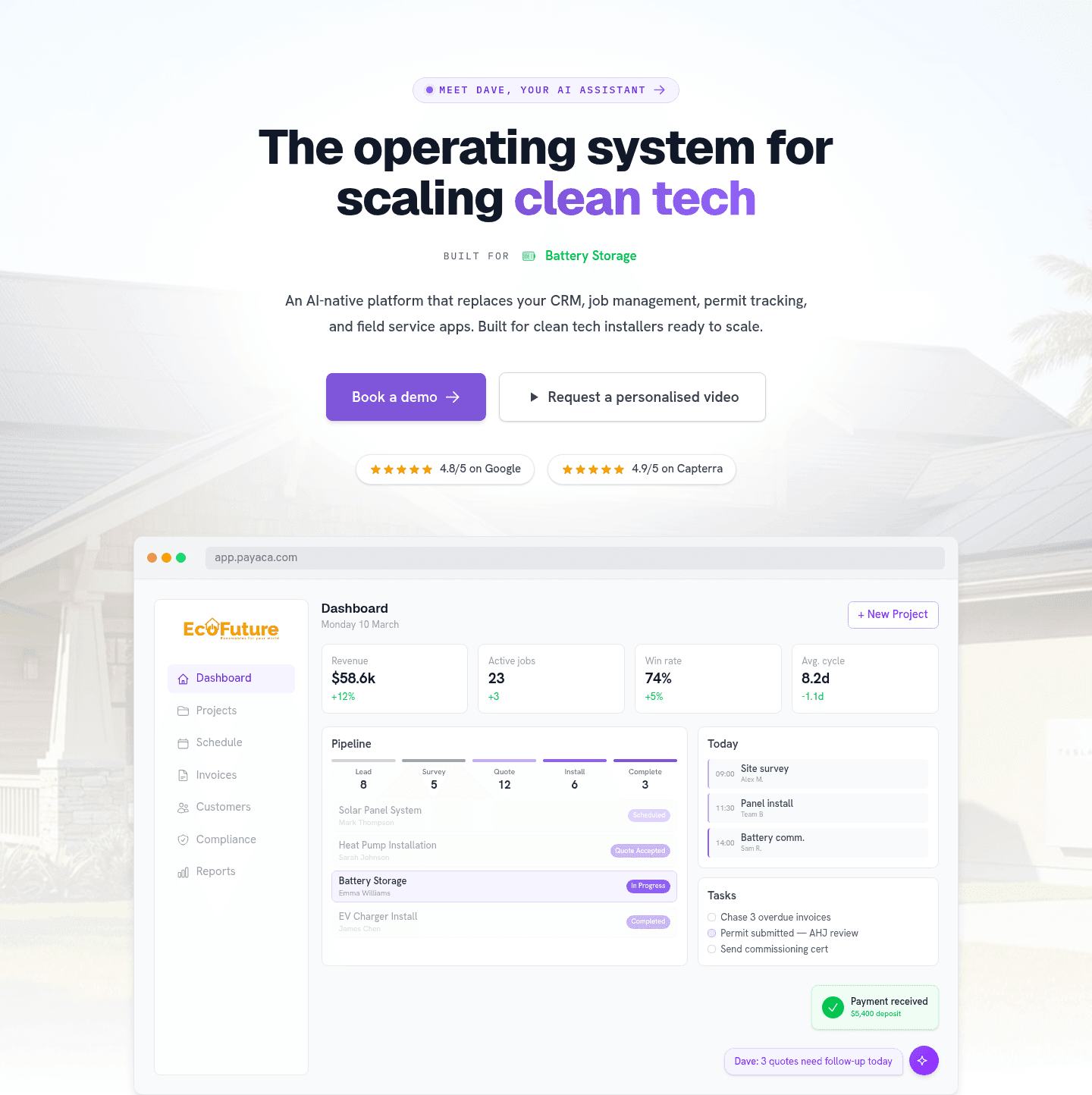
The primary CTA “Book a demo” is reinforced by a secondary “Request a personalised video” option beside it.
The above-the-fold trust stack shows “4.8/5 on Google” and “4.9/5 on Capterra” plus recognizable logos like OVO Energy.
The product UI mockups surface concrete metrics like “$58.6k” revenue, “23” active jobs, and “74%” win rate.
The problem section uses blunt copy “Your software is the problem.” with specific pain points like “15 hours per week” copying data.
Section we love
·Hero
1Real product dashboard (Revenue $58.6k, Win rate 74%, live pipeline stages) lets installers picture their own operations
2Dual review badges (4.8/5 on Google, 4.9/5 on Capterra) provide above-fold third-party proof
3Consolidation claim (replaces your CRM, job management, permit tracking and field service apps) frames it as an all-in-one OS
4Audience callouts (Built for clean tech installers, Built for Battery Storage) name exactly who it serves
5Two-path CTA (Book a demo plus Request a personalised video) serves both ready and hesitant buyers
05
Process
65/100
What makes this page stand out
The hero headline “Systemize execution. Prove compliance.” pairs with subcopy about an “AI agent,” policies, and results.
The hero uses two CTAs—“Get started” and “See it in action”—explicitly framed as free signup vs demo.
The page repeats credibility with “Trusted by 1m+ users” and a dense logo wall including Cisco, TPG, Toast, and Airtree.
The case-study strip adds hard outcomes like “49k+ employees standardized onboarding” and “30% faster documentation” with “read story” links.
Section we love
·Testimonial
1The IMCD quote carries a real before and after: work that took days now takes 25 to 30 minutes, a 75%+ cut in setup time
2Every card pairs a headshot, full name and job title with the customer logo (Colliers, Salesforce, HEALTHeLINK, Spreetail)
3Five different roles speak, from IT Manager to Global CEO, so several buying personas see themselves
4Read case study links under two quotes give doubters the long version without cluttering the grid
5A More testimonials button at the foot signals the proof goes deeper than the six cards shown
06
Deputy
64/100
What makes this page stand out
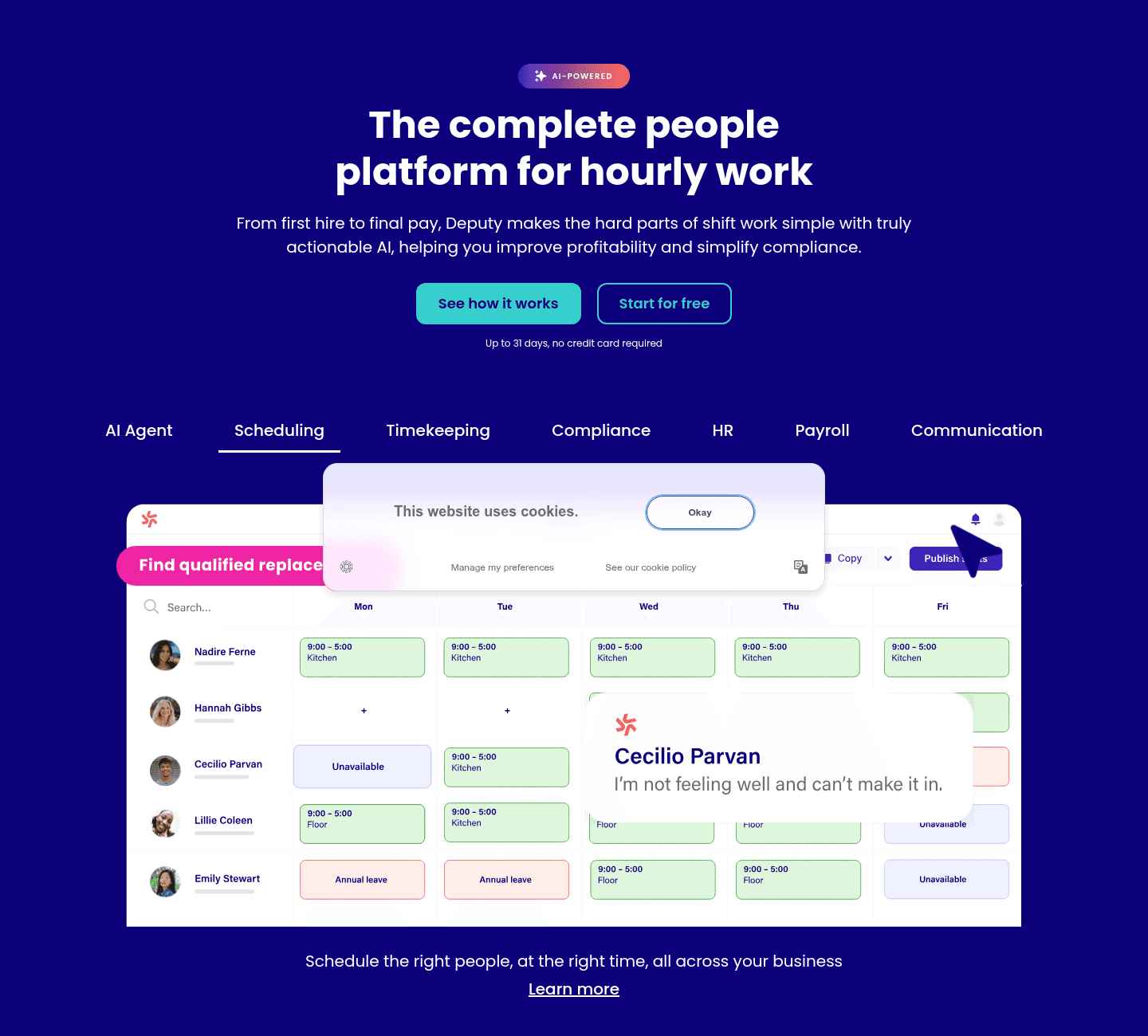
The trial reassurance line states “Up to 31 days, no credit card required” directly under the primary CTAs.
The hero trust strip shows four ratings: Capterra 4.6/5 (756), Trustpilot 4.1/5 (103), Software Advice 4.6/5 (746), G2 4.6/5 (316).
The audience selector uses four tabs—Single location, Multi location, Franchise, Enterprise—each pairing benefit copy with a case-study image.
The page repeats “Book a demo today” twice in the “Why thousands of businesses switch to Deputy every month” section.
Section we love
·Hero
1Audience-specific headline (The complete people platform for hourly work) names exactly who it serves
2Dual CTAs pair a low-commitment See how it works with the primary Start for free for both buyer mindsets
3Risk reducer under the CTA (Up to 31 days, no credit card required) removes signup friction
4Real scheduling UI with named staff and shift blocks lets prospects picture their own roster
See how your page compares to the 51.1 average page score
Run a diagnostic on your operations page and get a clear list of what to fix first to sharpen clarity, trust, and product proof.
Design patterns we see across these operations pages
Across 34 operations pages, the ones that convert tend to make the first screen do one job: name what the product runs and remove the obvious doubt.
The strongest moves pair a single, action-led button with proof a visitor can check fast, whether that is a count of organizations served, a row of third-party badges, or risk reducers sitting under the call to action. Use our website section examples to compare how these blocks show up across page types.
1Hero overlays a real product card (Syncing 1TB with a live bar chart) on a Pfizer lab photo to show data moving in a concrete context
2Logo wall below the CTA (OpenAI, Pfizer, Canva, LVMH, Docusign, Databricks) proves adoption by leading data and AI companies
3Category-clear eyebrow (The data foundation for AI) and audience-specific H1 (Automated data for autonomous agents) say what it is and who it serves
4Free, action-led CTA (Get started for free) lowers the barrier directly under the value prop
5Customer proof caption quantifies the payoff: Pfizer cut processing from hours to minutes while staying compliant
Reviewed design-pattern pick from Getcensus’s hero section.
What I love about this section
Hero overlays a real product card (Syncing 1TB with a live bar chart) on a Pfizer lab photo to show data moving in a concrete context
Logo wall below the CTA (OpenAI, Pfizer, Canva, LVMH, Docusign, Databricks) proves adoption by leading data and AI companies
Category-clear eyebrow (The data foundation for AI) and audience-specific H1 (Automated data for autonomous agents) say what it is and who it serves
Free, action-led CTA (Get started for free) lowers the barrier directly under the value prop
Overlooked sections that quietly build trust
In this set, the sections teams treat as secondary often carry real weight. A clear how-it-works walkthrough, a side-by-side comparison against the old way, and an honest pricing block all do quiet work to move a hesitant operator forward.
When those blocks are missing, the hero is forced to carry all of the trust, and visitors are left guessing about fit and cost.
1Cards split by department (Finance, Procurement, HR, Operations, Sales) so each buyer finds their own lane
2One line per card names the job, not the feature (Invoice customers with data from the contract)
3Carousel arrows plus a progress bar make it obvious more roles exist and cost one click to reach
4Each card promises a different outcome, so the section reads as breadth instead of one message repeated
5Dark cards on a soft pink band pull the eye straight to the role names at a glance
Reviewed overlooked-section pick from Oneflow’s use cases section.
What I love about this section
Cards split by department (Finance, Procurement, HR, Operations, Sales) so each buyer finds their own lane
One line per card names the job, not the feature (Invoice customers with data from the contract)
Carousel arrows plus a progress bar make it obvious more roles exist and cost one click to reach
Each card promises a different outcome, so the section reads as breadth instead of one message repeated
Use the examples below as prompts for what to standardize, not just what to redesign.
Checklist: a practical audit for operations website design
If you are iterating on an operations homepage, this checklist helps you spot missing sections and weak messaging fast, especially around Hero, Value Proposition, and Cta.
Built from 23 sections across 4 operations homepages in this September 2026 review. Each check below is a move the highest-scoring pages share, each paired with a real example.
Hero
Can a busy operator tell what you run in five seconds?
The headline names the outcome and the audience in one line.
Example: Tycoon AI's headline (Build a one-person company with AI agents) names the dream and the audience of solo founders in one line.
A low-risk first step sits right under the primary button.
Example: CtrlOps stacks triple risk reducers (1 month free trial, no credit card required, cancel anytime) directly under the CTA row.
Trust
Does the page earn belief before it asks for anything?
Proof is quantified with real numbers.
Example: CtrlOps headlines with four hard numbers (1,250+ servers under management, 15,420+ backups executed, 8,940+ deployments completed, <30s average deploy time).
The page mixes proof types instead of leaning on one.
Example: Safetyculture stacks four G2 Winter 2025 badges (Easiest To Use, Best Est. ROI, Leader, High Performer) next to an aggregated star rating.
Value proposition
Is the value concrete, or just adjectives?
The value proposition makes a specific, concrete claim.
Example: CtrlOps runs three privacy pillars (Zero Data Sharing, No Cloud Keys Required, Fully Local Privacy) that answer the biggest devops trust worry from three angles.
The page frames a mechanism of its own, not a generic promise.
Example: Tycoon AI frames an AI CEO operating system that runs day-to-day work like product priorities, customer feedback, and launch planning.
Features
Do features connect to outcomes the buyer cares about?
Feature copy leads with the outcome, not the spec.
Example: Tycoon AI's benefit-led headline (Astra manages AI employees and reviews their work) sells the outcome of a manager, not a feature.
Features are shown as a real interface, not abstract copy.
Example: CtrlOps previews seven product tabs (AI Terminal, File Manager, Multi-Server, Infra Details, SSH Management, Deployment, Backup) without crowding the page.
Call to action
Does the next click feel safe to a cautious buyer?
One primary action dominates, with action-led copy.
Example: CtrlOps lets a green Download for Mac button dominate the row with clear visual focus.
Reassuring microcopy sits next to the button.
Example: CtrlOps pairs its CTAs with triple reassuring microcopy (Start instantly, No credit card, No sneaky autorenewals).
The gap most operations pages leave open is pricing.
Pricing is the rarest section in the operations set. Of the homepages benchmarked, only CtrlOps exposes a pricing block clear enough to score. It anchors a Pro Annual plan with a BEST VALUE badge, spells out the effective monthly cost to defeat sticker shock, and stacks a free-trial risk reducer under the price. Pages that hide cost behind a Book a demo button leave the cheapest trust on the table.
Run it on your current page, then decide what to rewrite, what to reorder, and what proof to add before you touch visual polish. Score your own page against the same questions below, or try our landing page analyzer for a faster baseline.
Interactive quiz
What would your operations homepage score?
Question 1 of 5
0%
Can a visitor tell what your operations tool does in under 5 seconds?
"Manage every server from one local app" beats "the all-in-one operations platform for modern teams."
Reviewed by
Gabriel Amzallag , Founder, Web Anatomy
5 years CRO + SEO at Qonto (2021–2025). After advising 15+ SaaS on their websites (Payfit, Pigment…), the same patterns kept breaking, so I decided to build the source of truth on what works on the web: the intelligence layer every tool, builder, and team uses to ship sites that perform.
Quick answers based on the operations websites we reviewed.
What are the best operations websites?
[01]
The strongest pages in this review are CtrlOps, Scribehow, and Safetyculture, with an AI workforce tool close behind. Across 34 operations homepages, the ones that work pair a clear category promise with fast proof. CtrlOps frames the first click as relief and stacks low-risk download paths, Scribehow leads with named customer faces, and Safetyculture names its category and audience in the first screen.
What makes operations websites hard to get right?
[02]
Operations buyers arrive skeptical of one more tool and will not commit until a page shows what it runs and proves it works. The pages that win make the claim specific and back it fast. CtrlOps answers the privacy worry with three plain pillars, the AI workforce tool shows a real dashboard instead of abstract copy, and Scribehow puts named people and hard results side by side.
What is the biggest design mistake on operations homepages?
[03]
Leading with polish while hiding the product and the price. The average page in this review scored 51.1, and the gap usually sits in proof and clarity, not visual taste. Safetyculture shows real dashboards and a mobile app up front, while CtrlOps spells out a plan and the cost so a cautious buyer does not have to ask.
What sections should an operations homepage include?
[04]
A hero with one primary action, an early trust layer of logos, numbers, or named customers, a real product visual, a features block tied to outcomes, and a next step that feels low risk. In this review, Hero, Value Proposition, and Cta are the most common section types among the top performers, which is why operations pages that skip the trust layer tend to lose buyers before the product even loads.
How many operations website examples should I study before a redesign?
[05]
A handful is enough if you pick by the job to be done and read each page part by part. Study CtrlOps for a download-led tool, Scribehow for proof done well, the AI workforce tool for outcome-led product framing, and Safetyculture for category clarity at the top of the page.
Use a structured rubric that checks clarity, proof, and friction instead of trusting a gut read. Run your page through the landing page analyzer for a full read of what to fix first.