Skip to content

Best ERP Website Examples (And Why They Convert)

We scored 3 ERP homepages on 60+ conversion criteria. See which sections separate the top performers, and what your page is probably missing.

Updated April 20263 pages analyzed
#CompanyScore

Scored by AI across 60+ conversion criteria

Keel landing page
#1
67/100
Scroll to explore
Analyze your ERP pageFree. Takes 2 minutes.

What high-performing ERP homepage design gets right

ERP pages sell complex, high-commitment software to cautious enterprise buyers. The strongest pages in this benchmark do four jobs early:

50.2/100

Avg. page score

  • Make the operational problem obvious in the first viewport so the buyer knows which workflow the product replaces or unifies.
  • Layer trust early with testimonials, customer logos, deployment scale, or compliance language that enterprise procurement teams expect.
  • Show the product as a real workflow or dashboard so the promise feels operational instead of abstract.
  • Give enterprise buyers a clear next step that matches their buying process, whether that is a demo, consultation, or guided tour.

3 best ERP homepages analyzed in detail

Each company below is paired with its strongest section and scored across 60+ conversion criteria. See what they get right, and what you can borrow.

01

Keel, Procurement software that replaces spreadsheet chaos.

Editor's pick67/100
Gabriel AmzallagGabriel AmzallagFounder, Web Anatomy

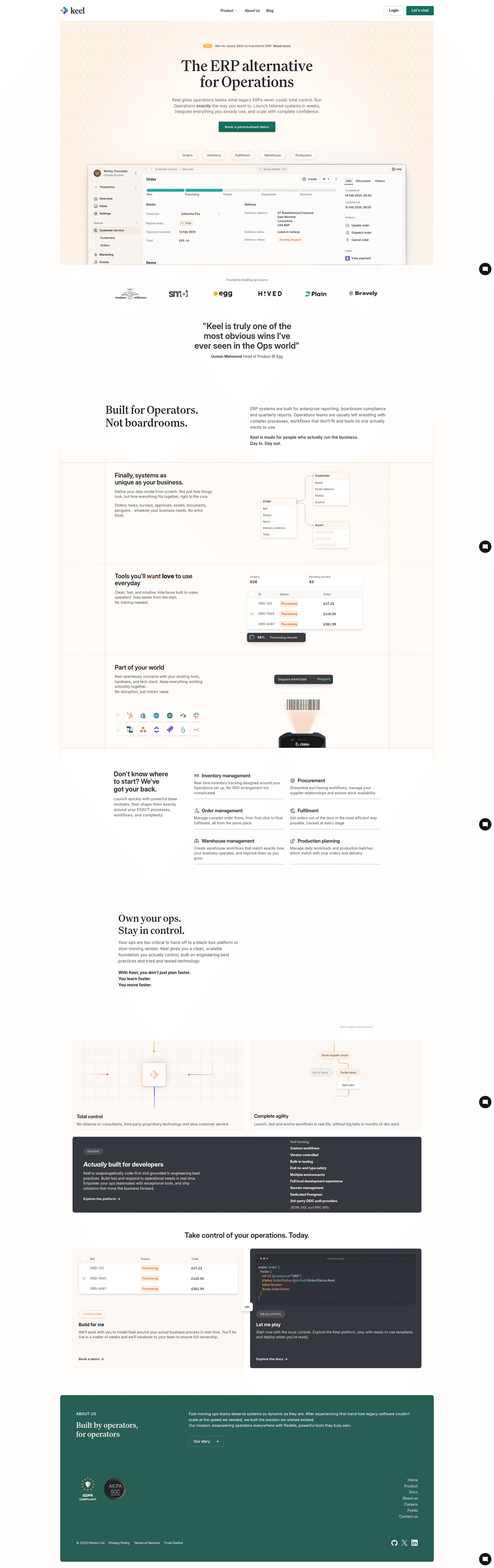
Problem-first ERP messaging done right. Keel leads with the procurement pain point, then positions the platform as the unified fix with clear scope and product visuals that make the workflow tangible.

What makes this page stand out

  • "Keel gives operations teams what legacy ERPs never could: total control" directly attacks incumbent weaknesses, framing traditional ERP as constraining rather than empowering.
  • "Launch tailored systems in weeks" addresses the notorious ERP implementation timeline pain point (typically months/years), offering a compelling speed advantage.
  • Feature pills (Orders, Inventory, Fulfilment, Warehouse, Production) provide immediate clarity on operational scope without lengthy descriptions.
  • The live product UI showing order management with real data creates visual credibility and helps buyers envision the tool in their own workflow.

Section we love

·Problem
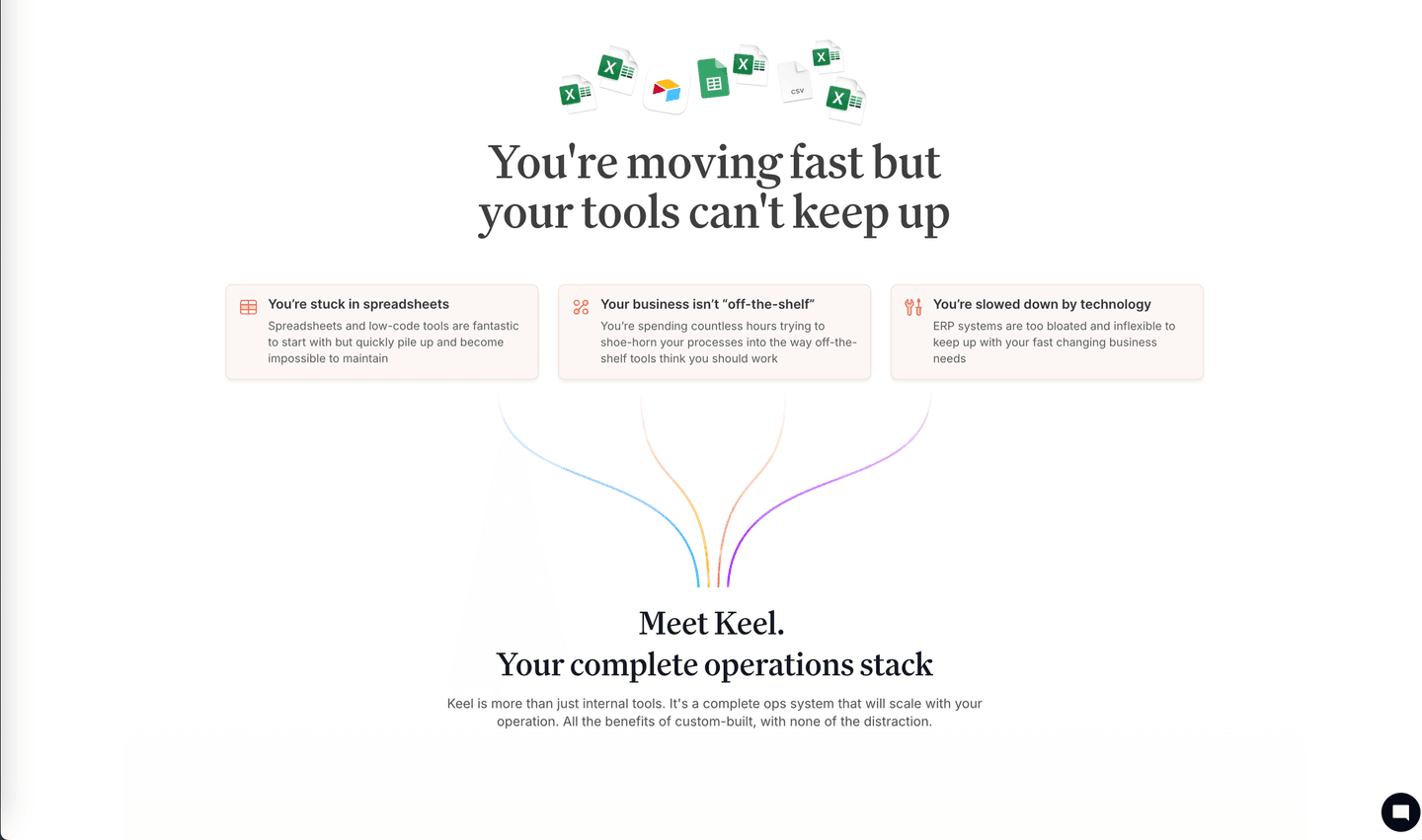
Keel Problem section
  1. 1Headline (you are moving fast but your tools cannot keep up) names the frustration of a fast-scaling ops team in their own words
  2. 2Three pain cards (stuck in spreadsheets, tools not off-the-shelf, slowed by technology) cover the distinct ways the status quo hurts
  3. 3Spreadsheet and file icons illustrate the messy before state, setting up the Meet Keel solution that follows
  4. 4Persona framing speaks to operations leaders who outgrew low-code tools, making the pain feel specific not generic
02

Precoro, Procurement and spend management that teams actually adopt.

64/100
Gabriel AmzallagGabriel AmzallagFounder, Web Anatomy

Trust-forward enterprise design. Precoro pairs a clean procurement workflow story with strong social proof and testimonial placement that reduces the perceived risk of switching ERP tools.

What makes this page stand out

  • Purchase order, invoice, and expense management in one platform creates end-to-end procurement workflow
  • Approval workflows with budget controls address the core governance need of procurement teams
  • Multi-department and multi-location support addresses organizational complexity
  • Integration with accounting and ERP systems creates workflow connectivity

Section we love

·Trust
Precoro Trust section
  1. 1Three hard counters anchor the claim (1000+ customers, $150B spend managed, 80+ countries).
  2. 2The $150B spend-managed figure is the standout, signaling enterprise-scale dollars flow through the tool.
  3. 3(850+ ratings across the web) sits above a row of platform icons (G2, Capterra and more) for third-party weight.
  4. 4Pairing usage stats with aggregated review platforms gives two distinct proof types in one compact band.
03

ERPNext (Frappe), Open-source ERP for modern businesses.

48/100
Gabriel AmzallagGabriel AmzallagFounder, Web Anatomy

Open-source differentiation in a locked-down category. ERPNext leads with transparency and community, creating immediate trust for buyers wary of enterprise vendor pricing and lock-in.

What makes this page stand out

  • Full-suite business management (accounting, HR, CRM, inventory, manufacturing) demonstrates breadth
  • Python/JavaScript framework enables deep customization by developers
  • Self-hosted and cloud options provide deployment flexibility
  • Active community and marketplace of apps extend the core platform

Section we love

·Navbar
ERPNext (Frappe) Navbar section
  1. 1The expanded Industry tree organizes nav by vertical (Manufacturing, Retail, Healthcare, E-commerce, Education)
  2. 2A Pricing item sits plainly in the sidebar for quick access
  3. 3The Start free trial CTA appears both top-right and in the hero
  4. 4Modules and Industry split the product into clear browsable category groups
  5. 5Trust links (Customers, Partners) sit alongside Blog and Contact us in the rail

See how your page compares to the 50.2 average page score

Run a diagnostic on your ERP page and get a section-by-section breakdown of what to fix first to improve clarity, trust, and product proof.

Design patterns we see across high-performing ERP pages

Across 3 ERP pages reviewed, the pages that convert tend to make the first screen do one job: name the operational problem and show the product solving it.

The strongest patterns pair specific workflow claims with testimonial-backed proof, then give enterprise buyers a next step that matches their buying process. ERP website design works best when it bridges the gap between complex software and a clear operational outcome. Use website section examples to compare how these building blocks show up across page types.

Hero Rippling

78/100

How Rippling captures attention above the fold
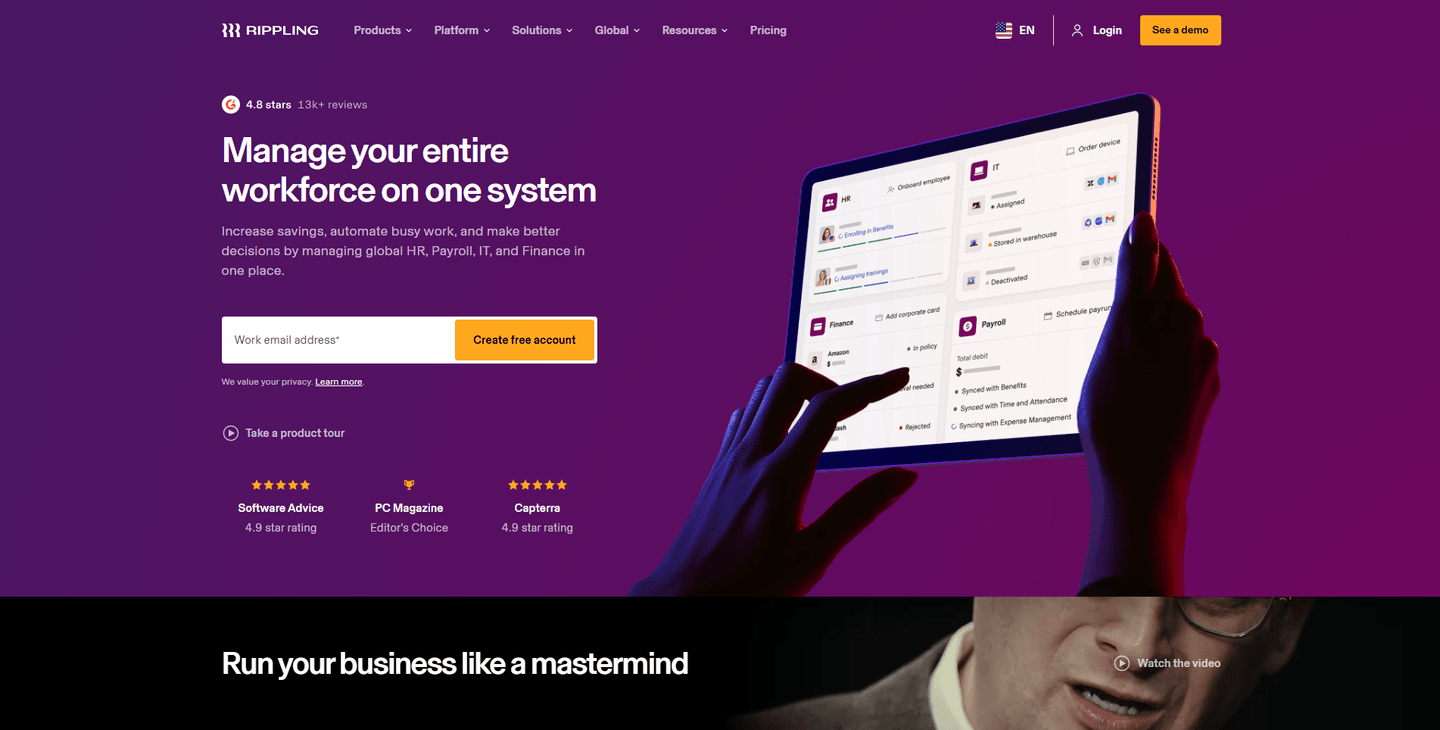
Rippling hero section
  1. 1Email input with Create free account CTA plus Take a product tour secondary path cover both conversion types
  2. 2Social proof row (4.8 stars, 2.9K+ reviews, G2 and PC Magazine Editors Choice badges) stacks credibility
  3. 3Product UI on tablet showing workforce management dashboard with employee profiles proves real functionality
  4. 4Headline (Manage your entire workforce on one system) clearly covers HR, Payroll, IT, and Finance in the subtext
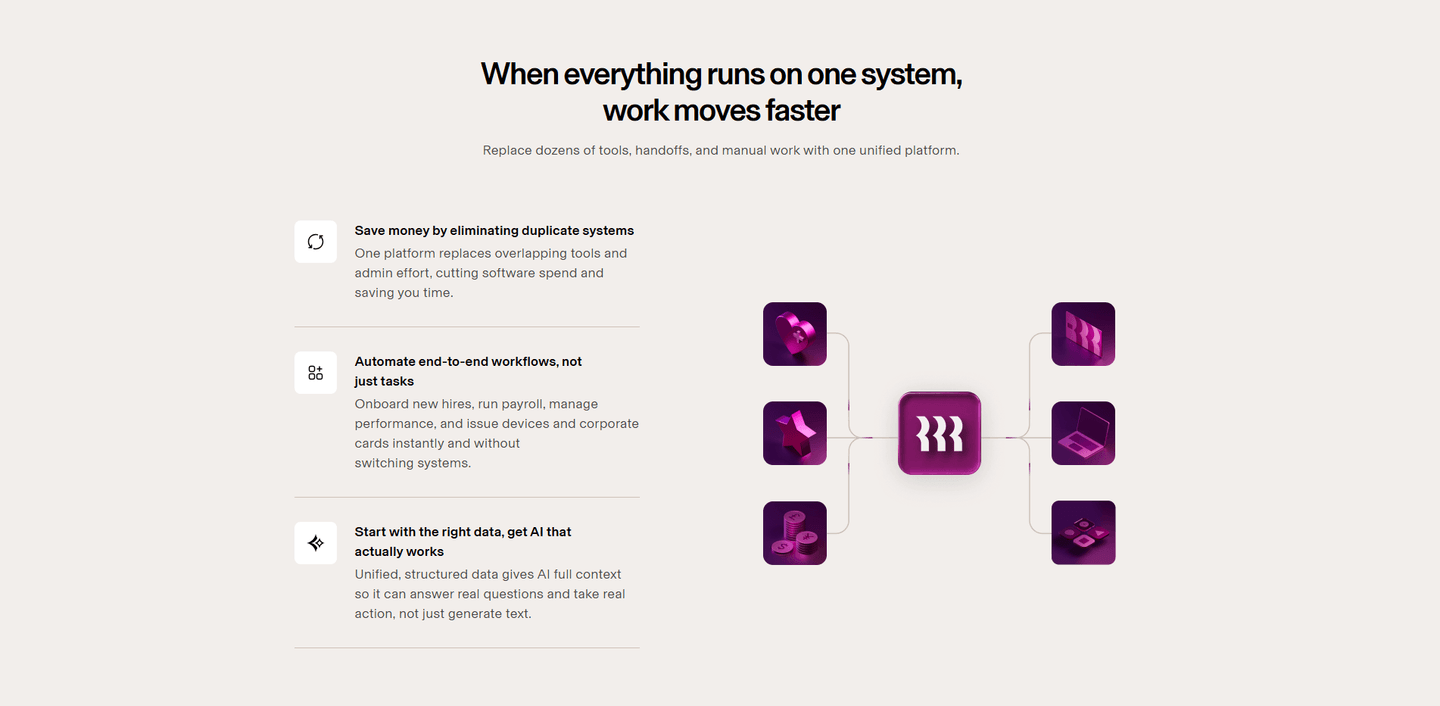
Reviewed design-pattern pick from Rippling’s hero section.

What I love about this section

  • Email input with Create free account CTA plus Take a product tour secondary path cover both conversion types
  • Social proof row (4.8 stars, 2.9K+ reviews, G2 and PC Magazine Editors Choice badges) stacks credibility
  • Product UI on tablet showing workforce management dashboard with employee profiles proves real functionality
  • Headline (Manage your entire workforce on one system) clearly covers HR, Payroll, IT, and Finance in the subtext
Testimonial Precoro

67/100

How Precoro lets customers do the selling

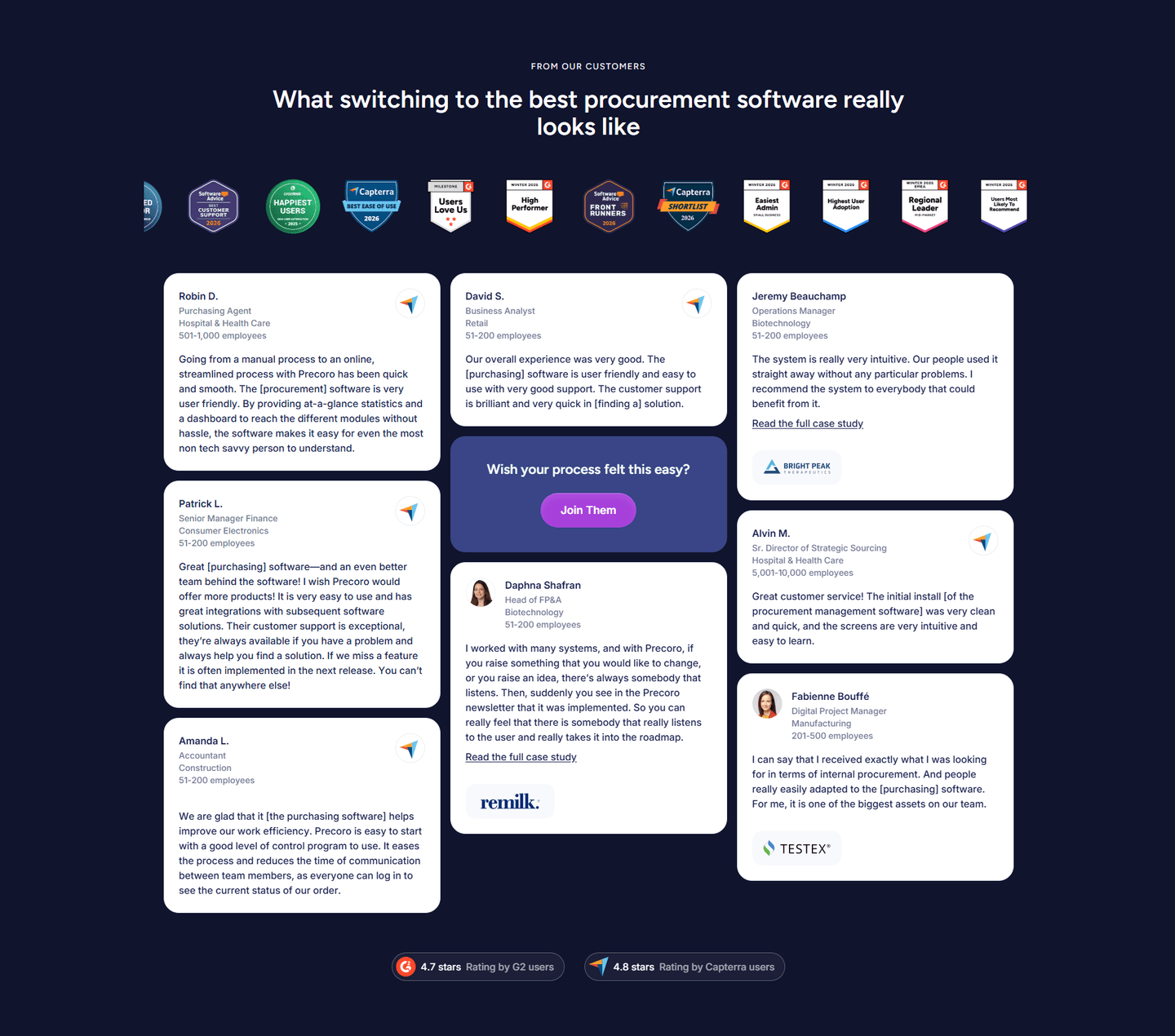
Precoro testimonial section
  1. 1Roles span Purchasing Agent, Business Analyst, Finance Manager and Director of Strategic Sourcing, proving cross-team adoption
  2. 2Read the full case study links plus customer logos (remilk, TESTEX) add depth and borrowed credibility
  3. 3Before-and-after framing (from a manual process to a streamlined online one with Precoro) shows the transformation
  4. 4Company size labels (51-200 employees) and review badges (G2 4.7, Capterra 4.8) reinforce that the proof is verifiable

Reviewed design-pattern pick from Precoro’s testimonial section.

What I love about this section

  • Roles span Purchasing Agent, Business Analyst, Finance Manager and Director of Strategic Sourcing, proving cross-team adoption
  • Read the full case study links plus customer logos (remilk, TESTEX) add depth and borrowed credibility
  • Before-and-after framing (from a manual process to a streamlined online one with Precoro) shows the transformation
  • Company size labels (51-200 employees) and review badges (G2 4.7, Capterra 4.8) reinforce that the proof is verifiable

Overlooked sections that quietly drive clarity and trust

In this set, navigation and how-it-works sections often do more conversion work than teams expect: they shape product understanding, reduce decision friction, and help enterprise buyers evaluate fit before committing to a demo.

The biggest gaps usually appear where the page should explain the implementation story and ongoing support model. When those sections are thin, enterprise buyers stall because they cannot evaluate total cost of ownership.

Navbar Precoro

57/100

Why this navbar works

Precoro navbar section
  1. 1Pricing is a top-level tab and the purple Book a Demo CTA anchors the far right corner
  2. 2The open Platform menu uses a two-pane layout (a left rail of sections feeding a right list of features)
  3. 3The Features pane lists concrete capabilities (Purchase Requests, Purchase Orders, Vendor Management, Three-Way Matching and OCR)
  4. 4A Popular badge flags Purchase Requests to steer first-time explorers
  5. 5Utility navigation pairs an EN language switcher with a quiet Log in link left of the CTA

Reviewed overlooked-section pick from Precoro’s navbar section.

What I love about this section

  • Pricing is a top-level tab and the purple Book a Demo CTA anchors the far right corner
  • The open Platform menu uses a two-pane layout (a left rail of sections feeding a right list of features)
  • The Features pane lists concrete capabilities (Purchase Requests, Purchase Orders, Vendor Management, Three-Way Matching and OCR)
  • A Popular badge flags Purchase Requests to steer first-time explorers

How It Works Precoro

83/100

How Precoro simplifies the process

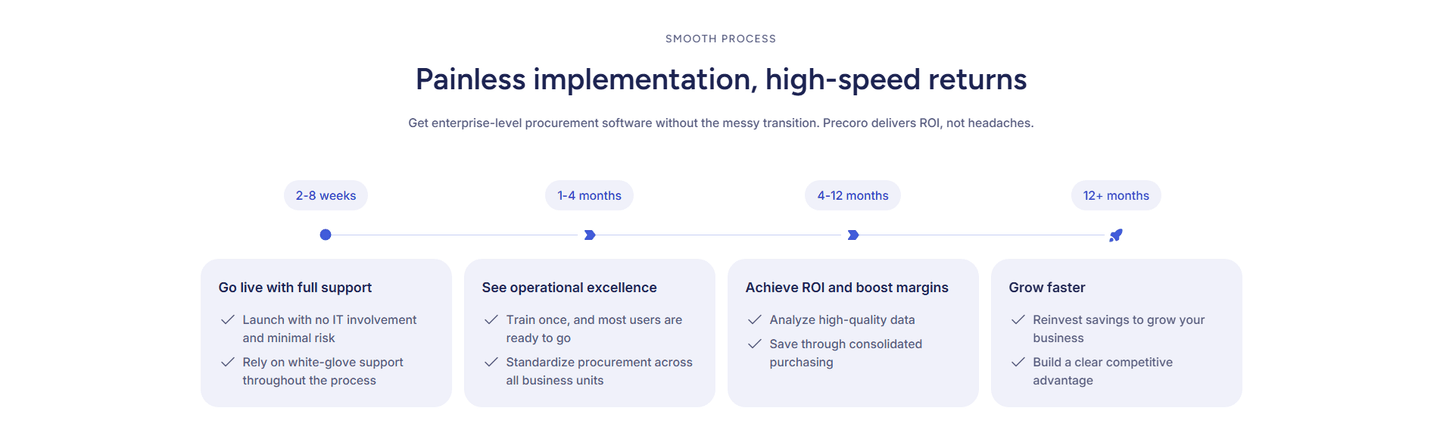
Precoro how it works section
  1. 1A four-stage timeline maps adoption from go-live to grow-faster along a clear left-to-right arrow
  2. 2Every stage carries a concrete timeframe (2-8 weeks, 1-4 months, 4-12 months, 12+ months)
  3. 3The arrow with milestone dots and a rocket at the end makes time-to-value progression visual
  4. 4Outcomes are previewed per stage (achieve ROI, boost margins, build a clear competitive advantage)
  5. 5Effort framing reassures: painless implementation, no IT involvement, minimal risk, no messy transition

Reviewed overlooked-section pick from Precoro’s how it works section.

What I love about this section

  • A four-stage timeline maps adoption from go-live to grow-faster along a clear left-to-right arrow
  • Every stage carries a concrete timeframe (2-8 weeks, 1-4 months, 4-12 months, 12+ months)
  • The arrow with milestone dots and a rocket at the end makes time-to-value progression visual
  • Outcomes are previewed per stage (achieve ROI, boost margins, build a clear competitive advantage)

Use the examples below as prompts for what to standardize, not just what to redesign.

Checklist: a practical audit for ERP website design

If you are iterating on an ERP homepage design, this checklist helps you spot missing sections and messaging gaps quickly, especially around Features, Trust, and Testimonial.

Run it on your current page, then decide what to rewrite, what to reorder, and what proof to add before you touch visual polish. For a faster baseline, you can also try our landing page analyzer.

Interactive quiz

What would your ERP homepage score?

Question 1 of 5
0%

Can an ERP buyer identify what you do in under 5 seconds?

"Procurement automation for mid-market teams" beats "transform your business operations."

Gabriel Amzallag

Reviewed by

Gabriel Amzallag , Founder, Web Anatomy

5 years CRO + SEO at Qonto (2021–2025). After advising 15+ SaaS on their websites (Payfit, Pigment…), the same patterns kept breaking, so I decided to build the source of truth on what works on the web: the intelligence layer every tool, builder, and team uses to ship sites that perform.

See how your page compares to the 50.2 average page score

Run a diagnostic on your ERP page and get a section-by-section breakdown of what to fix first to improve clarity, trust, and product proof.

Analyze your ERP pageFree. Takes 2 minutes.

Explore other industries

See how conversion patterns differ across verticals. Each page scores real homepages on the same framework.

See all industries
Benchmark-backed ERP homepage inspiration

ERP FAQ

Quick answers based on our ERP website benchmark dataset.

What are the best ERP websites?

[01]

The strongest performers in this April 2026 benchmark are Keel, Precoro, and ERPNext. We reviewed 3 pages against the same 60+-point conversion rubric, hero, trust, features, CTA, so the ranking reflects section-level execution rather than brand familiarity or category size.

What makes ERP websites harder to convert than other B2B pages?

[02]

ERP sells high-commitment software to cautious enterprise buyers who need proof of operational fit before requesting a demo. Across 3 pages reviewed, the pages that convert replace abstract "platform" language with a named pain: Keel leads with procurement-spreadsheet chaos as the villain; Precoro pairs the workflow with testimonials that lower switch risk; ERPNext uses open-source transparency to defuse vendor-lock-in anxiety.

What is the biggest design mistake on ERP homepages?

[03]

Leading with vague "transform your operations" messaging while delaying concrete workflow examples and social proof. The average page scored 50.2 across 3 homepages reviewed. Top performers answer "what does this replace?" in the first viewport. Keel's spreadsheet-to- platform framing, Precoro's procurement-and-spend positioning, ERPNext's transparent pricing, so the buyer has something verifiable to evaluate before scrolling.

What sections should an ERP homepage include?

[04]

A strong ERP homepage includes a clear hero naming the operational problem, an early trust layer (customer logos, testimonials, deployment numbers), a product walkthrough or workflow preview, feature-to-outcome mapping, and a CTA that matches enterprise buying expectations (demo, pilot, or consultation). Keel and Precoro are concrete templates. Each section earns the next scroll with a specific, verifiable claim, not a generic platform pitch.

How many ERP examples do I need to review before redesigning?

[05]

Three to five strong examples are usually enough. With 3 ERP pages benchmarked and only 11% reaching top-scoring, section-level comparison (hero vs hero, trust vs trust) matters more than collecting full-page references. Study Keel for problem-first positioning, Precoro for trust-forward enterprise design, and ERPNext for open-source differentiation.

Where can I find great inspiration for my ERP website?

[06]

Study pages section by section, not as full-page moodboards. Browse best landing page examples for the full gallery, then drill into hero section examples and trust section examples to see how Keel, Precoro, and ERPNext differ at each funnel stage.

How do I audit my ERP homepage?

[07]

Use a structured rubric that checks clarity, trust, and friction instead of relying on subjective feedback. Run your page through the landing page audit for a section-by-section score.