Best Open Source Website Examples (And Why They Convert)

We scored 12 open source project homepages on 60+ conversion criteria. See which sections separate the top performers, and what your page is probably missing.

Updated April 202612 pages analyzed
#CompanyScore

Scored by AI across 60+ conversion criteria

Meilisearch landing page
#1
62/100
Scroll to explore
Analyze your open source pageFree. Takes 2 minutes.

What high-performing open source homepage design gets right

Open source pages have to convert developers who evaluate quickly and expect transparency. The strongest pages in this benchmark do four jobs early:

52.8/100

Avg. page score

What strong open source pages do before the developer is ready to try

  • Make the tool category obvious in the first viewport so the developer knows what problem this project solves.
  • Show the developer experience as a real workflow with code examples, CLI snippets, or a live playground.
  • Layer trust cues early with GitHub stars, contributor count, community size, or recognizable adopters.
  • Give developers a zero-friction next step with a one-line install, live playground, or instant sandbox.

Top open source homepage analyzed in detail

Each company below is paired with its strongest section and scored across 60+ conversion criteria. See what they get right, and what you can borrow.

01

StrapiThe leading open-source headless CMS.

Editor's pick59/100
Gabriel AmzallagGabriel AmzallagFounder, LPA

Open-source CMS with developer-first messaging. Strapi pairs strong product visuals with transparent pricing and clear integration documentation that reduces every layer of developer evaluation friction.

What makes this page stand out

  • The self-hosted option provides complete data sovereignty — addressing the growing enterprise concern about content platforms holding their data in third-party clouds
  • Customizable API generation (REST and GraphQL) from a visual content model builder bridges the gap between developer flexibility and content team usability
  • Plugin marketplace and extensible architecture create an ecosystem play: community contributions expand Strapi's capabilities without proportional engineering investment
  • The developer community (60,000+ GitHub stars) serves as both social proof and a distribution channel — developers adopt Strapi, then advocate for it within their organizations

Section we love

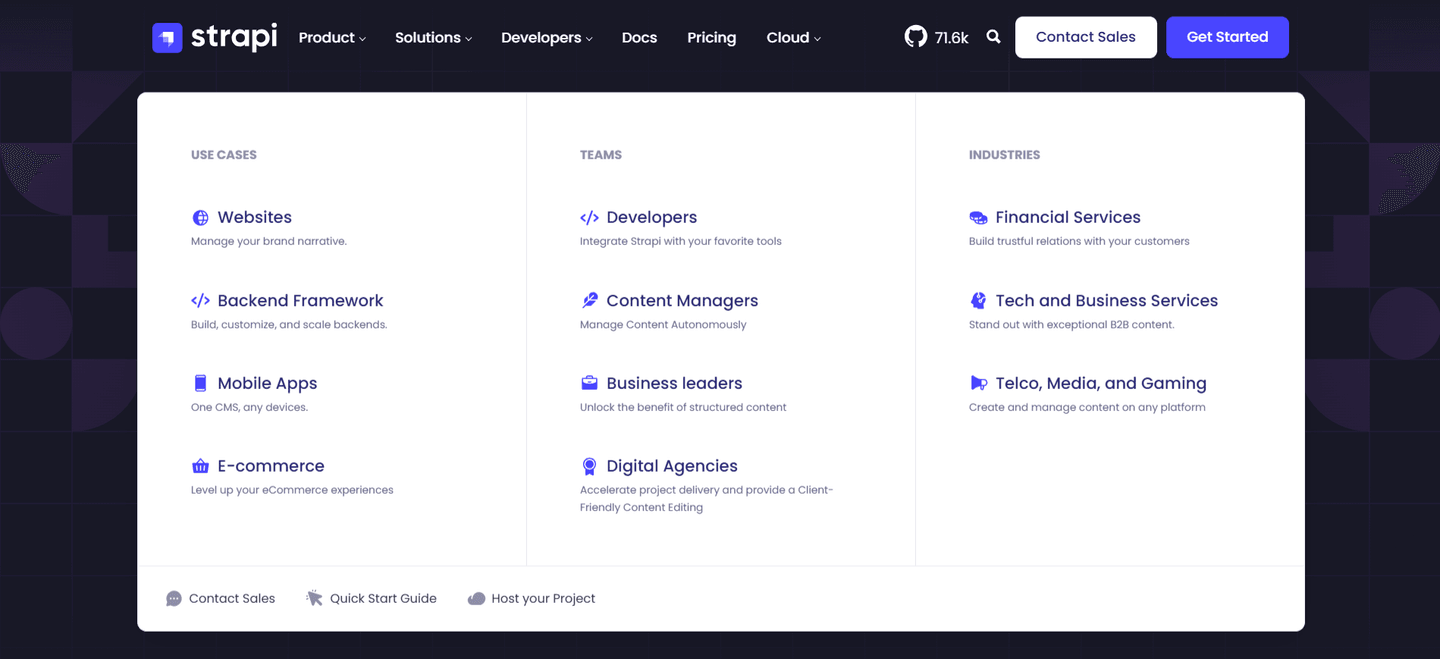
·NavbarBest in class
Strapi Navbar section
  1. 1Three-column mega menu (Use Cases, Teams, Industries) provides comprehensive self-selection for all visitor types
  2. 2Each menu item includes an icon and one-line description for quick scanning and context
  3. 3GitHub star count (71.6k) displayed in nav builds social proof for developer-focused audience
  4. 4Footer links in mega menu (Contact Sales, Quick Start Guide, Host your Project) offer immediate next steps

See how your page compares to the 52.8 average page score

Run a diagnostic on your open source page and get a section-by-section breakdown of what to fix first to improve clarity, trust, and community proof.

Design patterns we see across high-performing open source pages

Across 12 open source pages reviewed, the pages that convert tend to make the first screen do one job: name what the project does and make it immediately tryable.

The strongest patterns pair clear category claims with developer experience previews (code snippets, live playgrounds, CLI examples), then back those claims with community size and adopter logos that developers trust. Use website section examples to compare how these building blocks show up across page types.

Value Proposition Strapi

67/100

How Strapi presents their value

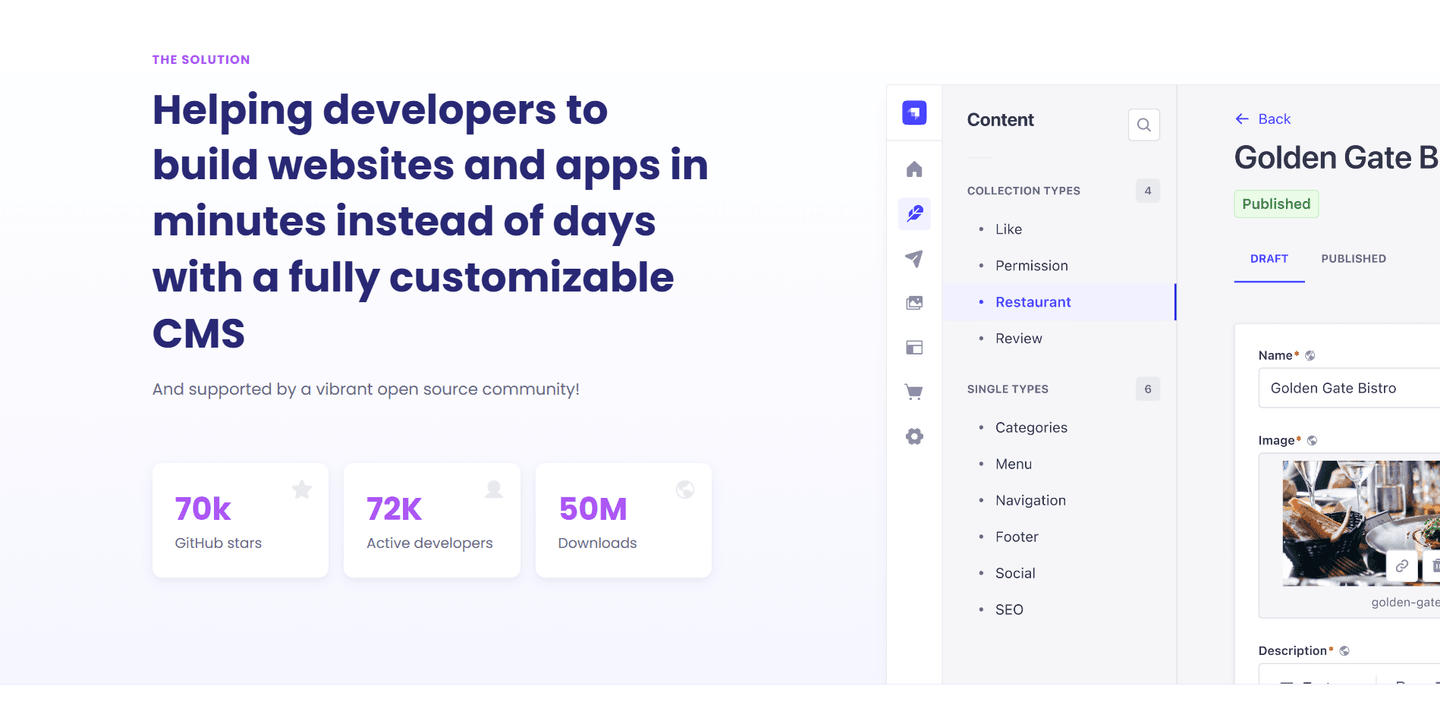
Strapi value proposition section
  1. 1Minutes instead of days time comparison in the headline immediately quantifies the developer productivity gain
  2. 2Three strong social proof metrics (70K GitHub stars, 72K active developers, 50M downloads) build massive credibility with the dev audience
  3. 3Product UI screenshot showing collection types and restaurant content entry makes the CMS customizability claim tangible and believable
  4. 4Open source community mention plus the GitHub stars metric together address both the trust and ecosystem concerns of developer buyers

Reviewed design-pattern pick from Strapi’s value proposition section.

What I love about this section

  • Minutes instead of days time comparison in the headline immediately quantifies the developer productivity gain
  • Three strong social proof metrics (70K GitHub stars, 72K active developers, 50M downloads) build massive credibility with the dev audience
  • Product UI screenshot showing collection types and restaurant content entry makes the CMS customizability claim tangible and believable
  • Open source community mention plus the GitHub stars metric together address both the trust and ecosystem concerns of developer buyers

Cta Strapi

57/100

How Strapi drives action without pressure

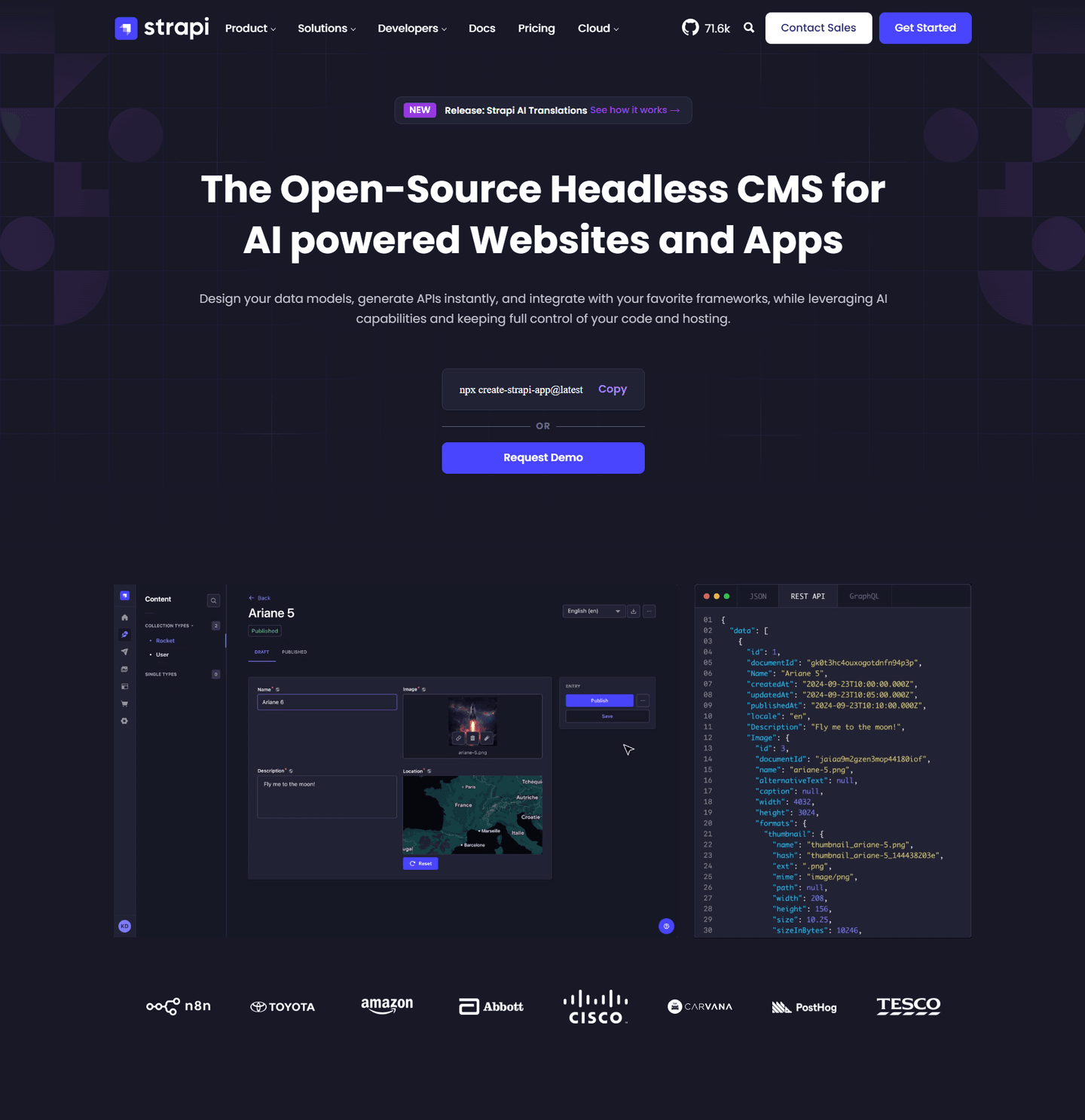
Strapi cta section
  1. 1Compliance badges (SOC 2, GDPR, MIT) placed prominently near CTAs reduce enterprise buyer risk perception instantly
  2. 2CLI copy-paste command (npx create-strapi-app@latest) lets developers start immediately without navigating away
  3. 3Enterprise logos (Airbus, Adidas, Toyota) serve as strong social proof validating the platform for serious use cases
  4. 4Dual-path CTAs (self-serve deploy vs enterprise exploration) smartly segment developer and buyer personas

Reviewed design-pattern pick from Strapi’s cta section.

What I love about this section

  • Compliance badges (SOC 2, GDPR, MIT) placed prominently near CTAs reduce enterprise buyer risk perception instantly
  • CLI copy-paste command (npx create-strapi-app@latest) lets developers start immediately without navigating away
  • Enterprise logos (Airbus, Adidas, Toyota) serve as strong social proof validating the platform for serious use cases
  • Dual-path CTAs (self-serve deploy vs enterprise exploration) smartly segment developer and buyer personas

Features Strapi

50/100

How Strapi showcases their product

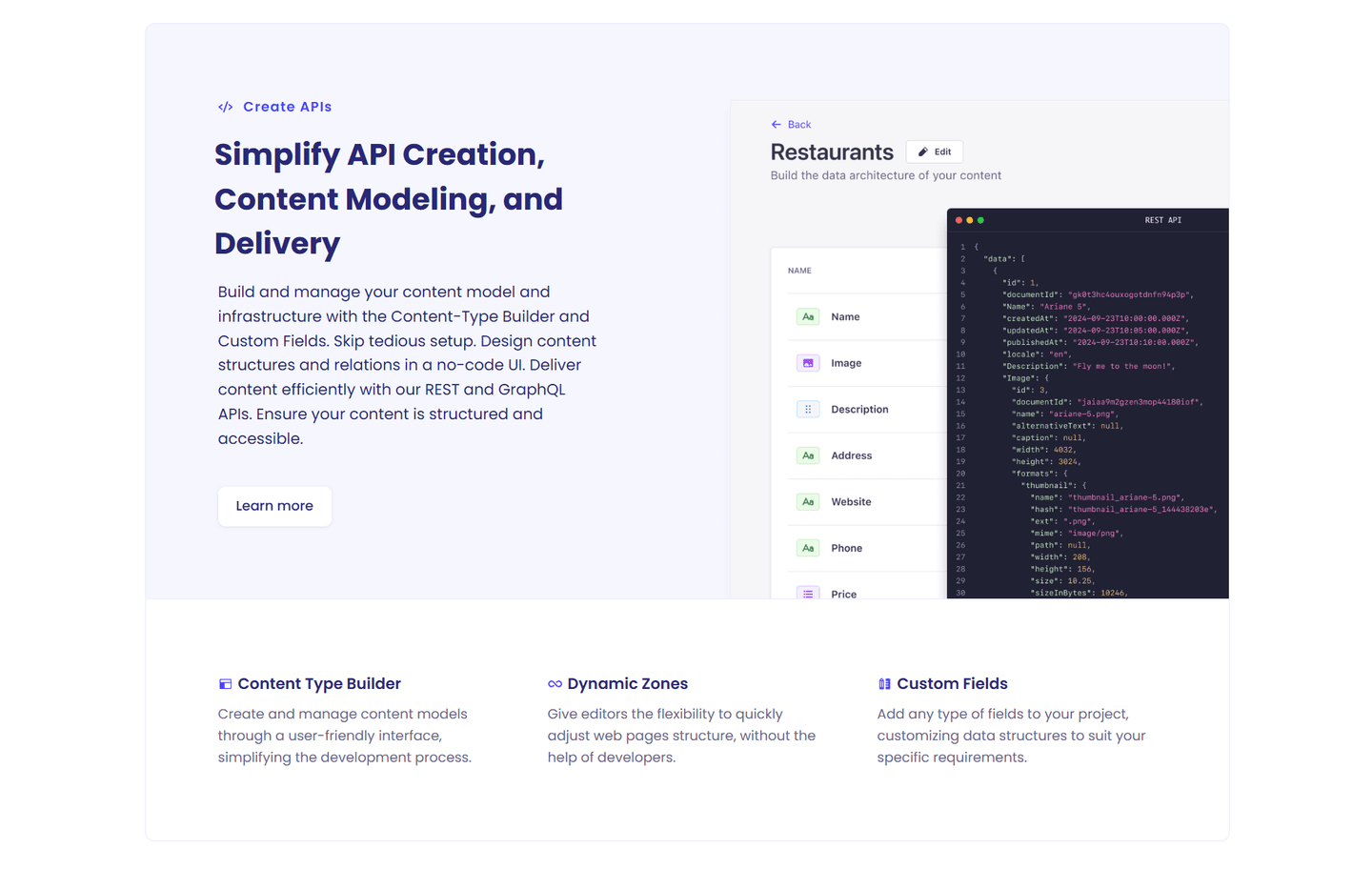
Strapi features section
  1. 1Product UI screenshot shows the actual Restaurants content type builder with fields and REST API response
  2. 2Three secondary features (Content Type Builder, Dynamic Zones, Custom Fields) expand the value proposition
  3. 3Learn more link lets prospects explore deeper without leaving the page flow
  4. 4Right-side code snippet shows real API output giving developers a concrete preview of the data structure

Reviewed design-pattern pick from Strapi’s features section.

What I love about this section

  • Product UI screenshot shows the actual Restaurants content type builder with fields and REST API response
  • Three secondary features (Content Type Builder, Dynamic Zones, Custom Fields) expand the value proposition
  • Learn more link lets prospects explore deeper without leaving the page flow
  • Right-side code snippet shows real API output giving developers a concrete preview of the data structure

Overlooked sections that quietly drive clarity and trust

In this set, pricing, integration, and footer sections often do more conversion work than teams expect: they shape the free-to-paid evaluation, signal ecosystem compatibility, and keep the developer journey coherent.

The biggest gaps usually appear where the page should explain pricing tiers and commercial boundaries. When those sections are thin, developers invest time building on the free tier only to hit unexpected walls.

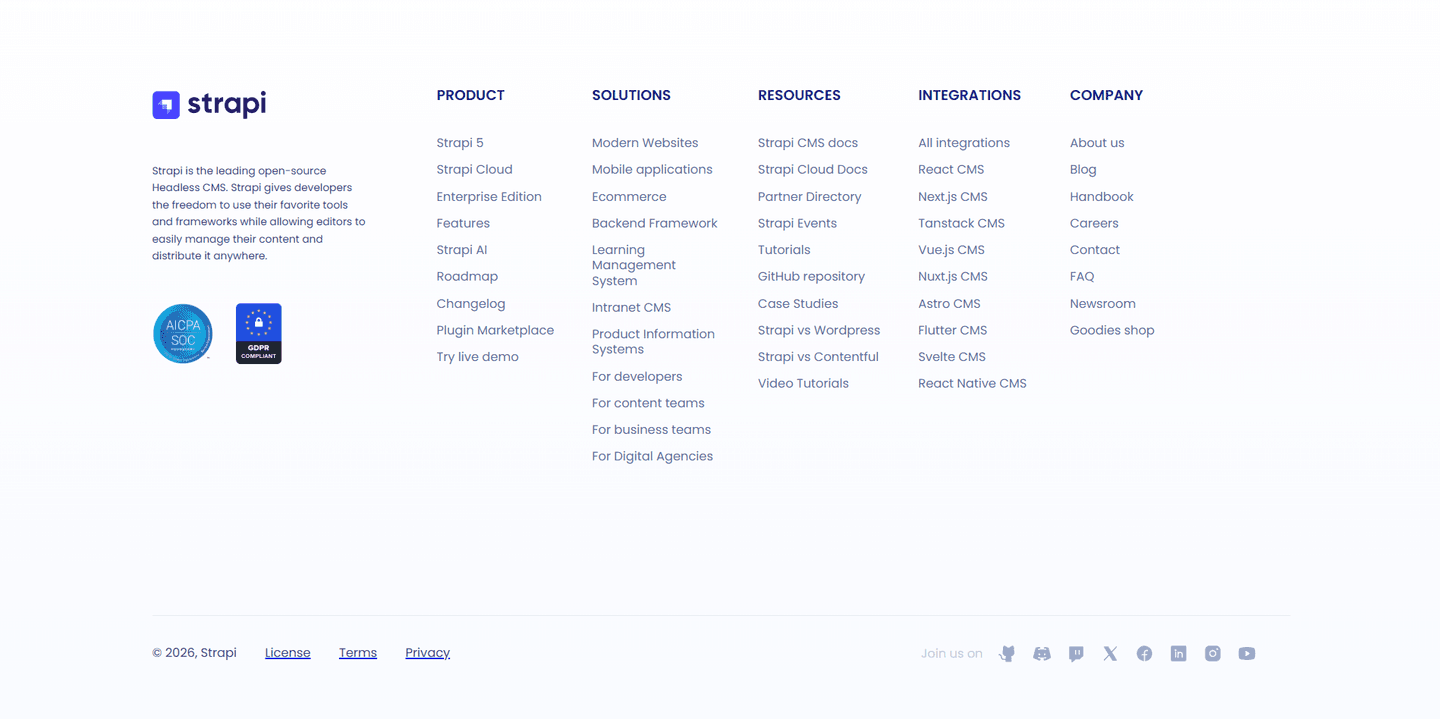
Footer Strapi

80/100

How Strapi closes the page with confidence

Strapi footer section
  1. 1AICPA SOC and GDPR Compliant badges displayed prominently below the brand description
  2. 2Try live demo link provides a low-friction secondary conversion path directly in the footer
  3. 3Six link columns (Product, Solutions, Resources, Integrations, Company) with 40+ deep links
  4. 4Integrations column lists specific CMS frameworks (React, Next.js, Vue.js, Nuxt.js, Astro, Flutter, Svelte)
  5. 5Bottom bar includes License, Terms, and Privacy links for legal transparency

Reviewed overlooked-section pick from Strapi’s footer section.

What I love about this section

  • AICPA SOC and GDPR Compliant badges displayed prominently below the brand description
  • Try live demo link provides a low-friction secondary conversion path directly in the footer
  • Six link columns (Product, Solutions, Resources, Integrations, Company) with 40+ deep links
  • Integrations column lists specific CMS frameworks (React, Next.js, Vue.js, Nuxt.js, Astro, Flutter, Svelte)

Integrations Strapi

50/100

How Strapi signals ecosystem strength

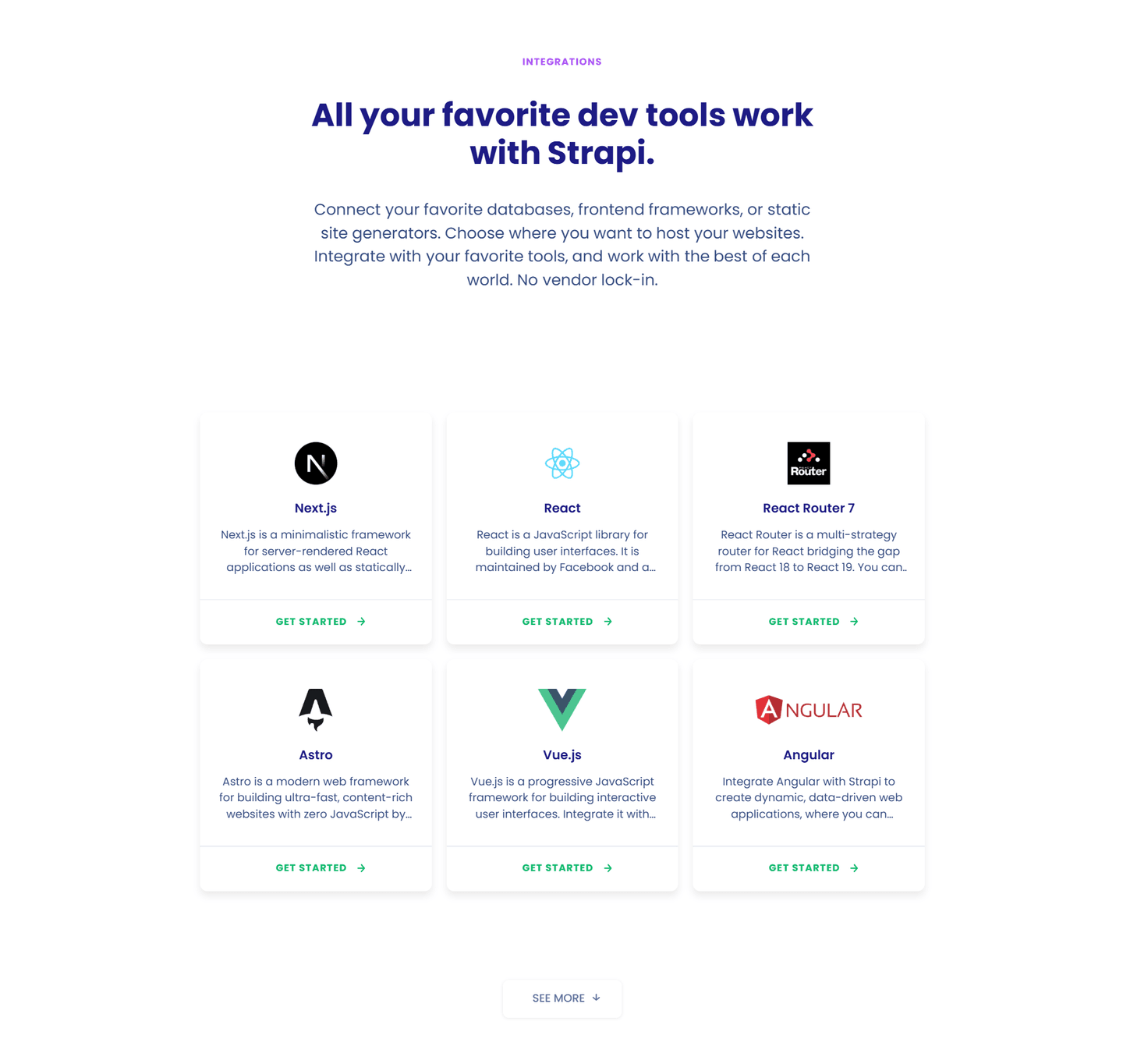
Strapi integrations section
  1. 1Each integration card includes a description and Get Started link providing immediate actionable next steps
  2. 2Features the most popular frontend frameworks like React Next.js Vue.js and Angular
  3. 3See More button at the bottom invites visitors to explore the full integration catalog
  4. 4Descriptive cards go beyond just logos by briefly explaining what each framework does
  5. 5No vendor lock-in messaging reinforces flexibility and reduces buyer hesitation

Reviewed overlooked-section pick from Strapi’s integrations section.

What I love about this section

  • Each integration card includes a description and Get Started link providing immediate actionable next steps
  • Features the most popular frontend frameworks like React Next.js Vue.js and Angular
  • See More button at the bottom invites visitors to explore the full integration catalog
  • Descriptive cards go beyond just logos by briefly explaining what each framework does

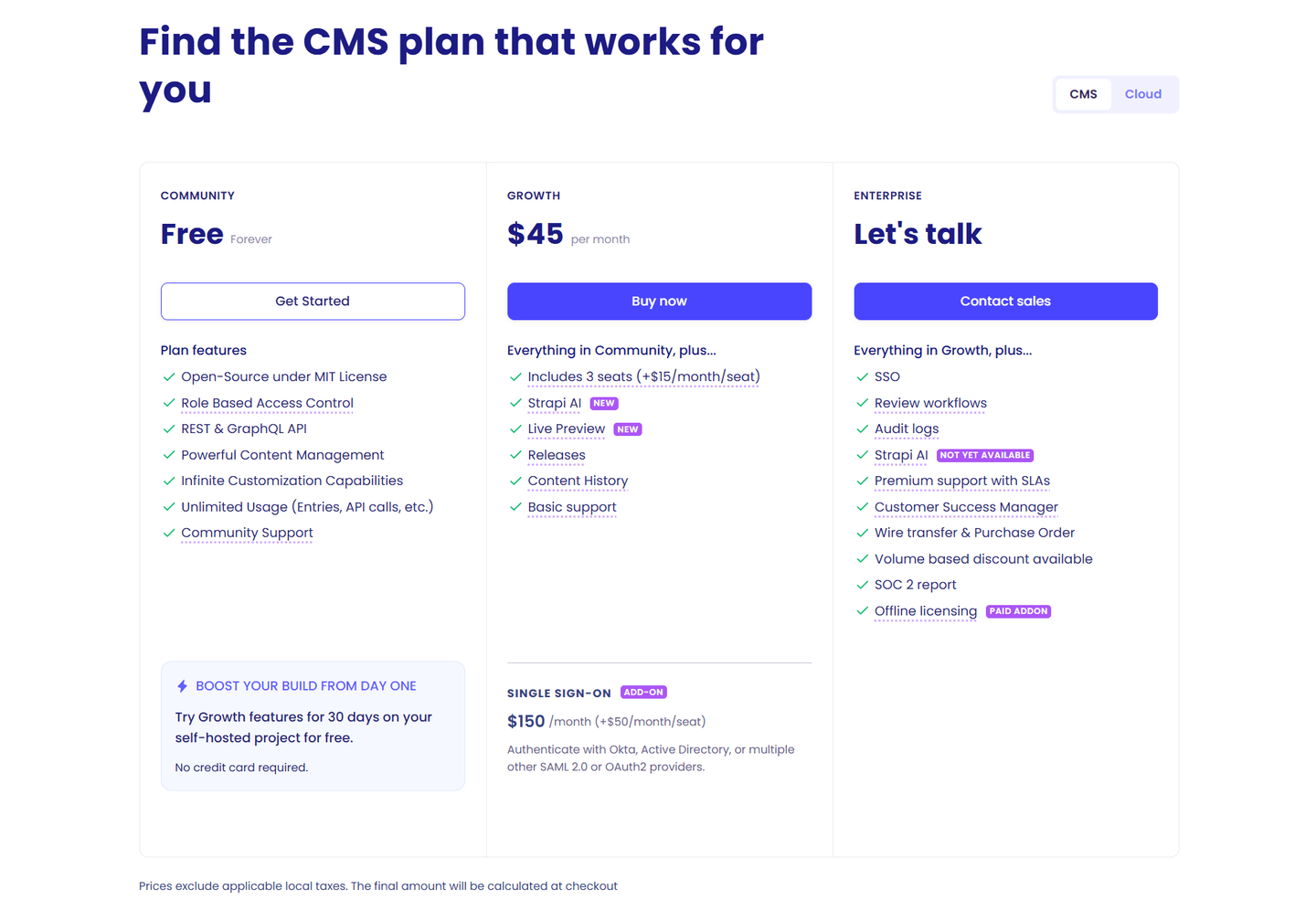
Pricing Strapi

43/100

How Strapi creates pricing transparency

Strapi pricing section
  1. 1Three clear tiers from Free forever to Growth at $45 to Enterprise custom
  2. 2CMS vs Cloud toggle at top lets users pick their deployment model
  3. 3SSO add-on priced separately ($150/month plus $50/seat) shows modular pricing
  4. 4Growth plan highlights new features (Strapi AI Live Preview) with badges
  5. 5Free trial callout for Growth (30 days no credit card) reduces risk

Reviewed overlooked-section pick from Strapi’s pricing section.

What I love about this section

  • Three clear tiers from Free forever to Growth at $45 to Enterprise custom
  • CMS vs Cloud toggle at top lets users pick their deployment model
  • SSO add-on priced separately ($150/month plus $50/seat) shows modular pricing
  • Growth plan highlights new features (Strapi AI Live Preview) with badges

Use the examples below as prompts for what to standardize, not just what to redesign.

Checklist: a practical audit for open source website design

If you are iterating on an open source homepage design, this checklist helps you spot missing sections and messaging gaps quickly, especially around Features, Cta, and Faq.

Run it on your current page, then decide what to rewrite, what to reorder, and what proof to add before you touch visual polish. For a faster baseline, you can also try our landing page audit.

Interactive quiz

What would your open source homepage score?

Question 1 of 5
0%

Can a developer identify what this project does in under 5 seconds?

"Open source search engine for apps" beats "the future of search infrastructure."

Gabriel Amzallag

Reviewed by

Gabriel Amzallag , Founder, LPA

5 years CRO + SEO at Qonto (2021–2025). After advising 15+ SaaS on their websites (Payfit, Pigment…), the same patterns kept breaking — so I decided to build the source of truth on what works on the web: the intelligence layer every tool, builder, and team uses to ship sites that perform.

See how your page compares to the 52.8 average page score

Run a diagnostic on your open source page and get a section-by-section breakdown of what to fix first to improve clarity, trust, and community proof.

Analyze your open source pageFree. Takes 2 minutes.

Explore other industries

See how conversion patterns differ across verticals. Each page scores real homepages on the same framework.

See all industries
Benchmark-backed open source homepage inspiration

Open Source FAQ

Quick answers based on our open source website benchmark dataset.

What are the best open source websites?

[01]

The strongest performers in this April 2026 benchmark are Meilisearch, Supabase, PostHog, and Strapi, with Ghost and Neon leading on focused-story and performance-first framing respectively. Across 12 open source homepages scored against 60+ criteria, these pages convert by making the tool immediately tryable (a one-line install, live playground, or code snippet in the hero) instead of asking developers to read marketing copy first.

What makes open source websites different from other SaaS pages?

[02]

Open source pages sell to developers who evaluate in minutes, not weeks, and who expect transparency by default. Across 12 homepages reviewed, the pages that convert eliminate the pitch: Meilisearch makes the tool testable in the hero, Supabase anchors to Firebase for instant category clarity, and PostHog earns trust with a distinctive voice and visible community signals instead of corporate throat-clearing.

What is the biggest design mistake on open source homepages?

[03]

Burying the getting-started experience behind marketing copy. The average page in this April 2026 benchmark scored 52.8. Top performers put the developer one click from trying the tool: Meilisearch opens with a playground, Supabase shows the database flow, and Neon leads with performance benchmarks. Developers evaluate by doing, so the hero should respect that.

What sections should an open source homepage include?

[04]

A hero that names the tool category in plain terms, an early trust layer with GitHub stars or recognizable adopters, a code snippet or live playground so developers can try immediately, transparent pricing marking the free-to-paid boundary, and a zero-friction getting-started CTA (one-line install, sandbox, or star on GitHub). Meilisearch and Supabase both stack these well. Across 12 homepages, the ones missing the tryable block convert least.

How many open source examples do I need to review before redesigning?

[05]

Three to five is enough if you pick by positioning style. Only 8% of homepages in this benchmark score in the top tier, so the gap is concentrated in a few blocks. Study Meilisearch for instant-tryable hero, Supabase for category-anchor positioning, PostHog for brand voice, Strapi for open-source-plus-commercial clarity, Ghost for focused story, and Neon for performance-first framing.

Where can I find great inspiration for my open source website?

[06]

Study pages section by section instead of saving full-page screenshots. Browse best landing page examples for the full gallery, then drill into hero section examples and features section examples to see how Meilisearch, Supabase, and PostHog differ at each funnel stage.

How do I audit my open source homepage?

[07]

Use a structured rubric that checks clarity, trust, and friction instead of relying on subjective feedback. Run your page through the landing page analysis for a section-by-section score against the same 60+ criteria used in this benchmark.